
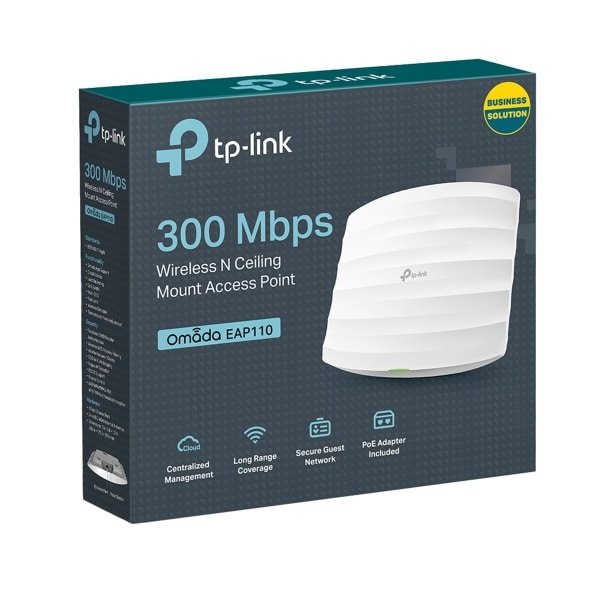
TP-Link 300Mbps Wireless N Ceiling Mount Access Point – TL-EAP110

KSh6,000.00
| Feature | Details |
|---|---|
| Model | TP-Link Omada EAP110 |
| Wireless Speed | Up to 300 Mbps (2.4 GHz) |
| Wireless Standards | IEEE 802.11b/g/n |
| Ethernet Port | 1 × 10/100 Mbps RJ-45 (supports passive PoE) |
| Power Supply | 24 V passive PoE (adapter included) |
| Typical Power Consumption | ≈ 2.8 W |
| Mounting Options | Ceiling (mounting kit included) |
| Coverage Area | ≈ 60 m² (≈ 650 ft²) |
| Supported Clients | 100+ concurrent clients |
| Dimensions (W × D × H) | ≈ 189.5 × 170.5 × 29.7 mm (≈ 7.5″ × 6.7″ × 1.2″) |
| Operating Temperature | 0°C ~ 40 °C (32 °F ~ 104 °F) |
| Warranty | 2-Year Limited Hardware Warranty |
TP-Link 300Mbps Wireless N Ceiling Mount Access Point (EAP110)
Whether it’s for your café, small office, hotel, clinic, school, or just to wipe out those Wi-Fi dead spots at home, the TP-Link EAP110 300Mbps Wireless N Ceiling Mount Access Point is still a top pick for value and dependability in 2025.
Phonex Tech sells and supports the EAP110, which is known for its pro features, simple setup, and great value. It’s been a best-seller for over eight years!
Why the TP-Link EAP110? Still Great
- Even with all the new Wi-Fi 6 and Wi-Fi 7 stuff out there, the EAP110 is still killing it with folks on a budget and smaller companies, and here’s why:
- It’s got that 802.11n speed (300 Mbps on 2.4 GHz).
- You can use PoE (Power over Ethernet) – so no plug needed!
- It’s made to stick to the ceiling/wall, so it disappears into the background.
- Central control is free with the Omada SDN Controller software.
- Handles 100+ users at once without breaking a sweat.
- Guest network, VLANs, speed limits, and login pages are doable.
.
Specs
Feature Detail
Model – TP-Link EAP110
Wireless Standard – IEEE 802.11n, 802.11g, 802.11b
Frequency -2.4 GHz
Max Wireless Speed – 300 Mbps
Antennas – 2 × Internal 4dBi Omni-directional
Transmit Power – ≤20 dBm (CE), ≤27 dBm (FCC)
Ethernet Port – 1 × 10/100 Mbps (supports Passive PoE)
Power Supply – 802.3af PoE or 9V DC adapter (included)
Mounting – Ceiling / Wall mounting (kits included)
Multiple SSIDs – Up to 8 SSIDs
Captive Portal -Yes (with Omada Controller)
Dimensions – 189.4 × 172.3 × 29.5 mm
Where the TP-Link EAP110 Shines
1. Cafés, Restaurants & Shops
People want quick, comp Wi-Fi. The EAP110 is solid at 300 Mbps, running a bunch of phones, tablets, and laptops all at the same time without shutdowns.
2. Hotels & Guesthouses
Build a safe guest network separate from everything else. Make a custom login (vouchers or Facebook) with the free Omada controller.
3. Clinics & Waiting Rooms
Give patients Wi-Fi, with medical records safe though VLAN separation.
4. Schools
Cheap way to spread out access points across classrooms, with central controls and bandwidth limits for each student.
6. Big Homes
If your router can’t reach every corner, especially in big places, a centrally placed EAP110 on each floor is the answer. Cheaper than those mesh systems too.
Why Ceiling Mounts Rock
- 360° coverage – no antenna fiddling required!
- Looks pro – blends into ceilings like a smoke detector
- Stays cooler than desktop routers
- Safe from curious folks and accidental unplugging
- Cables are cleaner with PoE
Simple to Install
1. Screw the bracket (template included) to the ceiling.
2. Run an Ethernet cable from your PoE or use the 9V adapter.
3. Snap the EAP110 onto the bracket.
4. Hook it into the Omada Controller (software or OC200 box) or go solo.
5. Done!
Be the first to review “TP-Link 300Mbps Wireless N Ceiling Mount Access Point – TL-EAP110”
Related products








Reviews
There are no reviews yet.