
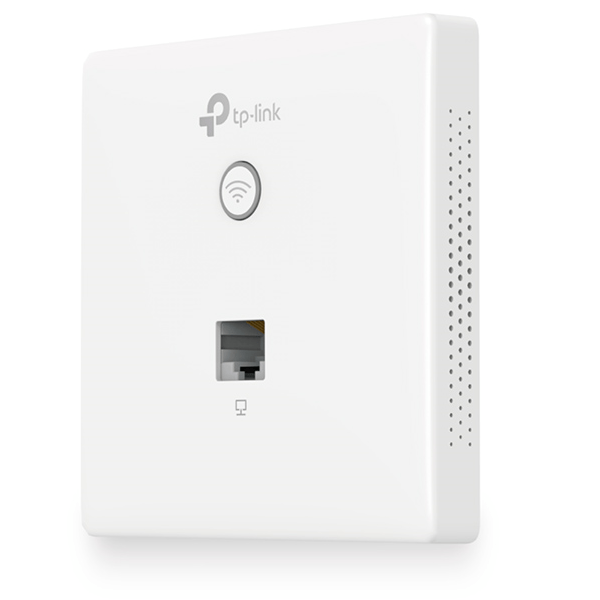


TP-Link 300Mbps Wireless N Wall-Plate Access Point TL-EAP115-WALL:
No one wants Wi-Fi dead zones or ugly routers messing up their space – especially in hotels, dorms, hospitals, offices, or homes. The TP-Link TL-EAP115-Wall access point fixes that. It hides in a regular wall socket and gives you solid Wi-Fi where you need it.
People seem to really like them. So, we put together this guide to help you decide if the TL-EAP115-Wall is right for you in 2025. We’ll talk about what it can do, how well it works, how to set it up, and how it stacks up against newer options.
What’s the Deal with the TL-EAP115-Wall?
The TL-EAP115-Wall is an access point that goes right on the wall, part of TP-Link’s EAP series. Forget about those clunky ceiling or desk routers – this one replaces your wall socket and blends in.
Here’s what it’s got:
- 300 Mbps speed on the 2.4 GHz band
- Small size (86 × 86 × 41 mm) – fits standard wall boxes
- Four Fast Ethernet ports (one for power and internet, three for devices)
- PoE support (no extra power cord needed)
- Centralized management (free cloud or hardware control)
- Can work as an access point, client, repeater, or bridge
- MU-MIMO and Beamforming for better connections
- Guest login options (great for hotels)
Setup: Quick and Simple
Here’s how we do it:
1. Turn off the power and take off the old faceplate
2. Run a cable to the wall box
3. Clip the cable into the back
4. Screw the unit into the box
5. Snap on the faceplate
6. Turn on the power
7. Set it up in the management app
Tip: Separate your network by floor for better security.
Be the first to review “TP-Link 300Mbps Wireless N Wall-Plate Access Point – TL-EAP115-WALL”
Related products



Reviews
There are no reviews yet.