
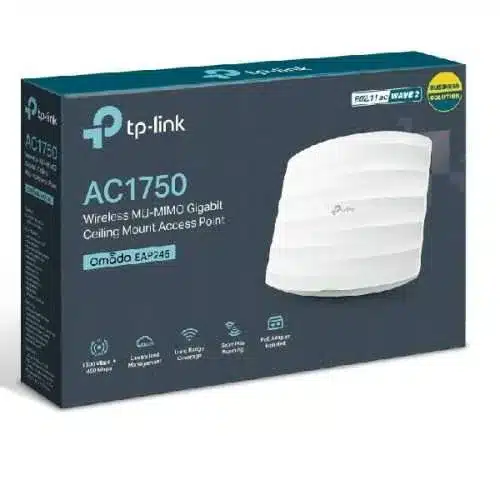
TP-Link AC1750 Wireless MU-MIMO Gigabit Ceiling Mount Access Point – TL-EAP245


KSh14,000.00
- Wi-Fi Standards: IEEE 802.11ac/n/g/b/a
- Wireless Speeds: Up to 1750Mbps (1300Mbps at 5GHz and 450Mbps at 2.4GHz)
- Wireless Modes: Access Point, Range Extender, Client, Multi-SSID, Wireless Bridge
- Wireless Security: 64/128-bit WEP, WPA/WPA2, WPA-PSK/WPA-Enterprise, WPA2-PSK/WPA2-Enterprise, 802.1X
- Antennas: Internal Omni 2.4GHz and 5GHz antennas
- Interface: 2 Gigabit Ethernet Ports (1 PoE support)
- Power Supply: 802.3af/at PoE, 48V passive PoE, or external power adapter (not included)
TP-Link AC1750 Wireless MU-MIMO Gigabit Ceiling Mount Access Point (EAP245)
Whether you run a café, hotel, office, school, warehouse, or retail store, the TP-Link AC1750 Wireless MU-MIMO Gigabit Ceiling Mount Access Point (EAP245) delivers seamless connectivity, exceptional coverage, and enterprise-grade performance at a budget-friendly price.
This comprehensive 2000+ word guide covers everything you need to know about the TP-Link EAP245—including its key features, real-world performance, installation tips, management options, comparison with newer models, and why buying from Phonex Tech gives you the best value and support.
Why the TP-Link EAP245 is Still the King of Budget Business
Launched in 2017, the EAP245 has stood the test of time. Even with Wi-Fi 6 and Wi-Fi 6E models now available, the EAP245 continues to dominate small-to-medium business installations because it strikes the perfect balance between performance, reliability, and cost.
Key specifications at a glance:
Feature Specification
Wi-Fi Standard – 802.11ac Wave 2 (Wi-Fi 5)
Speed – Up to 1750 Mbps (450 Mbps on 2.4 GHz + 1300 Mbps on 5 GHz) |
| MU-MIMO & Beamforming – Yes
| Ethernet Port – 1 × Gigabit Ethernet (PoE 802.3at supported)
| Antennas – 3×3 MIMO internal antennas
| Max Clients (recommended) – 100+ simultaneous devices
| Coverage (per AP) – Up to 300–400 m² (open space)
| Management -Omada SDN Controller, Standalone, or EAP Controller
| Power – 802.3at PoE or 12V DC adapter (included)
| Mounting – Ceiling / Wall mount (kit included)
Key Features That Make the EAP245 Stand Out
1. True MU-MIMO + Beamforming
The EAP245 was one of the first affordable access points to support 3×3 MU-MIMO and beamforming. This means:
- Multiple devices can be served simultaneously instead of waiting in queue.
- Signal is actively directed toward clients rather than broadcast in all directions.
- Dramatically reduces congestion in busy environments (restaurants, classrooms, offices).
2. Dual-Band AC1750 Speeds
- 2.4 GHz band: 450 Mbps (great for IoT devices, printers, older phones)
- 5 GHz band: 1300 Mbps (perfect for 4K streaming, video calls, large file transfers)
Even in 2025, most client devices are still Wi-Fi 5 or older, so you’re not leaving performance on the table.
3. Gigabit PoE Port (802.3at)
Power and data over a single Ethernet cable—no need for a nearby power outlet. This makes professional ceiling installations clean and cost-effective.
4. Seamless Roaming (802.11k/v/r)
When deployed in multiples with an Omada controller, clients roam between access points without dropping Zoom calls, VoIP, or video streams.
5. Omada SDN Compatibility
Fully compatible with TP-Link’s free Omada Software Controller, Hardware Controller (OC200/OC300), or Cloud-Based Omada Cloud. You get:
- Centralized management
- Guest network with SMS/Facebook/Voucher portal
- Captive portal & voucher system
- Band steering, airtime fairness, load balancing
- Zero-touch provisioning (great for MSPs)
6. Multiple Operation Modes
- Access Point (default)
- Range Extender / Repeater
- Client mode
- Multi-SSID (up to 16 SSIDs – 8 per band)
Perfect for creating separate networks for staff, guests, IoT devices, etc.
Real-World Performance & Coverage
Independent tests and thousands of customer reviews confirm:
– Single EAP245 easily covers 2500–3500 sq ft in typical office/house environment with drywall partitions.
– In open spaces (warehouses, halls) one unit can cover 4000+ sq ft.
– Throughput stays above 600 Mbps within 30 feet on 5 GHz even with 50+ clients connected.
– Rock-solid stability – many units have been running 24/7 for 5+ years without reboot.
Easy Installation – Even for Beginners
The EAP245 is famous for being “install-and-forget”:
1. Mount the base plate to ceiling or wall (T-bar clips included).
2. Connect PoE switch/injector or included 12V adapter.
3. Snap the AP onto the plate.
4. Adopt it via Omada app or web interface in under 5 minutes.
No certification required—perfect for IT consultants, electricians, or business owners doing it themselves.
Centralized Management Options
TP-Link has continually improved the Omada ecosystem:
- Omada App (iOS/Android) – Discover and manage APs from your phone
- Omada Software Controller– Free Windows/Linux/Mac software
- OC200 / OC300 Hardware Controller – For networks without a dedicated server
- Omada Cloud – Free cloud management (no public IP or port forwarding needed)
Be the first to review “TP-Link AC1750 Wireless MU-MIMO Gigabit Ceiling Mount Access Point – TL-EAP245”
Related products




-7%
Business Solutions
Original price was: KSh14,000.00.KSh12,999.00Current price is: KSh12,999.00.


Reviews
There are no reviews yet.