
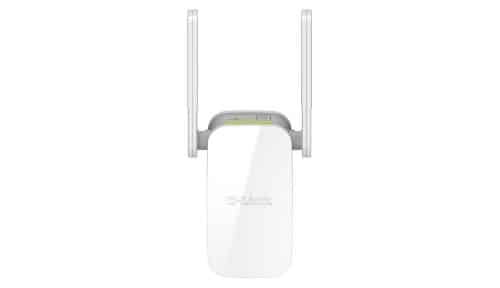
D-Link AC1200 Dual Band Wi-Fi 5 Range Extender – DAP-1610


KSh4,000.00
Key Features
- Wireless Standard -IEEE 802.11ac/n/g/b/a (Wi-Fi 5)
- Speed -Up to 1200 Mbps (867 Mbps 5 GHz + 300 Mbps 2.4 GHz)
- Antennas – 2 External Antennas
- Ports -1 x 10/100 Fast Ethernet
- Security -WPA/WPA2, WPS
- Dimensions– Compact wall-plug design
- Power -100-240V AC
- Compatibility – Any Wi-Fi router
D-Link AC1200 Dual Band Wi-Fi 5 Range Extender – DAP-1610
Get the D-Link DAP-1610 AC1200 Wi-Fi Range Extender say Goodbye to Wi-Fi Dead Zones with Fast Dual Band Performance
Is your Wi-Fi weak in some spots at home or the office? The D-Link AC1200 Dual Band Wi-Fi 5 Range Extender (DAP-1610) can fix that by boosting your current wireless network. You can grab one. It’s small but mighty, giving you speeds up to 1200 Mbps, great for streaming movies, gaming, video calls, and browsing.
We’ve got the real D-Link DAP-1610 at good prices, plus quick shipping and great help if you need it. No more buffering or dead zones – get your D-Link AC1200 Wi-Fi extender today and get Wi-Fi everywhere
Why Pick the D-Link DAP-1610 AC1200 Dual Band Wi-Fi Range Extender?
The D-Link DAP-1610 is a Wi-Fi 5 (802.11ac) dual-band range extender that makes your current router’s reach longer. It can hit speeds of 1200 Mbps (300 Mbps on 2.4 GHz + 867 Mbps on 5 GHz), so your devices get faster, better connections.
Here’s what’s cool:
- Dual-Band Tech: It uses both 2.4 GHz (for distance) and 5 GHz (for speed) to dodge interference.
- Super Simple Setup: Just plug it into the wall.
- Signal Lights: The LEDs show you where to put it for the best coverage.
- Works with Everything: It plays nice with older Wi-Fi stuff (802.11n/g/b/a) and any router.
- Easy Setup: Hit the WPS button or use the free QRS Mobile app to set it up fast.
D-Link AC1200 Wi-Fi Range Extender DAP-1610: Hot Features
1. Fast Dual Band Performance
Get fast wireless speeds with AC1200 tech. The 2.4 GHz band is good for everyday stuff like email, and the 5 GHz band is awesome for streaming 4K videos, gaming, and big downloads. This setup cuts down on lag from other networks.
2. More Wi-Fi Coverage
The DAP-1610 gets rid of Wi-Fi dead zones by repeating your router’s signal. It has two strong antennas that can reach tough spots like basements, bedrooms upstairs, the yard, or far-off corners of the office. People say they get much better signal, often adding hundreds of square feet of coverage.
3. Small Wall-Plug Design
No big boxes or messy cords! This thing plugs right into the wall and looks good doing it. You can even take it on trips and use the Ethernet port to make your own Wi-Fi hotspot at hotels.
4. Smart Signal Lights
The lights (green for strong, yellow for okay, red for weak) tell you where to put it for the best signal.
5. Fast Ethernet Port
Plug in devices like smart TVs, game consoles, or computers with the 10/100 Mbps Ethernet port for a solid, wired connection.
6. Good Security
It uses WPA/WPA2 encryption to keep your network safe. You can use the same name and password as your main router or make a separate one for guests.
7. Wi-Fi Mesh Ready
Use several DAP-1610 units with D-Link routers to make a mesh network for even better coverage.
8. Easy Ways to Set It Up
- WPS Button: Just press the WPS button on your router and this extender.
- QRS Mobile App: The free app for phones makes setup easy.
- Web Browser: You can also set it up through your browser.
How to Set Up the D-Link DAP-1610 Wi-Fi Extender
Setting up the D-Link AC1200 range extender is super easy and quick:
1. Plug the DAP-1610 into the wall between your router and the dead zone.
2. Wait for the power light to come on.
3. Use the WPS button on both the router and extender, or use the QRS app.
4. Pick your Wi-Fi network and type in the password.
5. Look at the signal lights to get the placement just right.
For the full instructions, grab the guide from the D-Link site or reach out to Phonex Tech support.
Why Buy the D-Link DAP-1610
We know our stuff when it comes to networking. When you buy the D-Link AC1200 Dual Band Wi-Fi 5 Range Extender (DAP-1610) from us, you get:
- Good Prices: Some of the best deals around.
- Fast Shipping: We get it to you quick.
- Helpful Support: Our team can help with setup or problems.
- Deals: You can bundle it with other gear to save money.
Wi-Fi Problems the D-Link AC1200 Extender Fixes
- Dead Zones in Big Houses: Extends the signal to far corners.
- Slow Streaming: The fast 5 GHz band handles streaming great.
- Gaming Lag: Less interference for better gaming.
- Lots of Devices: It’ll still run smoothly with many connections.
- Tough Walls: Strong antennas push past obstacles.
Technical Specifications of D-Link DAP-1610
Feature Details
- Wireless Standard – IEEE 802.11ac/n/g/b/a (Wi-Fi 5)
- Speed – Up to 1200 Mbps (867 Mbps 5 GHz + 300 Mbps 2.4 GHz)
- Antennas -2 External Antennas
- Ports -1 x 10/100 Fast Ethernet
- Security – WPA/WPA2, WPS
- Dimensions -Compact wall-plug design
- Power -100-240V AC
- Compatibility -Any Wi-Fi router
Be the first to review “D-Link AC1200 Dual Band Wi-Fi 5 Range Extender – DAP-1610”
Related products


Price range: KSh300.00 through KSh350.00
This product has multiple variants. The options may be chosen on the product page
-20%

4G LTE Routers
Original price was: KSh10,000.00.KSh8,000.00Current price is: KSh8,000.00.
-25%

4G LTE Routers
Original price was: KSh12,000.00.KSh9,000.00Current price is: KSh9,000.00.




Reviews
There are no reviews yet.