
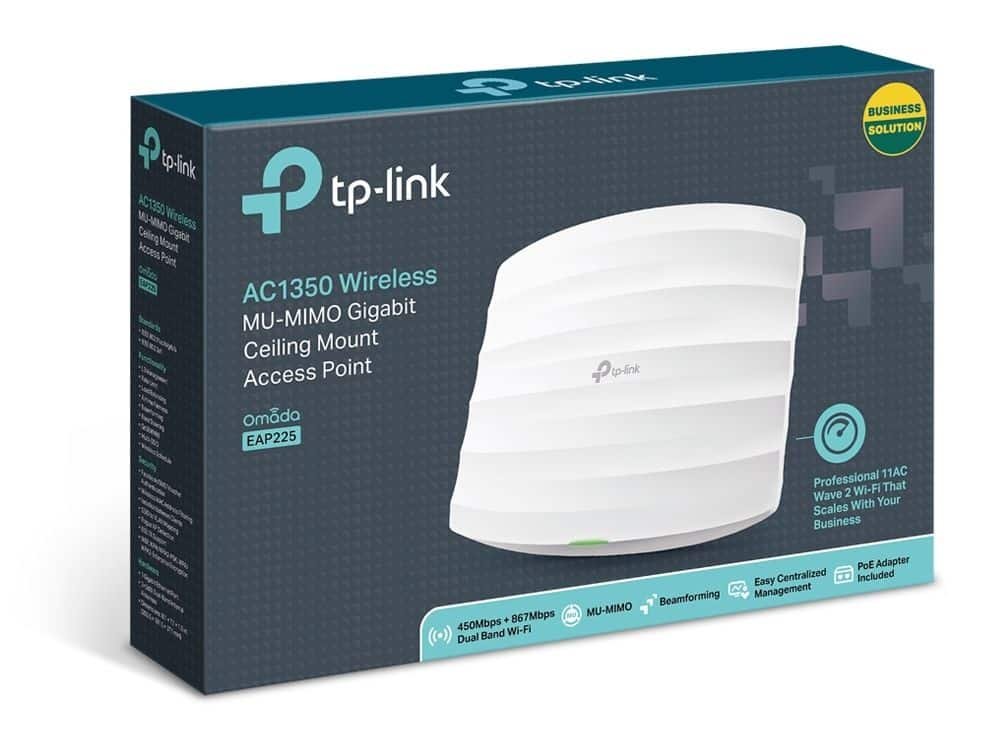
TP-Link AC1350 Wireless MU-MIMO Gigabit Ceiling Mount Access Point – TL-EAP225
KSh10,000.00
| Feature | Details |
|---|---|
| Model | TP-Link Omada EAP225 |
| WiFi Speed | Up to 450 Mbps (2.4 GHz) + 900 Mbps (5 GHz) – AC1350 |
| Wireless Standards | IEEE 802.11a/b/g/n/ac |
| Ethernet Ports | 1 × Gigabit RJ-45 (PoE input) |
| PoE Support | IEEE 802.3af/at |
| Mounting Options | Ceiling kit included |
| Typical Power Consumption | ≈ 10 W |
| Dimensions (W × D × H) | ≈ 189 mm × 189 mm × 35 mm |
| Management | Omada SDN Cloud / Local Controller / Mobile App |
| Warranty | 2-Year Limited Hardware Warranty |
TP-Link AC1350 Wireless Access Point:
Let’s face it, good Wi-Fi isn’t a nice-to-have anymore. If you’re running any kind of business – a café, office, hotel, school, even a warehouse – spotty Wi-Fi can drive away customers and kill productivity. That’s where the TP-Link AC1350 Wireless Access Point (EAP225) comes into play
They have fast shipping all over the country and good prices. The EAP225 is still a popular choice for businesses because it gives you dependable AC1350 Wi-Fi, smooth transitions between access points, PoE, and easy control – all at a price that won’t hurt your wallet.
Why the EAP225 is Still a Top Choice
Even though it’s been out for a while, the EAP225 (both the v3 and v4 versions) is still a best-seller. It just nails that sweet spot of good performance, lots of features, reliability, and affordability.
Quick Specs:
| Feature Specification
Wi-Fi – 802.11ac Wave 2 (AC1350)
Speed -450 Mbps (2.4 GHz) + 867 Mbps (5 GHz)
MU-MIMO -Yep (3×3 on 5 GHz)
Antennas – Internal, picks up signal from all directions
Ethernet Port – 1 × Gigabit (works with 802.3af/at PoE & Passive PoE)
Mounting – Ceiling / Wall (kit’s included)
Management – Omada SDN Controller, Standalone, or Cloud Access
Guest Network & Login Page – Yep
Roaming – Yep (802.11k/v)
Band Steering & Airtime Fairness – Yes
Max Clients – 200+ at once
Fast Wi-Fi with MU-MIMO
The EAP225 can hit speeds of up to 1350 Mbps:
- 867 Mbps on the 5 GHz band: Great for streaming videos, video calls, and moving big files.
- 450 Mbps on 2.4 GHz: Good for older devices and things that need a longer range, like IoT stuff.
With MU-MIMO and Beamforming, the EAP225 can handle multiple devices at the same time without slowing down. In the real world, one EAP225 can handle 80–100 users at once in busy places like classrooms, waiting rooms, or small offices.
Made for Easy Installation
The design is simple and clean (just over an inch thick) so it looks good anywhere. It could pass for a smoke detector, not some tech thing. Setting it up is super quick:
1. Put up the bracket (screws are included).
2. Plug in the Gigabit PoE cable.
3. Snap the EAP225 into place.
No antennas sticking out, no messy wires – just a clean, pro look.
Power Options Save You Cash
The EAP225 works with:
- 802.3af/at PoE: Use standard PoE switches or injectors.
- Passive PoE: Comes with an injector if you don’t have PoE switches.
Just run one Ethernet cable and you’re done – no need to find a power outlet. This can save you a lot on installation costs.
Omada SDN: Free Centralized Control
Unlike some brands that charge you every month, TP-Link’s Omada Software Defined Networking (SDN) is totally free, forever.
You can run everything from:
- Omada Hardware Controller (OC200 / OC300)
- Omada Software Controller (Windows/Linux/Mac)
- Omada Cloud-Based Controller
Things you get for free:
- Easy setup and updates
- Live monitoring
- Customizable login page
- Guest network options
- Speed limits
- Scheduled restarts
Be the first to review “TP-Link AC1350 Wireless MU-MIMO Gigabit Ceiling Mount Access Point – TL-EAP225”
Related products





General
Price range: KSh24,000.00 through KSh28,000.00
This product has multiple variants. The options may be chosen on the product page



Reviews
There are no reviews yet.