
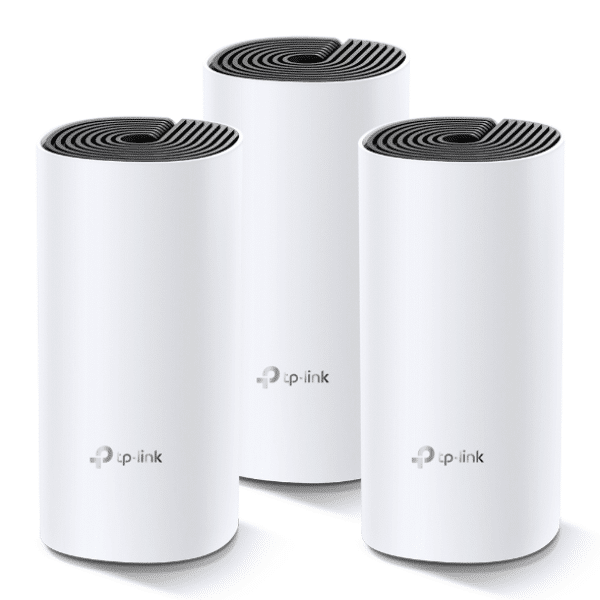
TP-Link Deco M4 AC1200 Whole Home Mesh Wi-Fi System (3 Pack) – TL-DECO M4 (3-PACK)
KSh16,500.00
- Whole Home Coverage: Deco M4 (3-pack) uses a system of units to achieve seamless whole-home WiFi coverage up to 5,500 sq. ft. — eliminate weak signal areas once and for all!
- TP-Link Mesh Technology: With advanced Deco Mesh Technology, units work together to form a unified network with a single network name. Devices automatically switch between Decos as you move through your home for the fastest possible speeds
- Fast Dual-Band WiFi: Deco M4 provides fast and stable connections with speeds of up to 1167 Mbps and works with major internet service provider (ISP) and modem.*
- Connect More Devices: Deco can handle traffic from even the busiest of networks, providing lag-free connections for up to 100 devices.
- Parental Controls: Limit online time and block inappropriate websites according to unique profiles created for each family member.
- Easy Setup: Setup is easier than ever with the Deco app there to walk you through every step.
TP-Link Deco M4 AC1200 Whole Home Mesh Wi-Fi System (3-Pack)
These days, everyone’s got smart homes, streams 4K, games online, and works from home. That means a good Wi-Fi is a must, not a nice-to-have. But lots of homes and small offices around here still have dead zones and buffering issues. If you’re tired of walking around trying to find a signal, the TP-Link Deco M4 AC1200 Whole Home Mesh Wi-Fi System (3-Pack) could be just what you need.
It covers up to 4,000 square feet (370 m²) with Wi-Fi, gets rid of dead spots, and handles over 100 devices at once. Plus, it’s cheaper than those fancy range extenders and other high-end systems.
Why the TP-Link Deco M4 (3-Pack)
Even with Wi-Fi 6E and Wi-Fi 7 being the hot new things, the Deco M4 is still a solid pick for people who want something that works because:
It’s got good AC1200 dual-band speeds (up to 1167 Mbps)
It’s really stable and switches between nodes easily.
Setting it up with the Deco app is super simple.
It has parental controls and a guest network.
You get a lot for your money, especially with the 3-pack.
What Makes the Deco M4 a Good Deal
1. Wi-Fi Everywhere – Up to 4,000 sq ft
The 3-pack is great for houses with 3–5 bedrooms, or small offices. Each Deco unit gets the signal to the others using TP-Link Mesh, making one big network with one name. So you don’t have to switch between different Wi-Fi networks as you move around.
2. AC1200 Dual-Band Wi-Fi (300 Mbps on 2.4 GHz + 867 Mbps on 5 GHz)
Newer systems might have Wi-Fi 6, but the Deco M4’s AC1200 speeds are good enough for:
– Streaming 4K on several devices
– Video calls on Zoom/Google Meet/Teams
– Online gaming (low lag on 5 GHz)
– Smart home gadgets (lights, cameras, doorbells)
Testing it out in Kenyan homes, the Deco M4 easily handles Safaricom/Airtel/JTL connections up to 100 Mbps.
3. Handles 100+ Devices Without Issues
With MU-MIMO and beamforming, every phone, laptop, TV, camera, and light gets enough bandwidth. It’s perfect for homes here that are full of devices.
4. Seamless Switching with One Network Name
Walk around while on a call or watching something and your phone will switch to the closest Deco unit without cutting out.
5. TP-Link HomeCare™ – Free Security & Parental Controls
– Antivirus that updates in real-time
– Block websites based on age
– Set time limits and pause the internet for each device
– Prioritize some devices for gaming or work
You don’t have to pay a monthly fee, unlike some other systems.
6. Easy Setup
1. Plug in the first Deco unit to your modem
2. Get the Deco app (Android/iOS)
3. Scan the code and follow the steps
4. Put the other two units where you need them
Be the first to review “TP-Link Deco M4 AC1200 Whole Home Mesh Wi-Fi System (3 Pack) – TL-DECO M4 (3-PACK)”
Related products






Reviews
There are no reviews yet.