
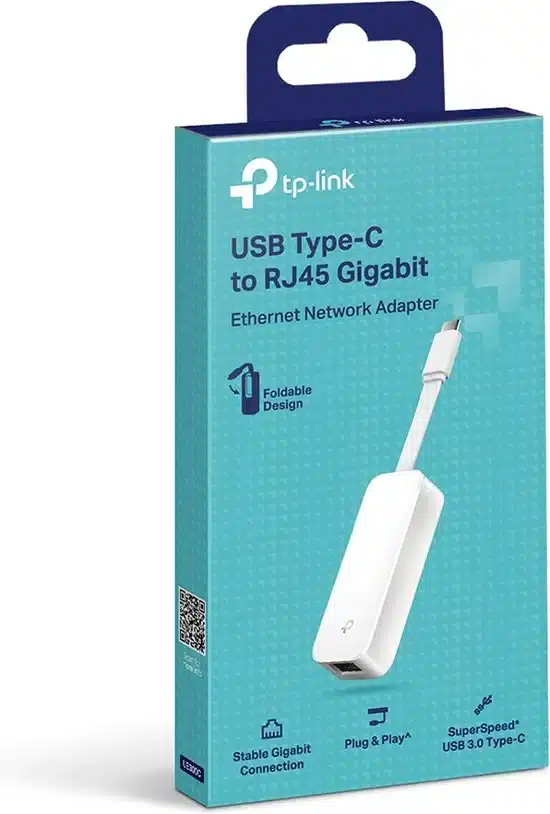
TP-Link USB Type C to Gigabit Ethernet Network Adapter Plug and Play – TL-UE300C


KSh3,000.00
- USB 3.1 Gen 1 Type-C Host Connection
- Gigabit Ethernet Port
- Bus Powered
- Foldable & Portable Design
- Plug-and-Play Design
- Supports Multiple Platforms
- Give Wired Internet Connections to USB-C Devices
- Gigabit Network for Fast, Stable Data Transfer
TP-Link USB Type C to Gigabit Ethernet Network Adapter – TL-UE300C
YWi-Fi is everywhere now, but you can’t beat a wired Gigabit Ethernet when you need speed and no lag. This is super important if you work from home, game a lot, stream stuff in 4K, or are always on Zoom. The TP-Link TL-UE300C USB-C to Gigabit Ethernet Adapter is a top pick if you have a slim Ultrabook, MacBook, Chromebook, iPad Pro, or Windows tablet that doesn’t have an RJ45 port.
What’s the TP-Link TL-UE300C?
Basically, the TP-Link TL-UE300C is a small USB Type-C to RJ45 Gigabit Ethernet adapter. Just plug it in, and boom, you’ve got a wired network port on any device with USB-C or Thunderbolt 3/4.
Here’s a quick look at the specs:
- Interface: USB 3.1 Gen 1 Type-C (you can plug it in either way)
- Ethernet port: 1 × Gigabit RJ45 (10/100/1000 Mbps)
- Chipset: Realtek RTL8153 (known to be reliable)
- Speeds: Full Gigabit (up to 1000 Mbps)
- LED lights: Show if it’s connected and working
- Size: 71 × 26 × 16.2 mm (fits in your pocket)
- Weight: ~20 g
- Works with: Windows 11/10/8.1/8, macOS (up to Sequoia 15.x), Linux, ChromeOS, iPadOS, Android (some devices)
Some cheap adapters only do Fast Ethernet (100 Mbps) or keep disconnecting. But the TL-UE300C uses a good Realtek chipset and is built well by TP-Link, so it works without issues.
Why Bother with Wired Ethernet Now?
Wi-Fi 6E and Wi-Fi 7 are around, but Gigabit Ethernet is still better in some cases:
- Less lag – Matters for gaming and trading stocks
- Steady speed – No problems from microwaves or other Wi-Fi networks
- More secure – Harder to hack than Wi-Fi
- Better video calls – No more bad connection messages
- Fast file transfers – Transfer a 1 GB file in about 8 seconds instead of 30+ seconds on Wi-Fi
- Power over Ethernet option – Can be used with PoE injectors in certain setups
If you have any of these, you know the struggle of not having an Ethernet port:
- MacBook Air/Pro (M1, M2, M3, M4)
- Dell XPS 13/14/16, Lenovo Yoga, HP Spectre/Envy
- Microsoft Surface Pro 9, Surface Laptop
- iPad Pro 11″ & 12.9″ (with USB-C)
- Samsung Galaxy Tab S8/S9
- Most new Chromebooks
It feels well-made. The plastic doesn’t creak, and the USB-C plug is strong. Plus, the Ethernet port folds in, so it’s easy to carry around and protects the connector in your bag.
Super Easy to Use – No Drivers Needed
The best part about the TL-UE300C is that it just works:
- Windows 11/10 – Drivers are built-in; plug it in, and you’re online in a few seconds
- macOS Ventura, Sonoma, Sequoia – It recognizes it right away; no drivers needed
- ChromeOS – Finds it automatically; great for schools
- iPadOS 17/18 – Shows up in Settings; good if you have a cellular iPad and need reliable internet in hotels
- Linux – Works instantly on Ubuntu, Fedora, Debian, etc.
No need to hunt for drivers online. This is awesome for companies that don’t let you install drivers.
Be the first to review “TP-Link USB Type C to Gigabit Ethernet Network Adapter Plug and Play – TL-UE300C”
Related products







Reviews
There are no reviews yet.