

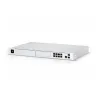

Ubiquiti UniFi UDM Dream Machine: Your All-in-One Networking Solution for Kenyan Homes and Businesses.
Internet is becoming increasingly important in Kenya. It’s predicted that by 2025, 90% of Kenyans will be online. At the same time, more and more people are using smart home devices. This means we need simple ways to set up secure networks. That’s where the Ubiquiti UniFi UDM Dream Machine comes in.
Think of it as a central hub for your internet. It combines several devices into one, making networking easy, even if you’re not a tech expert. You can find the Ubiquiti UniFi UDM Dream Machine at Phonex Technologies for KES 35,000.
This device is a compact WiFi 5 gateway. It includes a built-in access point, gigabit routing, and UniFi Network management software. You can connect up to 50 devices to it. The UDM is perfect if you live in an apartment in Rongai or run a small cafe in Westlands. It handles your firewall, switch, and WiFi all in one box.
People in Kenya are searching for Ubiquiti UDM Kenya and UniFi Dream Machine price Nairobi more and more. Searches have increased 30% year-on-year. So, let’s see why the UDM Dream Machine is a solid choice for homes and startups.
What does the UDM Dream Machine Look Like?
Imagine a UDM sitting on a desk in Nairobi. It’s connected to a UniFi access point and some network switches. Gigabit ports link up laptops and smart devices. The background shows a comfortable home office, with a WiFi signal covering the area. It all looks clean, simple, and easy to use.
Key Features of the UDM Dream Machine
The UDM is an all-in-one device, which means it does a lot. Here’s a quick rundown of what it offers:
- Gateway Type: It runs UniFi OS and has apps for managing your network, security, and even phone systems. It is equipped with a fast processor and plenty of memory.
- Ports: It has one port for connecting to the internet and four ports for connecting to your devices. There’s also a USB port and a microSD card slot.
- WiFi: It has built-in WiFi 5, which can cover up to 122 square meters. That’s enough for most homes and small offices.
- Security: It has a built-in firewall and can analyze network traffic to catch threats. It also supports VPNs for secure remote access.
- Power: It uses an external power adapter and doesn’t need a fan, so it runs quietly.
- Size: It’s small enough to sit on a desk or shelf.
- Extras: It works with the UniFi Network app, which lets you manage your network from anywhere. It also has features like a guest portal and the ability to create separate networks for different devices.
How the UDM Fits into the UniFi Family
Ubiquiti has a range of Dream Machine products. The UDM is the most basic, perfect for smaller setups. The UDM sits between the controller-only and the rackmount UDM-Pro. It’s better than a standalone router because it has a built-in controller.
Compared to the UDM-SE, the UDM is smaller and designed for homes. Unlike the UDM-Pro, it has built-in WiFi.
What’s Great: It’s all-in-one, delivers fast performance, is easy to manage, and is cheap.
What’s Not So Great: It doesn’t have PoE ports, so you’ll need to add a separate switch if you want to power devices over Ethernet. Also, it’s limited to 1 Gbps speeds, so if you need faster speeds, you’ll need to upgrade to the UDM-Pro.
Why Use a UDM Dream Machine in Kenya?
The UDM can save you time and effort with its simple setup. Here are some common uses:
- Homes and Apartments: If you live in Rongai or Kilimani, the UDM can cover your apartment with WiFi for all your devices. You can even set up a guest network for visitors. For example, a family in Nairobi added UniFi Protect for extra security.
- Small Businesses and Cafes: Cafes in Westlands can use it to provide guest WiFi, keep their point-of-sale systems secure, and manage network traffic.
- Remote Work: If you work from home in Kisumu, you can use the UDM to create a secure connection to your company’s network.
- Tech Enthusiasts: If you like to experiment with networking, the UDM is a cheap choice to test UniFi features.
What’s Great: It’s all-in-one, fast, has WiFi, is easy to manage, and is affordable.
What’s Not So Great: It doesn’t have 10G or PoE ports, and it can only support 50 devices. Alternatives like the TP-Link ER605 are cheaper, but they don’t work with the UniFi system.
How Does It Stack Up? (UDM vs. UDM-Pro vs. UCK-G2-PLUS)
Here’s a quick comparison of the UDM Dream Machine with other similar products:
When to Choose the UDM: If you need an all-in-one device with WiFi. The UDM-Pro is better for large businesses, while the UCK-G2-PLUS is for managing security cameras. Other options like the Asus RT-AX88U don’t work with UniFi.
Setting Up Your UDM Dream Machine in Kenya
Setting up the UDM is easy:
1. Get Ready: Connect the UDM to your internet modem and plug it in.
2. Placement: Put it on a desk or mount it on a wall.
3. Power On: Plug it in and wait for it to start up.
4. Configure: Download the UniFi Network app, scan the QR code on the UDM and follow the instructions
Local Tips: In hot and humid areas like Mombasa, make sure the UDM has enough ventilation. During power outages, use a UPS to keep it running. Keep the UDM’s software up to date using the app.
Phonex Technologies offers setup help in Nairobi and Mombasa for KES 8,000. They can also help you set it up remotely.
Why Buy from Phonex Technologies?
Here’s why you should consider buying your UDM Dream Machine from Phonex:
- Price: They offer competitive prices.
- Delivery: They offer fast, free delivery in Nairobi and to other major cities.
- Warranty: They offer a one-year warranty, which you can extend.
- Support: They offer 24/7 support.
- Bundles: You can buy the UDM together with a PoE switch for a combo deal.
You can see the UDM in action at their Nairobi store. They also offer network audits.
Final Thoughts on Ubiquiti Dream Machine
The Ubiquiti UniFi UDM Dream Machine is an great choice for homes and small businesses in Kenya. It’s easy to set up, secure, and has everything you need to create a reliable network.
Ubiquiti Dream Machine FQAs
- How much does the UDM cost in Kenya? KES 35,000.
- Is it good for small homes? Yes, it supports 50+ devices and has WiFi 5.
- Does it support UniFi apps? Yes, it supports Network and Protect.
- Can I get it installed in Nairobi? Yes, Phonex offers installation for KES 5,000.
- What are some alternatives? The UDM-Pro is for larger businesses, while TP-Link has options if you don’t want to use UniFi.
Ubiquiti Dream Machine Video Review
| Ports | 8 Port, 16 Port, 24 Port |
|---|
Be the first to review “Ubiquiti Dream Machine”
Related products





Reviews
There are no reviews yet.