

Ubiquiti UniFi UDM-Pro Dream Machine Pro: Is This the Right Gateway for Your Kenyan Business
So, you’re looking at upgrading your business network in Kenya, right? By 2025, pretty much everyone will be online (we’re expecting around 90% internet use!), and companies are dealing with way more data than ever. That means you need serious equipment to handle it all, especially if you’ve got a data center or a big office. That’s where rackmount gateways come in.
One option that’s getting a lot of buzz is the Ubiquiti UniFi UDM-Pro Dream Machine Pro. You can find it at Phonex Technologies for around KES 60,000. Basically, it’s a powerful piece of tech that fits into a standard rack, like you’d see in a server room. It acts like the brain of your network, managing security, traffic, and a bunch of other stuff. We’re talking about handling the internet for potentially 500+ devices with really fast speeds.
Think of it as the central hub in Ubiquiti’s Dream Machine family. It helps you run UniFi Network, Protect (for security cameras), Access (for door entry), and even Talk (their phone system). Plus, it has space for a hard drive, so you can record security footage from your cameras – useful if you’re running a business in Upper Hill or maybe a hotel in Mombasa.
People in Kenya are definitely searching for this thing. Searches like “Ubiquiti UDM-Pro Kenya” and “rackmount UniFi gateway price Nairobi” have jumped a lot recently. So, let’s break down what makes it special; We’ll look at its security features, how it fits into the UniFi system, and try to figure out if the UDM-Pro really is the best choice for your business in Kenya.
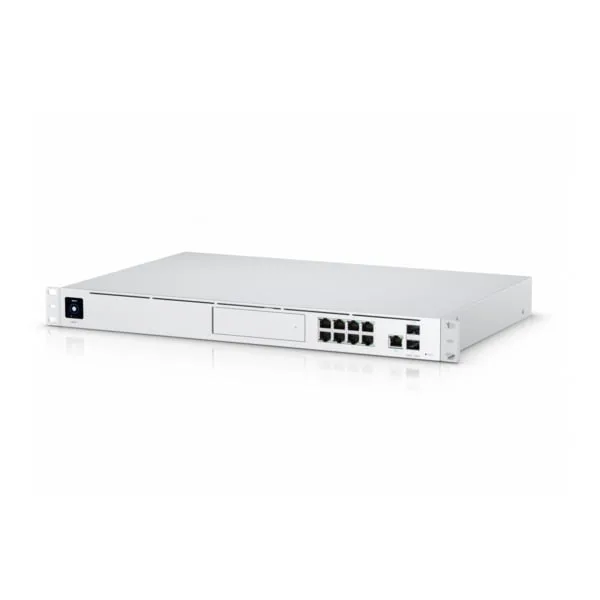
(Image: Ubiquiti UDM-Pro in a Nairobi server rack, showing cables and the hard drive bay. The screen displays the UniFi dashboard with device count, speed, and security camera recordings.)
What Exactly Can the UDM-Pro Do?
The UDM-Pro is designed to grow with your business. It’s built to manage everything from one place.
- It’s a UniFi OS Console, which means it runs Ubiquiti’s software to control your entire network.
- It’s got a fast processor (1.7 GHz quad-core) and plenty of memory (4 GB DDR4 RAM).
- For connections, it has regular gigabit Ethernet ports, plus a faster 10G SFP+ port for connecting to your internet provider. There’s also a USB port.
- Security is a big deal. It can handle 3.5 Gbps of intrusion detection and prevention (IDS/IPS), which basically means it can spot and block threats really quickly. It can also identify different types of traffic and create VPNs for secure connections.
- Like I said before, it has a bay for a standard 3.5 hard drive, where you can store recordings from your UniFi Protect security cameras (up to 10TB).
- It comes with everything you need to mount it in a rack, and it doesn’t use too much power (around 30W).
- It’s a standard 1U size, so it fits in any normal server rack.
- It even has a little touchscreen on the front for quick info and settings. You can manage it from your phone, access it from the cloud, and set up different networks for different purposes (like a guest Wi-Fi).
How Does UDM-Pro Kenya Fit in the UniFi Family?
Ubiquiti has a few different Dream Machine models. The UDM-Pro is the one meant for bigger setups that need to be in a rack. The regular UDM is smaller and sits on a desk and doesn’t have as much power. The UDM-SE is similar to the UDM-Pro, but it includes PoE ports, which is good if you have devices like IP phones or security cameras that get power through the network cable.
The UDM-Pro is strong because it’s fast, supports 10G connections, has a spot for a security camera hard drive, and works with all the UniFi apps.
One of the downsides is that it doesn’t have built-in Wi-Fi. You’ll need to add a separate UniFi access point if you want wireless. It also doesn’t have PoE, as I mentioned.
What Can You Actually Do With UDM-Pro Kenya in Kenya?
Because the UDM-Pro can handle so much data and run multiple apps at once, it can make your network faster and more efficient. Here are a few examples:
- Small and Medium-Sized Businesses: Offices in places like Upper Hill can use it to manage all their devices and record security footage. For example, a company in Nairobi might use the 10G connection to get faster internet speeds.
- Hotels: Hotels in Mombasa can use it to create separate Wi-Fi networks for guests and employees, and manage the traffic on each network.
- Universities: Universities in Kisumu can use it to power their e-learning platforms, prioritizing traffic for important applications and creating secure VPNs for students accessing resources remotely.
- Remote Offices: Businesses with offices in different locations, like in Eldoret, can use it to create secure connections between those offices.
Basically, the good thing is that this device offers fast speeds, supports newer connections and storage and works with other UniFi apps.
The not so good, you can only put it on a rack and It doesn’t have a PoE.There are other options like MikroTik RB4011 but it does not have the UniFi ecosystem.
How Does UDM-Pro Kenya Compare to Other Options?
| Feature | UDM-Pro | UDM | UDM-SE |
|---|---|---|---|
| Routing | 3.5 Gbps IDS/IPS | 1 Gbps | 3.5 Gbps |
| Ports | (8) GbE + 10G SFP+ | (4) GbE | (8) GbE PoE + 10G |
| Storage | HDD bay | None | HDD bay + 128GB SSD |
| Devices | 500+ | 50+ | 1,000+ |
| Price (KES) | 60,000 | 35,000 | 80,000 |
| Best For | Rackmount enterprise | Compact home | PoE high-scale |
Which One Should You Pick?
Choose the UDM-Pro if you need a rackmount solution with high performance and a place to store security camera footage. The regular UDM is good if you just need something small for your home or small office. The UDM-SE is the best choice if you need PoE ports to power your devices.
Setting It Up: A Quick Guide
1. Get Ready: Make sure you have space in your rack, Cat6 cables, and a hard drive if you want to use the security camera recording feature.
2. Mount It: Install the UDM-Pro in your rack using the included rack ears.
3. Plug It In: Connect the power adapter.
4. Set It Up: Use the UniFi app on your phone to scan the QR code on the UDM-Pro and follow the instructions. You’ll want to enable IDS/IPS for security and add your hard drive if you’re using UniFi Protect.
5. Ventilate it: Since it can get hot in Kenya you want to ensure good air-flow.
Phonex Technologies can also install it for you for around KES 8,000.
Why Buy From Phonex Technologies?
Price: They’re offering it for KES 60,000, which they claim is lower.
Delivery: They offer free delivery in Nairobi.
Warranty: You get a 1-year warranty, which you can extend.
Support: You can call them at +254 700 000 000 if you have any questions.
Bundles: They have a bundle with the UDM-Pro and a hard drive for KES 70,000.
So, Is It Worth It?
The UDM-Pro is a powerful option if you’re looking for a rackmount gateway. If you want to buy one, check out Phonex Technologies.
UDM-Pro Kenya Quick Answers to Common Questions
- How much does the UDM-Pro cost? Around KES 60,000.
- Can it handle 500 devices? Yes, it’s designed for that.
- Does it support security camera recording? Yes, it has a hard drive bay for that.
- How much does installation cost? Around KES 8,000 from Phonex.
- What are the alternatives? The UDM-SE is a good option if you need PoE.
secure.
Ubiquiti Dream Machine Pro Video Review
| Ports | 8 Port, 16 Port, 24 Port |
|---|
Be the first to review “Ubiquiti Dream Machine Pro – UDM-Pro Kenya”
Related products




Reviews
There are no reviews yet.