
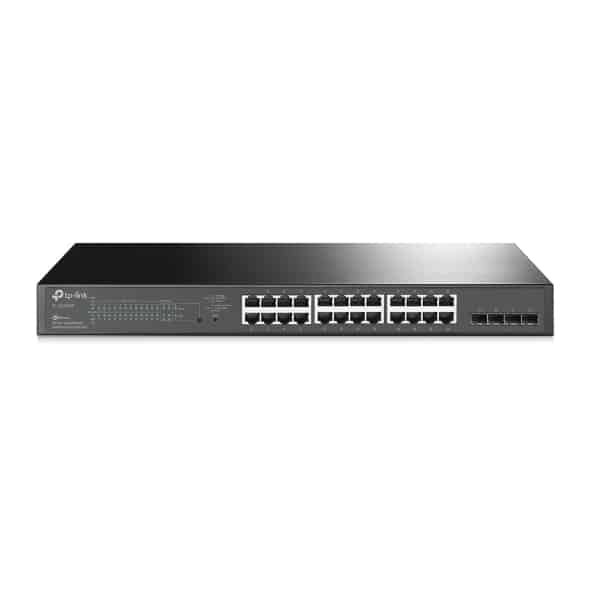
TP-Link 28-Port 10/100/1000Mbps JetStream Gigabit Smart Switch with 24-Port PoE+ – TL-SG2428P


KSh25,500.00
- 250 W PoE Budget: 24× 802.3at/af-compliant PoE+ ports with a total power supply of 250 W*.
- Full Gigabit Ports: 24× gigabit PoE+ ports and 4× gigabit SFP Slots provide high-speed connections.
- Integrated into Omada SDN: Zero-Touch Provisioning (ZTP)**, Centralized Cloud Management, and Intelligent Monitoring.
TP-Link TL-SG2428P: JetStream 28-Port Gigabit Smart Switch with 24-Port PoE+
Businesses today need a network that’s strong, reliable, and that works well to stay ahead. Whether you’re running a small office, a store, a hotel, or a place with lots of security cameras, the TP-Link TL-SG2428P JetStream 28-Port Gigabit Smart Switch with 24-Port PoE+ is a great pick. This switch uses Omada SDN and gives you fast gigabit speeds, easy PoE+ power, and good controls – all at a price that won’t break the bank.
Looking for a 24-Port PoE+ Gigabit Smart Switch, a TP-Link JetStream TL-SG2428P review, or the best 28-Port managed PoE switch for business? You’re in the right place. Here, we will check out what it can do, why it’s good, how you can use it.
Why Pick the TP-Link TL-SG2428P?
The TL-SG2428P (also called SG2428P in new versions) is from TP-Link’s JetStream series. It’s made for small and medium businesses (SMBs) that need more than just basic internet. Here’s what makes it special:
What It Has
- 28 Ports Total: 24 x Gigabit Ethernet RJ45 PoE+ ports + 4 x Gigabit SFP slots to hook up fiber.
- PoE+ Power: It has 250W of PoE power. Each PoE+ port can handle up to 30W (IEEE 802.3at/af). You can power up to 24 devices at once without needing extra power cords.
- Switching Speed: It switches at 56 Gbps without blocking, and forwards at 41.7 Mpps. This means smooth performance, even when things get busy.
- Mounting: It’s small (1U) and comes with stuff to mount it in a rack, also has rubber feet to sit on a desk.
- Cooling: It has two fans that change speed to keep things quiet and cool.
Software and Controls
- Omada SDN: Set it up without any work, control it from the cloud, and keep an eye on it with the Omada app or controller.
- Layer 2+: It can do static routing, VLANs (802.1Q, MAC, Protocol), QoS (L2/L3/L4), IGMP Snooping, and Link Aggregation (LACP).
- Security: It has ACLs, 802.1X, Port Security, DHCP Snooping, IP-MAC-Port Binding, and Storm Control to keep your network safe.
- PoE Tools: It can auto-fix devices that stop working, reach up to 250m, and turn PoE on/off on a schedule to save power.
- IPv6: It’s ready for new networks, with controls, ACL, and QoS for IPv6.
Compared to stuff from Cisco or Netgear, the TL-SG2428P has similar (or better) stuff for less money – a good choice for IT folks watching their budget.
Good PoE+ Power: Easy to Set Up
One of the best things about the TP-Link TL-SG2428P is that it has 24 PoE+ ports with 250W of power. Power over Ethernet (PoE) means you don’t need extra power plugs.
What Can It Power?
- IP Cameras: Great for security – power 24 high-quality cameras (like 4K ones that use 15-25W each).
- VoIP Phones: Plug in desk phones without needing plugs.
- Wireless Access Points: Put Wi-Fi 6 APs in big areas for good coverage.
- Other Stuff: IoT sensors, digital signs, POS systems, and access control.
With PoE Auto Recovery, the switch notices when devices aren’t working and restarts them, which keeps critical stuff like security networks running.
If you’re upgrading from switches without PoE, the TL-SG2428P can save you lots of cash on electricians and changes.
Omada SDN: Cloud Control That’s Easy
The TL-SG2428P works with TP-Link’s Omada Software Defined Networking (SDN). You can control your whole network – switches, access points, and gateways – from one place.
Good Things About Omada:
- Cloud or Local: Use the free cloud or a local controller to control things the way you want.
- Zero Setup: Devices set themselves up when plugged in.
- Omada App: Control and check on things from your phone, anytime, anywhere.
- Control Many Sites: Good for stores, franchises, or offices far away.
- Smart Watching: Get info on traffic and alerts in real-time.
This switch is great when you need PoE that you can trust and fast gigabit speed:
1. IP Security Camera Systems
– Power and connect 20+ cameras in warehouses, parking lots, or stores.
– Use SFP slots to connect to NVRs with fiber over long distances.
2. Office Networks
– Run VoIP phones, computers, and printers, and power Wi-Fi APs on the ceiling.
– Split up the network for guest Wi-Fi, staff, and IoT devices.
3. Hotels and Stores
– Set up wireless networks with PoE APs and IP phones at the front desk.
– Run digital signs and POS systems without power problems.
4. Schools
– Power projectors, IP intercoms, and Wi-Fi across campus.
5. Small Data Centers
– Use SFP to connect to core switches at 10G (with the right modules).
TP-Link TL-SG2428P Reviews: What People Say in 2025
The TL-SG2428P (and SG2428P) still gets good reviews:
- Trustworthy: Keeps running for 5+ years – IT people say this a lot.
- Good Price: Like Cisco, but cheaper.
- Easy to Use: Omada controller is easy – set it up fast.
- PoE Power: Powers 20+ devices easy.
How to Set Up the TL-SG2428P
1. Put the Switch: In a rack or on a desk.
2. Plug in Power and Internet: Use SFP for fiber or Gigabit RJ45 to your router.
3. Add to Omada Controller: Scan the QR code or find it with the tool.
4. Set PoE and VLANs: In the web GUI or Omada dashboard.
5. Plug in Devices: They start up right away.
The TP-Link JetStream TL-SG2428P is more than just a switch – it’s a way to grow. With Wi-Fi 6/7, 4K security cameras, and IoT, this 28-Port PoE+ switch makes sure you’re ready.
Be the first to review “TP-Link 28-Port 10/100/1000Mbps JetStream Gigabit Smart Switch with 24-Port PoE+ – TL-SG2428P”
Related products



Out of stock
General
Price range: KSh26,000.00 through KSh27,000.00
This product has multiple variants. The options may be chosen on the product page


Out of stock

Reviews
There are no reviews yet.