
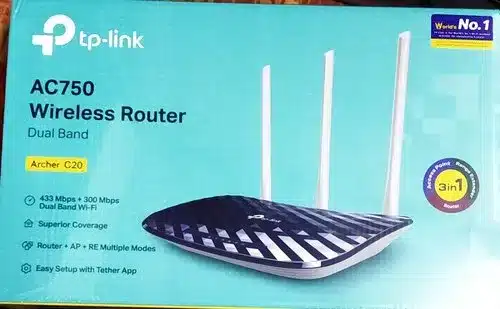

TP-Link Archer C20 AC750 Dual Band Wi-Fi Router
Want a Wi-Fi router that’s reliable, quick, and cheap, and will still stand? The TP-Link Archer C20 AC750 Dual Band Wireless Router is still a great pick for homes, students, small offices, or anyone needing dependable internet without a big spend.
Why the TP-Link Archer C20 Still Rocks
Even with Wi-Fi 6 and Wi-Fi 7 getting all the hype, the Archer C20 is still selling like because:
- It’s been used and trusted by tons of people.
- It’s great for watching HD videos, online learning, browsing, and some gaming.
- Dual-band tech (2.4GHz + 5GHz) helps cut down on interference.
- Setting it up is super simple with the TP-Link Tether app (iOS & Android).
- It’s got a guest network, parental controls, and supports IPv6.
- It saves energy and stays cool, even when it’s on all the time.
- TP-Link offers a killer 3-year warranty.
Pretty Quick AC750 Dual Band Speeds
The Archer C20 gives you combined wireless speeds reaching 733 Mbps:
- 5GHz band: Up to 433 Mbps – Best for streaming HD, gaming online, video calls, and smooth browsing.
- 2.4GHz band: Up to 300 Mbps– Good for emails, social media, browsing the web, and smart home stuff.
Because of the dual-band stuff, you can put devices that hog bandwidth on the quicker 5GHz band while keeping older devices and IoT gadgets on the steady 2.4GHz band. No more buffering or interference!
Good Wireless Range with Antennas
The Archer C20 comes with three external antennas that do a good job of spreading the signal around your place, covering about 1800–2200 sq. ft., give or take, depending on walls and junk.
It’ll easily cover a small apartment, a multi-level house, or a little shop. People say they get strong signals even in far-off rooms and on balconies.
setup
You don’t need a geek to set up your Archer C20. Here are three easy ways:
1. TP-Link Tether App (the most popular way)
2. Using a web browser (tplinkwifi.net or 192.168.0.1)
3. The WPS button for a quick hookup
The setup guide is in English and other languages.
Useful Features
- Guest Network – Keep your main password safe when visitors are around.
- Parental Controls – Block bad websites and manage when kids can go online.
- IPv6 Ready – Ready for the next version of the internet.
- QoS (Quality of Service) – Make sure your gaming, streaming, or work stuff gets priority.
- Access Control– Block or allow certain devices.
- IPTV Support– Good for users of certain internet services.
Who’s This Router Good For ?
– Students in dorms or shared housing
– People working from home who need to save money
– Families who stream stuff on services
– Users who only got an internet box without a Wi-Fi router included
– People swapping out older routers
– Shop owners who need reliable Wi-Fi for customers and payment machines
– Anyone wanting solid internet for a good price
Be the first to review “TP-Link AC750 Wireless Dual Band Router – TL-ARCHER C20”
Related products


Out of stock

Out of stock


Out of stock


-17%


Out of stock
General
Original price was: KSh24,500.00.KSh20,400.00Current price is: KSh20,400.00.
This product has multiple variants. The options may be chosen on the product page


Reviews
There are no reviews yet.