
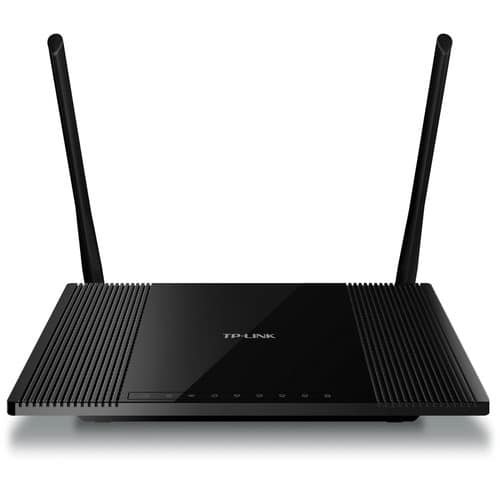


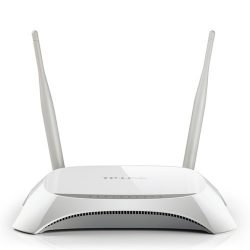
TP-Link 300Mbps High Power Wireless N Router TL-WR841HP
The TP-Link TL-WR841HP 300Mbps High Power Wireless N Router is still one of the best deals around if you need reliable Wi-Fi that reaches far. If you’ve got thick walls or a big place with dead spots, or you just want good Wi-Fi in your small office without emptying your wallet, the TL-WR841HP is still a winner – and there’s a good reason for that.
Why the TL-WR841HP Still Rocks
New Wi-Fi 6 and 6E routers are all the rage, but tons of homes and businesses in places like , Kenya, Nigeria, and Sri Lanka are still mostly using 2.4 GHz devices – think laptops, smart TVs, security cameras, printers, and those gadgets that connect to the internet. The TL-WR841HP was made for this setup.
It’s got 9 dBi high-gain detachable antennas and high-power amplifiers, so it sends Wi-Fi way farther than those basic 150 Mbps or 300 Mbps routers. Tests show it can easily cover **1500–2000 square feet indoors and punch through thick walls. A lot of those new, cheaper Wi-Fi 6 routers can’t even do that on the 2.4 GHz band.
What Makes the TL-WR841HP a Best-Seller?
1. Awesome Range & Punches Through Walls
- 300 Mbps High Power Wireless N
- Two strong amplifiers + 9 dBi antennas
- Gets Wi-Fi to every corner of a 3–4 bedroom apartment, a house, or small office
- Works great in those concrete buildings you see everywhere
2. Steady 300 Mbps on 2.4 GHz
- Good for streaming movies, playing games online, downloading stuff, and video calls
- Can handle like 30–40 devices at once without bogging down (if you set it up right)
- Plays nice with older 802.11 b/g stuff
3. Simple Setup & Easy to Use
- Sets up in a minute with the Tether app (iOS & Android) or on your computer
- The TP-Link Tether app lets you control what your kids can see online, set up a guest network, and manage bandwidth from your phone
- WPS button for quick, secure connections
4. Good Security
- WPA/WPA2 encryption (the newest software can even do WPA3)
- SPI firewall, IP & MAC binding, DoS protection
- Guest network keeps visitors away from your main stuff
5. Does a Lot of Different Things
- Router mode (how it comes)
- Access Point mode
- Range Extender / Repeater mode
- WISP mode (popular where people get internet wirelessly)
6. Quality of Service (QoS)
- Makes sure your games, streams, or video calls get priority
- Gives different amounts of bandwidth to different devices or programs
7. Tough & Stays Cool
Vents in the front and a big heat sink keep it from overheating, even when it’s working hard
People say they last 5–8 years running all the time
How to Set It Up
1. Plug it in and plug the internet cable into the blue port.
2. Connect to its Wi-Fi (the name and password are on the sticker) or use an Ethernet cable.
3. Open a browser and type http://tplinkwifi.net or 192.168.0.1
4. Quick Setup → pick your country → it’ll find your internet type → name your Wi-Fi and make a password.
5. That’s it! You can install the TP-Link Tether app for more control.
Tip: Put the router in the middle of your place, up high (not in a cabinet), and point one antenna straight up and the other two at angles for the best Wi-Fi everywhere.
Be the first to review “TP-Link 300Mbps High Power Wireless N Router – TL-WR841HP”
Related products








Reviews
There are no reviews yet.