
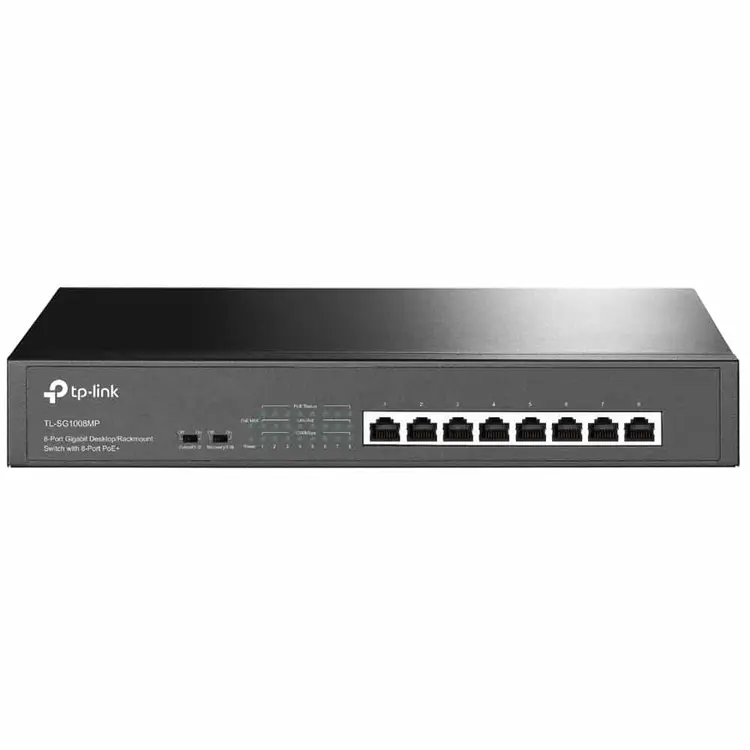
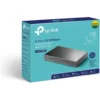
TP-Link 10-Port Gigabit Desktop Switch with 8-Port PoE+ – TL-SG1210P
KSh12,000.00
Specifications
- 9 10/100/1000Mbps RJ45 ports, 1 Gigabit SFP port
- With 8 PoE+ ports, transfers data and power on one single cable
- Works with IEEE 802.3af/at compliant PDs and expands office network
- 802.1p/DSCP QoS enable smooth latency-sensitive traffic
- High PoE power budget with up to 30W for each PoE port and 63W for all PoE ports
TP-Link TL-SG1210P: A Solid 10-Port Gigabit Switch with 8 PoE+ Ports for Homes and Small Businesses
If you’re running a small business, setting up a home office, or using security cameras, the TP-Link TL-SG1210P 10-Port Gigabit Desktop Switch with 8-Port PoE+ is a great pick. It’s a simple switch that gives you fast Gigabit speeds and Power over Ethernet (PoE+). This means you can power things like wireless access points, phones, and cameras without extra power cords.
The TL-SG1210P is easy to use, works well, and has some cool features like Extend Mode and PoE Auto Recovery. Let’s check out what it can do, how it works, and why it might be just what you need if you’re looking for a good PoE switch for cameras, a Gigabit PoE switch for a small office, or a cheap 8-port PoE+ switch.
Why Go for a PoE+ Switch Like the TP-Link TL-SG1210P?
PoE is cool because it lets you send power and data through one cable. The TL-SG1210P follows the IEEE 802.3af/at standards, giving you up to 30W per port and a total of 63W across eight ports. This cleans up your setup, saves money on extra cables, and makes things easier in places that are hard to reach.
These switches are great if you have:
- Security cameras all over the place
- A Wi-Fi network with access points that need power
- Office phones that use PoE
- A small business that needs a fast, reliable network
People like the TL-SG1210P because it doesn’t have a fan, so it’s super quiet – perfect for offices or homes. It gets good ratings on places like Amazon and Reddit (usually 4.7+ stars) because it’s easy to use and dependable. Lots of folks say it’s the best cheap PoE switch, whether you’re a newbie or a pro.
Key specifications
What It Does The Details
Total Ports – 10 (9 x Gigabit RJ45 + 1 x Gigabit SFP slot)
PoE+ Ports – 8 (Ports 1-8, up to 30W each)
Total PoE Power -63W
Speed -20 Gbps
Data Speed -14.88 Mpps
Standards -IEEE 802.3af/at PoE+, 802.1p/DSCP QoS, IGMP Snooping |
Modes -Extend Mode (up to 250m on Ports 1-4), Priority Mode, Isolation Mode |
How It’s Made -No fan, metal box, sits on a desk or wall |
Size -209 × 126 × 26 mm |
Power Use -7W (idle) / Up to 77W (when using all PoE) |
Other Goodies – PoE Auto Recovery, Plug-and-Play, Place for a lock |
Features That Make the TL-SG1210P Stand Out
1. Smart PoE+ Power
The switch gives power where it’s needed. If you’re using too much power, it gives it to the most important ports first. This is great for things like PTZ cameras or powerful access points.
2. Extend Mode for Long Distances
Turn on Extend Mode on Ports 1-4, and you can send data up to 250 meters (but at a slower speed of 10Mbps). This is useful for big areas like warehouses or outdoor security setups.
3. Priority and Isolation Modes
- Priority Mode: Makes sure important stuff (like video calls) on Ports 1-2 gets the most bandwidth.
- Isolation Mode: Keeps traffic separate for better security – good for guest networks.
4. PoE Auto Recovery
If a device freezes up, the switch restarts it automatically. This saves time if you have cameras in hard-to-reach spots.
5. Quiet and Tough
It doesn’t have a fan, so it’s silent, and the metal case can handle everyday wear and tear. Plus, you can mount it on a wall if you want.
How to Set It Up
1. Put the switch on a desk or mount it on a wall.
2. Plug in the power.
3. Connect your internet to Port 9 or the SFP slot.
4. Connect your PoE devices to Ports 1-8.
5. Use the buttons on the front to switch modes if you need to.
The TL-SG1210P is a good value, giving you more PoE ports and cool modes for a lower price.
Keywords: TP-Link TL-SG1210P, 10-Port Gigabit Switch, 8-Port PoE+, PoE switch for IP cameras, best budget PoE switch, Gigabit desktop switch, Power over Ethernet switch, small business network switch, fanless PoE switch, Extend Mode PoE switch*
Be the first to review “TP-Link 10-Port Gigabit Desktop Switch with 8-Port PoE+ – TL-SG1210P”
Related products


-7%
Business Solutions
Original price was: KSh14,000.00.KSh12,999.00Current price is: KSh12,999.00.




Reviews
There are no reviews yet.