
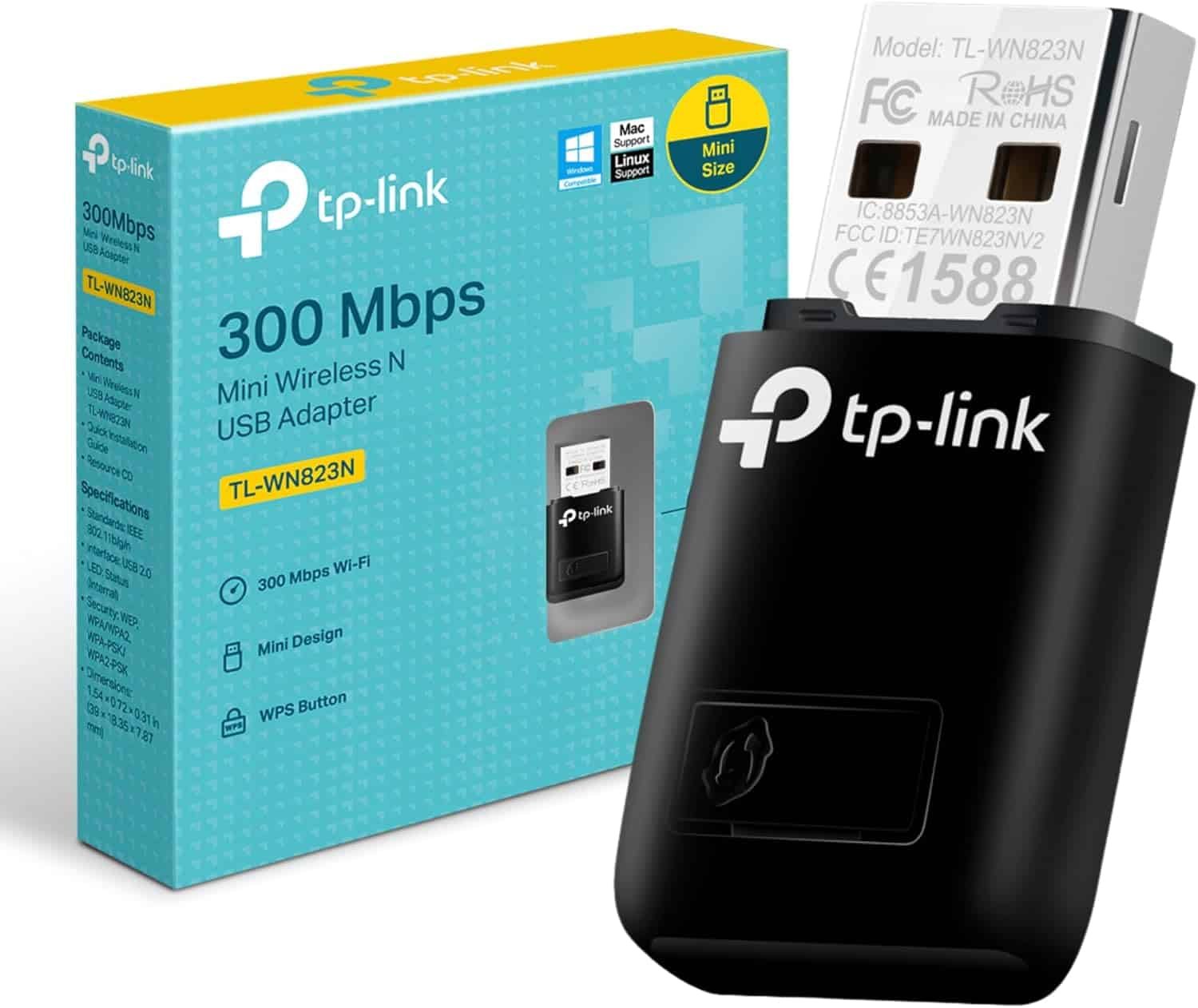
TP-Link 300Mbps Wireless N Mini USB Adapter – TL-WN823N


KSh2,000.00
Key Features & Specifications
Category Details
- Model TL-WN823N (300Mbps Wireless N Mini USB Adapter)
- Wi-Fi Standard IEEE 802.11b/g/n (2.4 GHz only – no 5 GHz support)
- Maximum Speed -300 Mbps (real-world typically 100–200 Mbps)
- Antenna 2×2 MIMO internal antennas (better range & stability than 1×1 adapters)
- Interface USB 2.0 (works on USB 3.0/3.1 ports too)
- Dimensions -compact: 39 × 18 × 7.9 mm (smaller than most USB drives)
- Weight ~5 grams
- One-Button Security -| Physical WPS button for instant encrypted connection
- SoftAP Mode – Turn your PC/laptop into a Wi-Fi hotspot to share internet
- Security -64/128-bit WEP, WPA/WPA2, WPA-PSK/WPA2-PSK
- LED Indicator – Yes (power & activity)
- Operating Systems – • Windows 11/10/8.1/8/7/XP (plug & play on newer versions)
- • macOS 10.7–10.15 (limited newer macOS support)
- Linux (excellent with RTL8192EU drivers, popular for Raspberry Pi)
- Chipset -Realtek RTL8192EU (Version 3) – very good driver support
- Range -Up to 100 m indoors in ideal conditions (typical 20–50 m through walls)
- Power Consumption -Very low – doesn’t heat up even after hours of use
- Included Accessories -Mini CD with drivers & utility, quick setup guide
TP-Link 300Mbps Wireless N Mini USB Adapter – TL-WN823N
having a reliable internet connection is a must. Whether you’re watching videos, playing games, working, or just browsing, a good WiFi connection is super important. If your computer doesn’t have WiFi, or the built-in WiFi isn’t cutting it, the TP-Link 300Mbps Wireless N Mini USB Adapter TL-WN823N is a cheap and easy fix. You can grab it from us. It’s small, easy to use, and gives you good wireless performance without costing a lot.
The TL-WN823N has been a popular choice for people watching their wallets for years, and it’s still a solid option for basic internet stuff. Let’s take a look at its features, why it’s useful, how to set it up, what people think of it.
Why Go for the TP-Link TL-WN823N in 2025?
Okay, so there are newer WiFi 6 and WiFi 7 adapters out there that are super fast, but a lot of homes and offices in Kenya still use older 2.4GHz networks that go up to 300Mbps. If you have an internet plan that’s around 100-300Mbps (like most Safaricom, Airtel, or Faiba plans), the TL-WN823N gives you up to 300Mbps wireless speeds on the 2.4GHz band. That’s plenty for watching videos, video calls, games, and downloading files.
Here’s why the TL-WN823N is still a good choice:
- 300Mbps Wireless Speed: Great for watching videos, calls, and games without lag.
- Tiny Design: It’s smaller than a flash drive, so it won’t get in the way. Great for travel or leaving it plugged in.
- SoftAP Mode: Turns your wired internet into a WiFi hotspot for your phone or tablet.
- Easy Security: Has a WPS button to quickly connect to your router securely.
- MIMO Tech: Uses multiple antennas to boost speed and make your connection more stable.
- Works with Everything: Works with Windows (XP/7/8/10/11), older Macs, and even Linux/Raspberry Pi.
TL-WN823N: Features and Specs
The TP-Link TL-WN823N is built on the 802.11n standard, which is a good mix of performance and price. Here’s what you need to know:
Wireless Stuff
- Standard: IEEE 802.11b/g/n (2.4GHz only)
- Speed: Up to 300Mbps
- Antenna: Internal antennas
- Range: Good for small to medium homes, up to 100 meters indoors.
Design
- Size: Really small, about 39 x 18 x 7.9 mm
- Port: USB 2.0 (works with USB 3.0, too)
- Button: WPS button for easy connections
- LED: Shows if it’s on and working
Security and Software
- Encryption: Supports WEP, WPA/WPA2
- SoftAP: Can make a virtual WiFi hotspot
- Software: Comes with a CD or downloadable drivers
To turn your computer into a hotspot:
- Open the TP-Link program.
- Turn on SoftAP and give your hotspot a name and password.
- Connect your devices.
People say setup takes less than 5 minutes. If you have any trouble, Phonex Tech’s support team can help you out.
If your router is still N-standard or your plan is under 300Mbps, the TL-WN823N saves you money. Only upgrade if you have newer routers or super-fast internet.
Why Buy from Phonex us?
We are a reliable Kenyan store that sells real networking stuff. Here’s why you should buy from them:
- Real Products:
- Good Prices
- Fast Shipping
- Good Support
Easy Installation: Get Online in Minutes
One of the biggest selling points of the TP-Link TL-WN823N is its plug-and-play simplicity. Here’s a step-by-step guide:
- Insert the Adapter: Plug the TL-WN823N into a free USB port on your PC or laptop.
- Install Drivers:
- Windows 10/11 often auto-installs drivers.
- For older OS or manual setup, use the included mini-CD or download from TP-Link’s official site.
- Connect to WiFi: Open the TP-Link utility or Windows WiFi menu, select your network, and enter the password.
- WPS Quick Connect: Press the WPS button on your router, then on the adapter—no password typing needed.
Be the first to review “TP-Link 300Mbps Wireless N Mini USB Adapter – TL-WN823N”
Related products


Out of stock


Out of stock
General
Price range: KSh26,000.00 through KSh27,000.00
This product has multiple variants. The options may be chosen on the product page


General
Price range: KSh42,000.00 through KSh89,999.00
This product has multiple variants. The options may be chosen on the product page


Reviews
There are no reviews yet.