
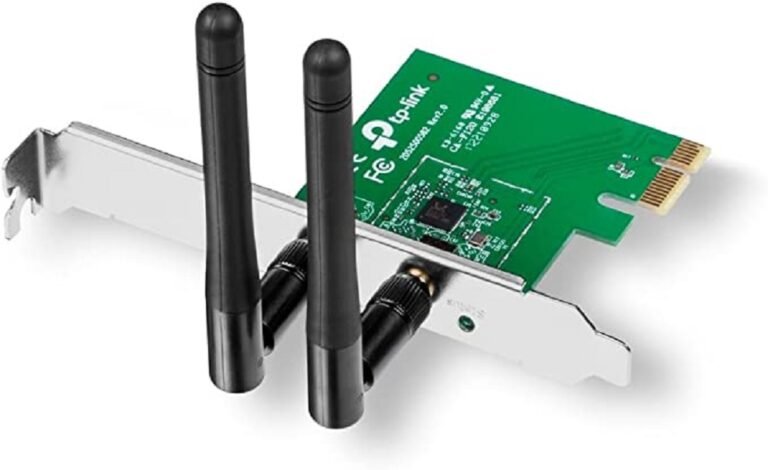

TP-Link 300Mbps Wireless N PCI Express Adapter – TL-WN881ND
Okay, so you need WiFi for your desktop. Maybe your PC doesn’t have it built-in, or maybe your current setup is just slow. The TP-Link TL-WN881ND is a pretty basic but solid option that won’t empty your wallet. It gives you up to 300Mbps speeds on the 2.4GHz band, which is fine for surfing the web, watching videos, and doing some light gaming.
If you’re building a PC, fixing up an old one, or just need WiFi in a room far away from your router, the TL-WN881ND is easy to use, has good range, and it works. Let’s get into the details, how to set it up, how well it works, and why it might still be worth buying in 2025.
Why Pick the TP-Link TL-WN881ND ?
The TP-Link TL-WN881ND has been a popular choice for a while. there are newer WiFi adapters out there with faster speeds, but the TL-WN881ND still has its place:
– Cheap WiFi: It’s not expensive at places like Phonex Tech, so it’s good if you just want basic 2.4GHz WiFi.
– Works with Old Routers: It’s compatible with older routers (802.11b/g/n), which a lot of people still have.
– Good Range: It has 2 antennas for better range and fewer dead spots.
– Fast Connection: It plugs directly into your motherboard for a faster connection than those USB adapters.
A lot of people still use 2.4GHz for things like smart home devices and basic internet stuff. This adapter is good enough for watching videos, making calls, and playing simple games. If your internet plan is under 300Mbps, you probably won’t notice much difference compared to more expensive options.
What the TP-Link TL-WN881ND Offers
The TL-WN881ND has some nice features for a basic WiFi adapter:
Up to 300Mbps: It can handle video, games, and calls.
- Antennas: You can move or upgrade the antennas to get a better signal.
- Better Signal: It sends data in a way that gets better range and goes through walls easier.
- Easy Setup: It has a button for quickly connecting to compatible routers.
- Secure: It keeps your network safe with different types of security.
- Small Size: It fits in small PC cases.
- Flexible: You can connect directly to other devices or use a normal router setup.
These things make the TL-WN881ND a solid choice for anyone who doesn’t want to run an Ethernet cable across the room.
Specifications
Here’s what you need to know about the TL-WN881ND:
Category Specification
Wireless Standards – IEEE 802.11n, 802.11g, 802.11b
Frequency -2.4-2.4835GHz
Speed – Up to 300Mbps
Reception Sensitivity -270M: -68dBm@10% PER<br>130M: -68dBm@10% PER<br>108M: -73dBm@10% PER<br>Etc.
Transmit Power -<20dBm (EIRP)
Antennas –2 x Detachable Omni-Directional (2dBi, RP-SMA)
Interface PCI Express x1
Size -120.8 x 78.5 x 21.5 mm
Wireless Security -WEP, WPA/WPA2, WPA-PSK/WPA2-PSK
Modulation -DBPSK, DQPSK, CCK, OFDM, etc.
OS Support – Windows 11/10/8.1/8/7/XP, Linux (with drivers)
The 2 antennas help it perform better than adapters with only one antenna, giving you better coverage and a more reliable connection.
The TP-Link TL-WN881ND is pretty easy to install:
- Turn Off Your PC: Unplug it and open the case.
- Put in the Adapter: Find a PCIe x1 slot on your motherboard and push the card in.
- Attach the Antennas: Screw on the antennas.
- Start PC and Install Drivers: Use the CD or download the drivers from TP-Link’s website. Usually, Windows will recognize it automatically.
- Connect to WiFi: Use the TP-Link tool or Windows settings to find and connect to your WiFi. You can also press the WPS button on your router for a quick connection.
- Small Cases: If you have a small PC case, you might need to swap the bracket.
In tests, it gets close to 300Mbps when you’re near the router and around 100-150Mbps through walls, which is better than a lot of laptop WiFi on the same frequency.
The TL-WN881ND is cheap and simple, which makes it good for older PCs or basic setups.
Be the first to review “TP-Link 300Mbps Wireless N PCI Express Adapter – TL-WN881ND”
Related products



-7%
Business Solutions
Original price was: KSh14,000.00.KSh12,999.00Current price is: KSh12,999.00.


Reviews
There are no reviews yet.