
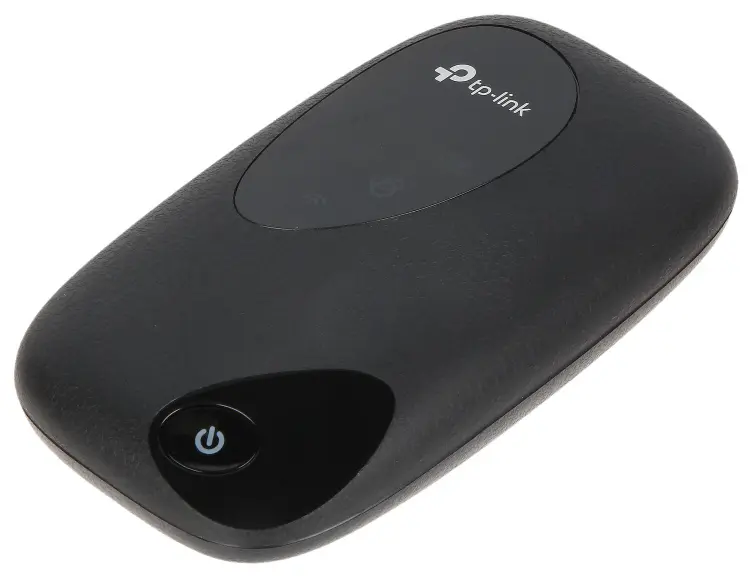


TP-Link 4G LTE Mobile Wi-Fi TL-M7000
Staying connected is a must these days. Whether you’re working from cafes, road-tripping with the family, or just trying to avoid sketchy public Wi-Fi, having your own internet is a lifesaver. That’s where the TP-Link 4G LTE Mobile Wi-Fi TL-M7000 comes in. It’s a small but mighty device that gives you fast 4G wherever you are. You can find it now at Phonex Tech. This hotspot lets you share your internet easily, without worrying about data limits or weak signals from your phone.
Looking for the best 4G LTE mobile hotspot that’s cheap, works well, and is easy to carry around? The TL-M7000 is a great choice. I’ll go over what it can do, how to set it up, how it performs, and why it’s essential for today’s lifestyle. By the end, you’ll see why so many people think it’s the best portable Wi-Fi hotspot out there.
Why is the TP-Link TL-M7000 a Great 4G LTE Mobile Hotspot?
The TP-Link TL-M7000 isn’t just any pocket Wi-Fi; it’s made for people who are always on the move. It’s part of TP-Link’s well-known range of networking products. The M7000 works with the latest 4G networks, so it should work in most countries. With download speeds up to 150Mbps and upload speeds up to 50Mbps, it can handle anything from streaming videos to downloading files fast.
The best part is that the M7000 is unlocked, so you can use any SIM card you want without contracts or limits. This is great for people who travel a lot or switch providers often. Phonex Tech has the real TP-Link TL-M7000, which comes with a 2000mAh battery that lasts up to 8 hours. That’s perfect for long days without needing a charger.
What makes it special? It can connect up to 10 devices at once. Imagine sharing a good, stable signal with your laptop, tablet, phone, and even your smartwatch while you’re out with the family. No more fighting over phone hotspots that kill your battery. It has 2.4GHz Wi-Fi (up to 300Mbps) that covers about 30-50 feet, which is good for small groups or just yourself.
There are a lot of portable Wi-Fi hotspots for travel out there, but this one is easy to use. It weighs only 86 grams and is about 4 x 2 inches, so it’s smaller than a deck of cards. You can easily put it in your pocket or bag. It also works with networks around the world .
TP-Link 4G LTE Mobile Wi-Fi TL-M7000: What You Get
Here’s a rundown of the features that make the TL-M7000 a popular item at Phonex Tech. These aren’t just features on a spec sheet; they’re based on what users say and what experts have found.
Fast 4G LTE
It’s powered by LTE Cat4 tech, so it can download at 150Mbps and upload at 50Mbps. That’s fast enough for streaming in 4K, playing games online, and video calls without any lag. If 4G isn’t available, it switches to 3G HSPA+, so you’re always online. Users have said they get 50-100Mbps in cities, which is better than many phone hotspots.
Long Battery Life
The 2000mAh battery is a big plus. It gives you up to 8 hours of use and 600 hours on standby. People have said it lasts about 6-7 hours when streaming a lot, and it only gets warm, not hot. You can charge it with a micro-USB from your laptop, car, or power bank to keep it going on trips.
Simple Sharing and Management
You can connect up to 10 devices like laptops, phones, tablets, and even things like cameras or speakers. The tpMiFi app (free for iOS and Android) lets you see how much data you’re using, set limits, block devices, and even send messages. It also has security features like WPA2 encryption and MAC filtering to keep your network safe.
Small Design with Easy-to-Read Display
It doesn’t have a complicated interface. A small color screen shows the battery level, signal strength, data use, and connected devices. There are also three lights on the front to show you what’s going on. It has a power-saving mode that turns off the Wi-Fi after 10 minutes of not using it to save battery.
Works Everywhere and is Unlocked
It’s an unlocked 4G LTE router with a SIM slot* so it works with most carriers like AT&T, Verizon, and Vodafone. It also supports lots of different bands, which makes it a great Wi-Fi hotspot for traveling abroad.
These things come together to make a device that’s useful and ready for the future of 4G, even as 5G becomes more common.
Super Simple Setup
One of the best things about the M7000 is how easy it is to set up. You can start using it in no time:
1. Put in Your SIM: Take off the back cover, put in a nano-SIM card, and close it up. It comes with adapters for micro-SIMs.
2. Turn it On: Hold the power button for 3 seconds. The lights will come on, and your Wi-Fi hotspot will be ready in about 30 seconds.
3. Connect Your Devices: Look for the Wi-Fi name (like TP-LINK\_M7000\_XXXX) on your phone or laptop. Enter the password that’s on the device or screen. Now you have internet.
4. Use the App: Get the tpMiFi app, scan the QR code on the M7000, and change settings like the Wi-Fi name, password, or data alerts. You can also manage it on your computer at 192.168.0.1.
People online say it’s very easy to set up and works with Windows, macOS, iOS, and Android. If you’re new to portable 4G hotspots, this is as easy as it gets.
How Well Does It Work?
Specs are important, but what really matters is how it performs. The M7000 does well in tests:
- Speed Tests: In an area with Vodafone 4G, it got 120Mbps download and 40Mbps upload. It streamed Netflix on two devices at the same time without any buffering. Compared to using your phone as a hotspot, it saved battery and kept speeds more consistent.
- Battery Life: It lasted 7.5 hours with normal use like browsing, emails, and some video. That’s good for traveling or hiking. It also lasts longer on standby for emergencies.
- Coverage It covers about 30-50 feet inside and up to 65 feet outside. It can handle 10 devices without slowing down, but streaming 4K on multiple devices might reduce the speed to 8-10Mbps per person.
It’s a great **4G hotspot for working remotely** because it gives you stable Zoom calls and access to the cloud without Wi-Fi issues.
Why is the TP-Link TL-M7000 Good for Travel and Outdoors?
If you travel a lot, this is for you. It fits in your bag, and it works with LTE networks around the world so you won’t have roaming fees in Europe, Asia, or Australia. Use it with an eSIM or international plan for affordable data.
People who love the outdoors like it for camping or RVing. You can stream music, use GPS, or share photos without trying to find a cell signal. One person said it was a lifesaver for family trips because it lasted through hikes even when it was raining.
In cities, it’s perfect for avoiding crowded Wi-Fi at cafes. Business travelers like that they can track their data usage with the app.
Be the first to review “TP-Link 4G LTE Mobile Wi-Fi – TL-M7000”
Related products




Reviews
There are no reviews yet.