
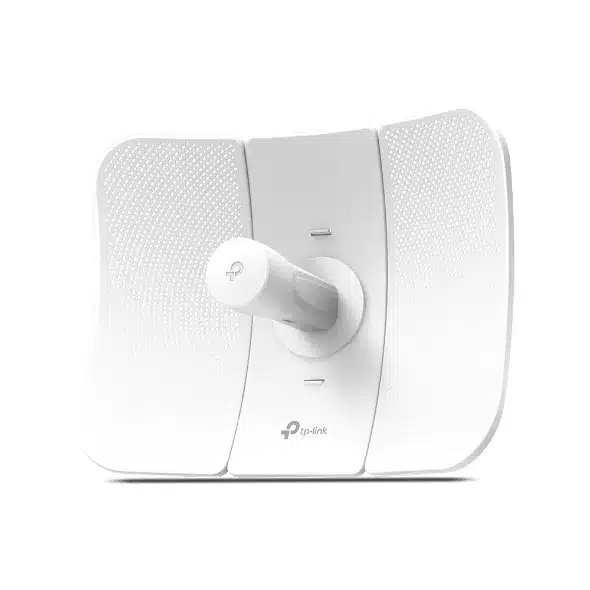


TP-Link 5GHz 867Mbps 23dBi Outdoor CPE TL-CPE710 – Still a Great Long-Range Wireless Option
If you need reliable, fast internet without spending a ton, the TP-Link TL-CPE710 is still a top pick for outdoor setups. It works for point-to-point (PtP) and point-to-multipoint (PtMP) wireless. It’s got 867 Mbps on the 5 GHz band, a built-in 23 dBi high-gain antenna, and Pharos OS for sending signals far away. It’s really good for WISPs, farms, construction areas, resorts, schools, and anyone who needs strong wireless that goes the distance.
What’s So Good About the TP-Link TL-CPE710?
The TL-CPE710 is made for sending wireless signals and connecting clients from far away. It’s part of TP-Link’s Pharos series, which a lot of WISPs and rural internet providers have been using for years.
Quick Specs:
Stuff Details
Wireless – IEEE 802.11a/n/ac (5 GHz only)
Speed – 867 Mbps (80 MHz channel width)
Antenna – 23 dBi, directional
Beam Width – 9° horizontal, 7° vertical
Send Power – 27 dBm (500 mW) – can be changed
Processor – Qualcomm Atheros 750 MHz CPU
Memory – 128 MB DDR2 RAM, 16 MB Flash
Ethernet Port -1 × Gigabit LAN (Passive 24V PoE)
Weatherproof – IP65
Temperature – –40 °C to +70 °C
Distance Tested – Over 25 km in real tests
Controls – Pharos Control, Web, CLI, SNMP
Why Use 5 GHz Instead of 2.4 GHz?
While 2.4 GHz devices (like the older CPE510) are still around, 5 GHz has a lot of advantages these days:
- Less interference – 2.4 GHz is full of Wi-Fi, Bluetooth, and other signals.
- Bigger channels (up to 80 MHz) → faster speeds in real life, like 400–550 Mbps.
- Lower lag for calls and video.
- DFS lets you use more channels that aren’t usually available.
The TL-CPE710 does DFS and changes channels if it sees radar, so you get cleaner airwaves most routers can’t touch.
What Makes the TL-CPE710 Special?
1. Strong Antenna
The antenna sends the signal in a narrow beam (9°), so it goes farther and doesn’t get messed up by other signals.
2. MAXtream TDMA
This technology helps avoid crashes when you have lots of CPE710/CPE610 units connected to one base station (like TL-BS520 or TL-BS210). It keeps the speed from dropping like with normal Wi-Fi.
3. Pharos OS
The Pharos Control software allows you to run lots of units from one spot. It lets you:
– Find and set up units easily
– Watch what’s happening and get alerts
– Update firmware all at once
– Check signals and survey sites
4. PoE and Gigabit
It comes with a PoE injector that can run cables up to 60 meters. You can also use 802.3at PoE+ switches if you have them.
5. Tough Build
It’s built to last with aluminum, ESD protection (15 kV), and lightning protection (6 kV). It can handle storms, heat, and cold.
Easy to Set Up
TP-Link made it easy to line things up:
- Signal lights on the unit
- Sound during setup (plug headphones into the PoE injector)
- Built-in signal checking tool
- Setup page with signal graph
Be the first to review “TP-Link 5GHz 867Mbps 23dBi Outdoor CPE – TL-CPE710”
Related products




Reviews
There are no reviews yet.