
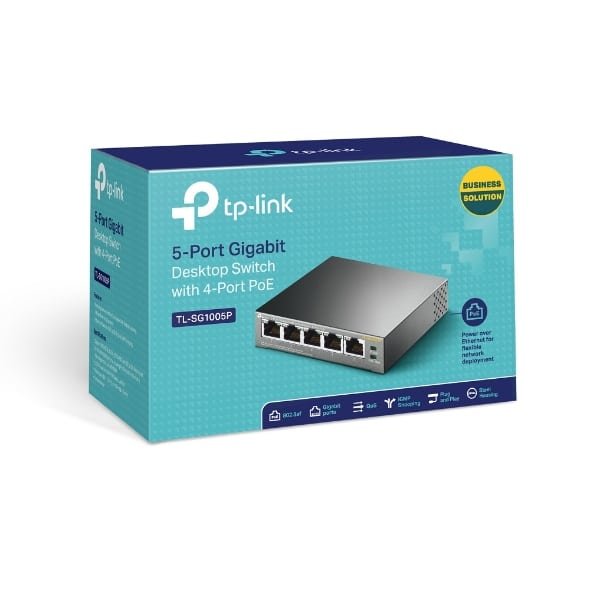
TP-Link 6-Port 10/100Mbps Desktop Switch with 4-Port PoE+ – TL-SF1006P

KSh5,500.00
Technical Specifications
- Power Over Ethernet – 4× PoE+(802.3at/af) ports providing up to 30W per port, total PoE budget 67W
- Plug and Play -Easy setup with no software installation or configuration needed
- Extend Mode -Up to 250m data and power PoE transmission range under Extend Mode, ideal for surveillance system (Speed will be downgraded to 10 Mbps)
- Priority Mode -Support Priority mode for ports 1-2, guarantee high quality of video or voice data transmission
- Limited Lifetime Warranty -Industry leading lifetime warranty and free 24/7 technical support
TP-Link TL-SF1006P
If you’re looking at the TP-Link 6-Port 10/100Mbps Desktop Switch with 4-Port PoE+ TL-SF1006P, then good, you’re on the right track! This switch is simple to set up, and it delivers power over Ethernet (PoE+), so you can ditch some of those power adapters. It’s perfect for powering things like IP cameras, VoIP phones, or wireless access points. It’s cheap, easy to use, and does the job well.
What’s the TP-Link TL-SF1006P All About?
Basically, the TP-Link TL-SF1006P is a 6-port Ethernet switch with 4 PoE+ ports. Ports 1-4 give you PoE+ (up to 30W per port), and all the ports handle data at 10/100Mbps speeds. The total PoE power is 67W, which is usually enough to power several devices without needing extra stuff.
Key highlights include:
- Just Plug It In: No setup needed, just connect your devices.
- Go the Distance: Extend Mode lets you send power up to 250 meters – works great for security cameras in large areas.
- Pick Your Priorities: Priority Mode lets you give ports 1-2 top priority for things like video or VoIP.
- Smart Power: It knows what’s a PoE device, protects non-PoE stuff, and makes sure the right devices get power when things get overloaded.
- Tough and Quiet: It has a metal case and no fan, so it lasts long and doesn’t make noise.
- Small Size: It’s only 158 × 101 × 25 mm, so it fits anywhere, and you can even mount it on a wall.
This switch follows all the important standards for data transfer and quality. It can handle a good amount of traffic for small networks.
## What’s So Great About the TP-Link TL-SF1006P?
Key Features.
1. 4 PoE+ Ports with 67W Total
Each PoE+ port can push out 30W, for a total of 67W. That’s usually plenty for things like:
- IP cameras
- Wireless access points
- VoIP phones
- IoT sensors or IPTV boxes
The switch figures out how much power each device needs and sends it safely.
2. Extend Mode for Extra-Long Runs (Up to 250m)
Normally, PoE only goes about 100m. But with Extend Mode, you can go up to 250 meters at 10Mbps. This helps a lot with:
- Outdoor security cameras in big areas
- Large homes or offices
- Rural setups
Keep in mind that Extend Mode drops the speed to 10Mbps, but that’s still fine for most video surveillance.
3. Priority and Isolation Modes
There’s a switch on the device that lets you:
- Set Priorities: Make sure ports 1-2 get enough bandwidth and power.
- Isolate Ports Keep ports separate for better security, like in public Wi-Fi spots (depends on the model).
4. Protects Against Overloads
If you use more than 67W of PoE, the switch will cut power to the lower-priority ports to keep the important ones running.
5. Quiet and Energy-Saving
The metal case keeps it cool without a fan, so it’s silent. It also uses less power.
6. No Setup Needed
Just plug it in and it works. LEDs show you what’s going on, so it’s easy to troubleshoot.
Why Pick This Over Other Switches?
There are lots of PoE switches out there, but the TL-SF1006P is a good deal if you’re on a budget:
- Good Price: It’s often cheaper than fancy switches.
- Reliable: TP-Link tests their stuff, and people say it lasts for years.
- Good Reviews: People give it good ratings for being reliable and easy to use for security cameras.
Some people wish it had gigabit speeds, but it’s usually not a problem for things like surveillance.
What’s It Good For?
1. Security Camera Systems
This is what it’s best at. You can hook up to 4 PoE IP cameras without needing extra power. And with Extend Mode, you can put cameras far away:
- Home security
- Small stores
- Offices
You can connect it to a network video recorder (NVR) for a complete system.
2. Small Businesses and Offices
- Power VoIP phones
- Add wireless access points
- Connect computers and printers
It’s good for small offices with a few devices.
3. Home Offices and Smart Homes
- Mesh Wi-Fi systems
- Smart doorbells or cameras
- Networked printer
4. Other Uses
- Dorms: Shared Wi-Fi and security.
- Temporary setups: Events or construction sites.
- IoT devices: Sensors.
How to Set It Up
1. Take it out of the box and put it on a desk or wall.
2. Plug in the power.
3. Connect your internet router to any port.
4. Connect your PoE devices to ports 1-4.
5. Turn on Extend Mode if you need it.
6. Flip the Priority switch for important video stuff.
Specifications
| What It Is | What It Does
Ports -6 × 10/100Mbps RJ45 (4 PoE+
PoE -IEEE 802.3af/at
PoE Per Port – Up to 30W
Total PoE – 67W
Distance – 100m / 250m in Extend Mode
Speed -1.2 Gbps
Size -158 × 101 × 25 mm
Power Use – Max 74W (with PoE)
Temperature – 0–40°C
Certifications -FCC, CE, RoHS
Be the first to review “TP-Link 6-Port 10/100Mbps Desktop Switch with 4-Port PoE+ – TL-SF1006P”
Related products





-7%
Business Solutions
Original price was: KSh14,000.00.KSh12,999.00Current price is: KSh12,999.00.
Reviews
There are no reviews yet.