
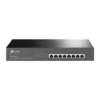
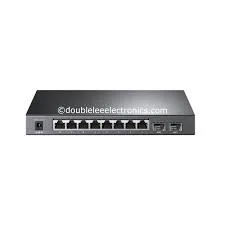
TP-Link 8-Port Gigabit Smart PoE+ Switch with 2 SFP Slots – TL-SG2210P

KSh16,000.00
Key Features:
- 8 PoE ports
- L2/L3/L4 QoS and IGMP snooping to enable you optimize voice and video applications
- Tp-Link TL-SG2210P WEB/CLI managed modes, SNMP, RMON bring abundant management features
- Gigabit Ethernet Speeds for superfast connection
- Security Features including 802.1Q VLAN, ACL, Port Security and Storm control help protect LAN area investment
TP-Link TL-SG2210P: Great 8-Port Gigabit Smart PoE+ Switch with 2 SFP Slots
The TP-Link TL-SG2210P JetStream 8-Port Gigabit Smart PoE+ Switch with 2 SFP Slots is a favorite for IT folks and business owners wanting a small but feature-packed switch. It’s got 8 PoE+ Gigabit ports, 2 SFP slots for fiber, and it works with TP-Link’s Omada SDN platform, giving you good performance in a size that fits on your desk.
Why Go for the TP-Link TL-SG2210P 8-Port Gigabit Smart PoE+ Switch?
The TL-SG2210P is a winner in the Gigabit PoE switch world because it gives you the right amount of power, it’s easy to move around, and it has good management features. Part of TP-Link’s JetStream series, this smart switch supports 802.3af/at PoE+ standards on all 8 RJ45 ports, pushing out up to 30W per port and a total PoE amount of up to 61W (depending on the model).
Key Highlights
8 x Gigabit Ethernet PoE+ Ports – Full 10/100/1000 Mbps speeds for things that need a lot of bandwidth.
2 x Gigabit SFP Slots – Great for fiber connections to make your network bigger or have backup links.
20 Gbps Switching Capacity – Keeps things running smoothly, even when busy.
Fanless Design – Runs quietly, so it’s good for offices.
Omada SDN Compatibility – Manage your network from one place, whether it’s in the cloud or on your computer, making it easy to grow.
If you’re looking for a **TP-Link 8-Port Gigabit Smart PoE+ Switch with 2 SFP Slots TL-SG2210P look at** or comparing it to brands like Cisco or Netgear, you’ll see that the TL-SG2210P gets good marks for being reliable and a good deal.
Key Features of the TP-Link TL-SG2210P
1.Strong PoE+ Stuff
One of the best things about the TL-SG2210P is its strong Power over Ethernet. All eight RJ45 ports are PoE+ ready, so you can power things like:
- Wi-Fi access points (like the TP-Link Omada EAP series)
- IP security cameras
- VoIP phones
- IoT gadgets
With 61W of PoE power, you can plug in lots of high-power devices without needing extra power cords. The switch is smart about sharing power, giving priority to important devices first if it runs out.
2. Gigabit Speed with SFP Options
Every port runs at Gigabit speeds, giving you a 20 Gbps backplane and a 14.88 Mpps forwarding rate. The two SFP slots work with 1000Base-X modules, making it simple to hook up to fiber for distances of up to 10km or more. This is super useful for connecting buildings or to core switches.
3.Good Layer 2+ Management
Unlike simple switches, the TL-SG2210P is a smart managed switch with:
- 802.1Q VLAN Support– Up to 4K VLANs to keep your network separate and safe.
- QoS (Quality of Service)– Makes sure voice, video, and important traffic get priority using L2/L3/L4 classification.
- IGMP Snooping – Makes multicast traffic better for IPTV or video.
- Link Aggregation (LACP) – Combines ports for more bandwidth and backup.
- Static Routing – Basic L3 features to send traffic between VLANs well.
- Access Control Lists (ACL) – Better security with IP/MAC/port-based filtering.
Other tools like Port Mirroring, Loop Prevention, and Cable Diagnostics make fixing problems easier.
4.Omada SDN for Centralized Control
The TL-SG2210P works fully with TP-Link’s Omada Software Defined Networking platform. Using an Omada controller (hardware, software, or cloud), you can:
- Manage tons of devices from one place.
- Use Zero-Touch Provisioning (ZTP) to set things up fast.
- Watch real-time stats and set up alerts.
- Update firmware and settings for many things at once.
This makes it a great pick for networks that are growing and might add more Omada access points or switches later.
5.Security to Keep Your Network Safe
Security is a must in today’s networks. The TL-SG2210P has:
- IP-MAC-Port Binding – Stops ARP spoofing and man-in-the-middle attacks.
- 802.1X Authentication – Port security using RADIUS.
- Storm Control – Helps with broadcast, multicast, and unicast storms.
- DoS Defense – Protects against common denial-of-service attacks.
- DHCP Snooping – Keeps bad DHCP servers out.
These things make sure your network stays safe, even in shared or public spots.
What You Can Do with the TL-SG2210P
The small size (209 × 126 × 26 mm) and fanless design make the TL-SG2210P easy to use in lots of places. Here are some good examples:
1. Small Office or Home Office (SOHO) Networks
Hook up computers, printers, VoIP phones, and a NAS and power Wi-Fi access points on the ceiling. The SFP slots let you connect to your main router or modem easily.
2. IP Security Camera Systems
Power and connect up to 8 PoE IP cameras (like 4K models that use about 15-25W each). Use VLANs to keep camera traffic separate and QoS to make sure video streams smoothly to an NVR.
3. Making Your Wi-Fi Bigger
Put up multiple Omada EAP access points for full Wi-Fi in cafes. powers APs without extra cables, saving on setup costs.
4. VoIP Phone Systems
Businesses with IP phones like PoE power and QoS, so calls are clear even when there’s lots of data traffic.
5. Stores and Hotels
In stores or hotels, the switch can power POS systems, digital signs, and Wi-Fi for guests, all managed from one place with Omada cloud.
Lots of users say they use the SFP slots for fiber between buildings, making cheap campus networks without needing expensive core switches.
Setting up the TL-SG2210P :
1. Plug the switch into power and your network.
2. Go to the web GUI using the default IP (192.168.0.1).
3. Use the setup tool for basic stuff.
4. If you’re an expert, use CLI via Telnet/SSH or connect with the Omada controller.
Update your network now – the TP-Link TL-SG2210P 8-Port Gigabit Smart PoE+ Switch with 2 SFP Slots is a smart choice for speed, growth, and saving money.
Be the first to review “TP-Link 8-Port Gigabit Smart PoE+ Switch with 2 SFP Slots – TL-SG2210P”
Related products


-7%
Business Solutions
Original price was: KSh14,000.00.KSh12,999.00Current price is: KSh12,999.00.

Reviews
There are no reviews yet.