
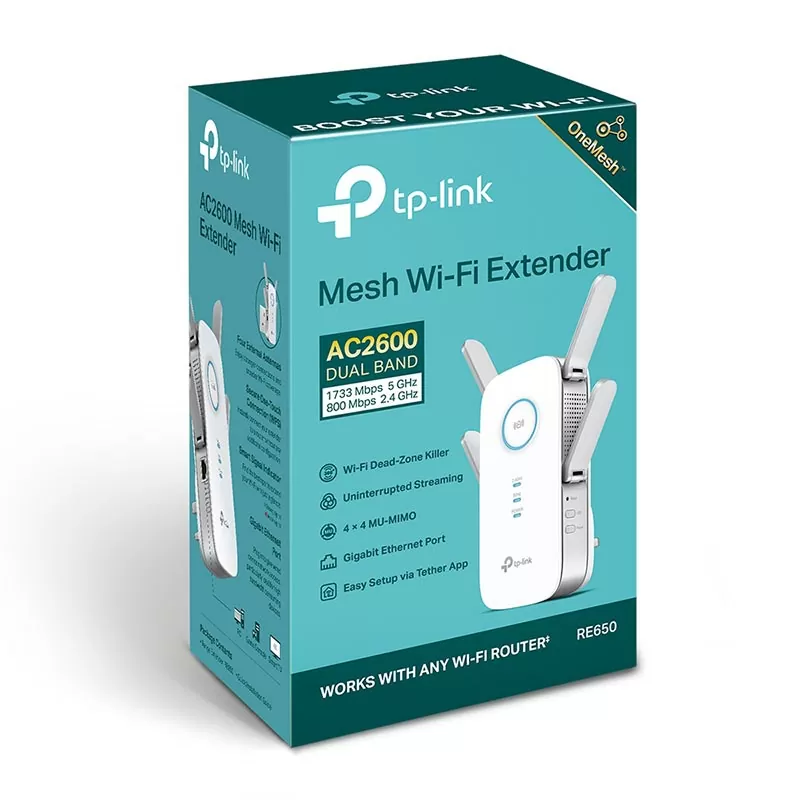
TP-Link AC2600 Mesh Wireless N Wall Plugged Range Extender – TL-RE650
KSh14,000.00
- Superior Extended Range – Four fixed external antennas extend Wi-Fi coverage
- 4-Stream for AC2600 Dual Band Wi-Fi – Simultaneous 800Mbps on 2.4GHz + 1733Mbps on 5GHz
- 4×4 MU-MIMO** – Simultaneously transfers data to multiple devices for 4x faster performance
- Beamforming Technology – Send targeted Wi-Fi signal to individual devices for stronger connections
- Gigabit Ethernet Port – Provide faster wired connections to smart TVs, computers and gaming consoles
- Intelligent Signal Light – Helps to determine the best location for optimal Wi-Fi coverage by indicating the signal strength in the current placement
- AP Mode – create a new Wi-Fi access point to enhance your wired network with Wi-Fi capability
- TP-LINK Tether App – Easily access and manage your network using any iOS or Android mobile device
- Ultimate Compatibility – Extend the range of any Wi-Fi router or wireless access point
TP-Link AC2600 Mesh Wireless N Wall Plugged Range Extender TL-RE650
Let’s be real, nobody likes slow or spotty Wi-Fi. Trying to watch a movie, get work done, or let the kids play games online becomes a pain when your signal sucks. That’s why the TP-Link AC2600 Mesh Wireless N Wall-Plugged Range Extender (TL-RE650) is still a top pick in 2025
Why the TP-Link TL-RE650 Still Rocks
Even with newer options out there, the TL-RE650 is still a hit because:
1. It’s speedy with AC2600 dual-band (800 Mbps on 2.4 GHz + 1733 Mbps on 5 GHz).
2. It does mesh right with OneMesh and EasyMesh.
3. Plugs into the wall, has a Gigabit Ethernet port, and shows you the signal strength.
Specs
What It Is | What It Does
Wi-Fi – IEEE 802.11ac/n/a 5 GHz, IEEE 802.11b/g/n 2.4 GHz
Speed -Up to 2600 Mbps (1733 Mbps 5 GHz + 800 Mbps 2.4 GHz)
Antennas – 4× external antennas + MU-MIMO
Brains -Dual-core CPU
Mesh -TP-Link OneMesh™ & EasyMesh
Ethernet -1× Gigabit (10/100/1000 Mbps)
Coverage -Up to 2,000 sq ft more (expect ~1,600–1,800 sq ft in real life)
Easy to Place – no power bricks
Signal Help – helps you find the best spot
Wired to Wireless – makes a Wi-Fi hotspot from a wired input
App -Setup & control with iOS & Android
etup is Quick
TP-Link makes it easy:
1. Plug the RE650 into a wall between your router and the dead zone.
2. Hit the WPS button on your router, then the WPS button on the RE650 – should connect in about 30 seconds
OR
Use the TP-Link Tether app for a super simple setup with a signal strength meter.
The signal lights tell you if you’ve got it in the right place – blue is good, red means move it closer to the router.
Be the first to review “TP-Link AC2600 Mesh Wireless N Wall Plugged Range Extender – TL-RE650”
Related products



Reviews
There are no reviews yet.