
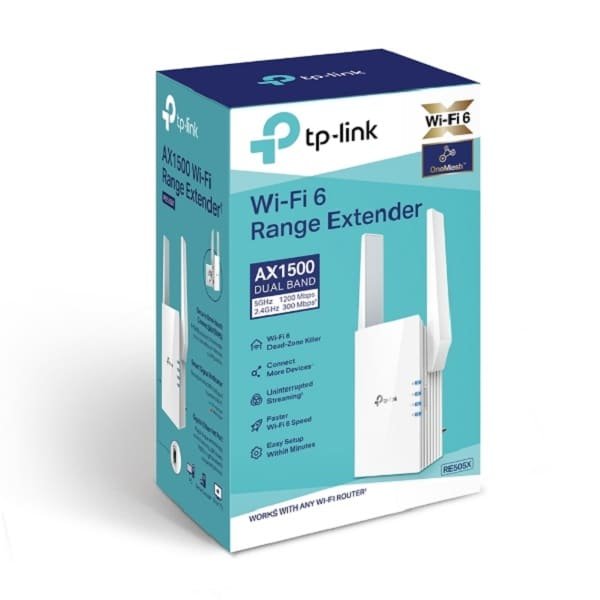

TP-Link AX1500 Wi-Fi 6 Range Extender (RE505X)
Let’s be real – spotty Wi-Fi is a pain. It messes with work, makes streaming a headache, and bugs out your smart home stuff. If you’re fed up with loading screens, dropped video calls, or gadgets that just won’t after connect in certain spots, the TP-Link AX1500 Wi-Fi 6 Range Extender RE505X (aka TL-RE505X) could be just the fix.
The RE505X is one of the best Wi-Fi 6 extenders you can get without breaking the bank. This guide covers everything: how it works day-to-day, setting it up, what it does, what else is out there, and why it’s a smart move.
What’s Cool About the TP-Link RE505X?
This thing isn’t just a Wi-Fi repeater. It’s a dual-band Wi-Fi 6 extender that brings faster wireless to every part of your house.
Here’s a quick look at what it packs:
| Feature Specification
Wi-Fi Standard – Wi-Fi 6 (802.11ax)
Total Speed – Up to 1500 Mbps (1201 Mbps on 5 GHz + 300 Mbps on 2.4 GHz)
Bands – Simultaneous Dual-Band
MU-MIMO & OFDMA – Yes (both technologies)
Beamforming – Yes
Processor – dual-core CPU
Ports – 1× Gigabit Ethernet port
Coverage – Up to 1,500 sq.ft (adds ~150–200% more coverage)
Max Devices – 30+ simultaneous devices
Setup Method – One-Touch WPS or Tether app
Modes – Range Extender & Access Point mode
Intelligent Signal Indicator – Yes
Compatibility -Works with ANY router (TP-Link, ASUS, Netgear, Google Nest, Eero, etc.)
Warranty – 3 Years (when bought from authorized sellers like Phonex Tech)
Since it rocks Wi-Fi 6, the RE505X is way better than those older Wi-Fi 5 (AC) extenders. Expect:
- Way more devices can hook up
- Way less lag (great for gaming and streaming)
- Better performance when lots of folks are online
- Longer battery on your devices
Easy Setup
TP-Link makes this easy:
Option 1 – WPS Button (super easy)
1. Plug it in between your router and the dead zone.
2. Hit WPS on your router.
3. Hit WPS on the RE505X.
Done. It copies your Wi-Fi info.
Option 2 – TP-Link Tether App (iOS/Android)
The app finds the extender fast and shows you signal strength. It tells you where to put it, too.
Option 3 – Web Thing (192.168.0.254)
For those who want to set up stuff their own way.
Gigabit Ethernet Port
The RE505X has a Gigabit LAN port. This means:
Hook up your TV or computer and get fast speeds.
Turn it into a Wi-Fi 6 Access Point if you want.
Signal Light
The light on the front shows how strong the signal is:
– Blue: good spot
– Red: move it closer
– Blinking: doing its thing
Be the first to review “TP-Link AX1500 Wi-Fi 6 Range Extender – TL-RE505X”
Related products





Reviews
There are no reviews yet.