
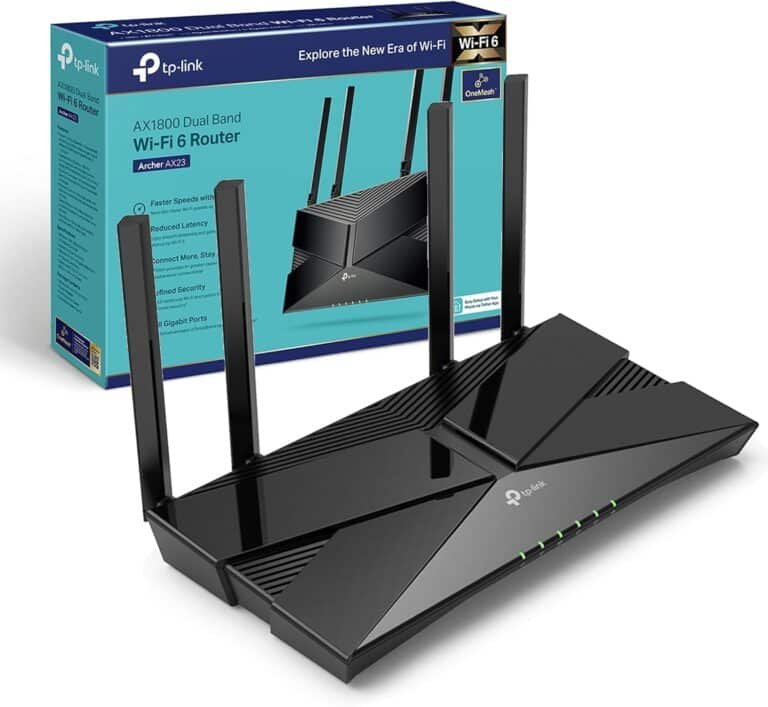
TP-Link AX1800 Dual-Band Wi-Fi 6 Router – TL-ARCHER AX23


KSh7,500.00
| Brand | TP-Link |
| Model | Archer AX23 |
| WiFi Standard | WiFi 6 (802.11ax) |
| Frequency Bands | 2.4 GHz & 5 GHz (Dual-Band) |
| Max Wireless Speeds | 5 GHz: ~1201 Mbps, 2.4 GHz: ~574 Mbps |
| LAN Ports | 4× Gigabit LAN |
| WAN Port | 1× Gigabit WAN |
| Antennas | 4× Fixed External High-Performance |
| Security | WPA3, WPA2, Guest Network, IP/MAC Binding |
| Special Features | OFDMA, MU-MIMO, Airtime Fairness, OneMesh Support |
| Buttons | WPS/WiFi, Reset, Power On/Off |
| Dimensions | 260.2 × 135.0 × 38.6 mm |
| Power Supply | 12 V ⎓ 1 A |
TP-Link Archer AX23 AX1800 Dual-Band Wi-Fi 6 Router
Whether you’re working remotely, streaming content on several devices, doing some online gaming, or just browsing with family, the TP-Link Archer AX23 (AX1800 Dual-Band Wi-Fi 6 Router) gives great service at a crazy-low price.
Let’s jump into this guide where we’ll go over the TP-Link Archer AX23—from the tech stuff and how it works in real life to how to set it up, what it can do, how it stacks up against pricier routers, and why it’s the best choice to make.
What’s So Great About the TP-Link Archer AX23?
The Archer AX23 is from TP-Link’s Archer AX series, giving Wi-Fi 6 (802.11ax) tech to people on a budget without losing the important things.
Here’s a quick look at what’s good:
- Wi-Fi 6 (AX1800) – Speeds up to 1.8 Gbps total (1201 Mbps on 5 GHz + 574 Mbps on 2.4 GHz)
- Dual-band with OFDMA and MU-MIMO tech
- 4 antennas + Beamforming
- 1 Gigabit WAN + 4 Gigabit LAN ports
- 1.5 GHz tri-core CPU
- OneMesh™ for coverage everywhere
- TP-Link Tether app for setup and handling
- WPA3 + HomeShield basic security (free)
- Target Wake Time (TWT) for better battery on phones
- Works with all providers
Speed and How It Works
Even if the Archer AX23 is rated at AX1800 (it’s entry-level Wi-Fi 6), tests show it beats many AC2200 and even some AC3000 routers from a while back.
- 5 GHz band: 750–950 Mbps right by the router, 500–650 Mbps one room away, and 300–450 Mbps even with walls in the way.
- 2.4 GHz band: 150–250 Mbps at a distance — good for gadgets that don’t need high speed but hate losing signal.
In a condo or townhouse, one Archer AX23 can cover the whole place with Wi-Fi 6.
Is This Router For You?
1. Switching from old routers
2. Homes with 15–30 devices (phones, laptops, TVs, cameras, etc.)
3. Streaming on several screens at once
4. Gaming online
5. Working from home
6. People who want Wi-Fi 6 without spending tons of money
If you pay for fast internet, the Archer AX23 will let you you get good use out of it over Wi-Fi.
What’s It Like?
The Archer AX23 looks simple and slick. It’s pretty small, so you can put it anywhere.
What you get:
- Archer AX23 router
- Power thing
- Ethernet cable
- Guide
The antennas can fold down, and you can put it on a wall.
Easy Setup
TP-Link makes setup super simple:
1. TP-Link Tether App
2. Web thing ([http://tplinkwifi.net](http://tplinkwifi.net) or 192.168.0.1)
During setup you can:
- Set up Wi-Fi names
- Turn on Guest Network
- Turn on security
- Set rules
Cool Wi-Fi 6 Stuff
OFDMA
Lets the router talk to many devices at the same time.
MU-MIMO 4×4
Sends data to devices at once.
Beamforming
Points the Wi-Fi signal.
Target Wake Time (TWT)
Saves battery.
1024-QAM
Puts more data into the signal.
OneMesh
The Archer AX23 works with OneMesh. If you need more reach, just add gear and make a mesh network.
HomeShield Security
The Archer AX23 has TP-Link HomeShield (free):
- Finds things
- Blocks bad sites
- Stops bad stuff
- Rules
You can pay for more, but the free version is good.
Wired Stuff
TP-Link has good wired stuff:
- 1 Gigabit WAN port
- 4 Gigabit LAN ports
There is no USB port (unlike other models), but who cares?
Be the first to review “TP-Link AX1800 Dual-Band Wi-Fi 6 Router – TL-ARCHER AX23”
Related products





Reviews
There are no reviews yet.