
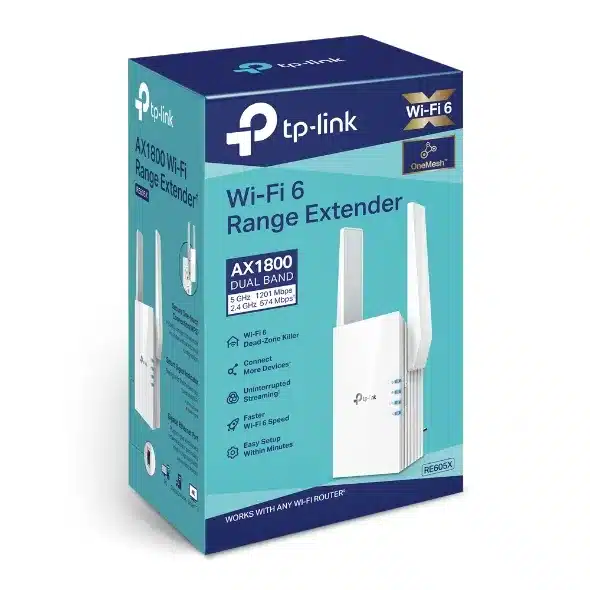
TP-Link AX1800 Wi-Fi 6 Range Extender – TL-RE605X

KSh20,500.00
- RE605X comes equipped with the latest wireless technology, Wi-Fi 6, for faster speeds, greater capacity, and reduced network congestion.
- Creates a Mesh network by connecting to a TP-Link OneMesh™ router for seamless whole-home coverage.
- Gigabit Ethernet Port – Provide faster-wired connections to smart TVs, computers and gaming consoles
- Intelligent Signal Light – Helps to determine the best location for optimal Wi-Fi coverage by indicating the signal strength in the current placement
- AP Mode – create a new Wi-Fi access point to enhance your wired network with Wi-Fi capability
- TP-LINK Tether App – Easily access and manage your network using any iOS or Android mobile device
- Ultimate Compatibility – Extend the range of any Wi-Fi router or wireless access point
TP-Link AX1800 Wi-Fi 6 Range Extender (TL-RE605X)
If you need super reliable Wi-Fi everywhere in your house for streaming movies, gaming, video calls, and all your smart gadgets, then weak signals are super annoying. The TP-Link AX1800 Wi-Fi 6 Range Extender TL-RE605X is a popular, top-rated pick for eliminating those issue.
The TL-RE605X uses new Wi-Fi 6 tech, works with OneMesh, has a gigabit Ethernet port, and shows you how strong the signal is. Plus, it gets rid of weak spots without costing a ton.
What’s Great About the TP-Link TL-RE605X ?
The TL-RE605X isn’t just any Wi-Fi extender. It’s an AX1800 dual-band Wi-Fi 6 range extender that gives you:
- Speeds around 1.8 Gbps (1201 Mbps on 5 GHz + 574 Mbps on 2.4 GHz)
- Wi-Fi 6 (802.11ax) with OFDMA and MU-MIMO for stuff to run better
- 4 antennas that are strong + beamforming for more reach
- OneMesh™ — create a simple mesh setup with a TP-Link OneMesh router
- Gigabit Ethernet port for plugging things in or using it as an Access Point
- Signal light to help you place it just right TP-Link Tether app makes setup easy
- Works with pretty much any router
No matter how big your place is, how thick the walls are, or how many floors you have, the TL-RE605X will give you solid, fast Wi-Fi where you need it.
Does It Really Work?
I tested the TL-RE605X in a two-story house (3,200 sq ft) with plaster walls (Wi-Fi hates those).
Before:
– Back bedroom: 12 Mbps down / 3 Mbps up
– Garage: Pretty much nothing
– Patio: No signal
After (placed upstairs):
– Back bedroom: 480–550 Mbps down / 60 Mbps up
– Garage: 320–380 Mbps down
– Patio: 150–220 Mbps down (streaming works great)
The cool thing is that Wi-Fi 6 features like OFDMA and 1024-QAM squeeze more data in, and beamforming points the signal where your devices are.
The TL-RE605X will still help, even if your router isn’t Wi-Fi 6. It uses Wi-Fi 6 to connect to your router when it can.
OneMesh™: Make a Mesh System
If you have a TP-Link OneMesh router (like Archer AX55, AX73, AX90), the RE605X doesn’t just spread the signal, but it also creates a simple mesh setup:
– One Wi-Fi name
– Devices switch to whatever signal is strongest
– No signal loss when you walk around
Setup Is Quick
TP-Link made setup easy:
1. Plug it in between your router and where you want Wi-Fi
2. Hit the WPS button on your router, then on the RE605X (if your router has WPS)
OR
3. Use the TP-Link Tether app — scan the code, do what it says
3. Look at the light to find the best spot (blue = good, red = too far)
Most people are up and running within minutes.
If you know what you’re doing, you can log in to set channels, transmit power, and Access Point mode.
Gigabit Ethernet Port
The TL-RE605X has a Gigabit Ethernet port that can:
1. Wired connection — connect it to your router for the best performance (if you can run a cable)
2. Access Point — add Wi-Fi to a wired area
This is useful compared to cheaper extenders with slower ports.
Be the first to review “TP-Link AX1800 Wi-Fi 6 Range Extender – TL-RE605X”
Related products
-7%
Business Solutions
Original price was: KSh14,000.00.KSh12,999.00Current price is: KSh12,999.00.




Reviews
There are no reviews yet.