
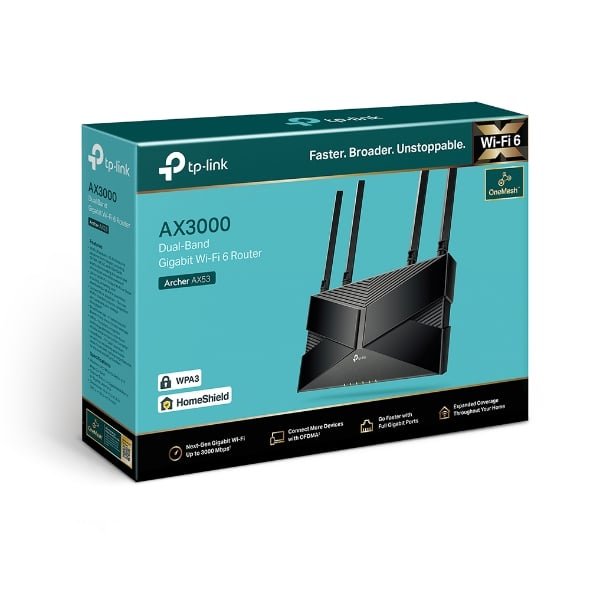
TP-Link AX3000 Wireless Dual Band Gigabit Wi-Fi 6 Rounter – TL-ARCHER AX53


KSh8,500.00
- Brand: TP-Link
- Model: Archer AX53
- Color: Black
- Dimensions: 26.02 × 13.5 × 4.16 cm
- Weight: 810 g
- Connectivity: Dual-band (5 GHz / 2.4 GHz)
- Wireless Standard: Wi-Fi 6 (802.11ax)
- Operating System Compatibility: Windows
TP-Link Archer AX53 (AX3000) Wi-Fi 6 Router
These days, a fast and reliable home network isn’t just nice to have—it’s a must. Whether you’re watching videos, gaming, working from home, or got a ton of smart gadgets, the TP-Link Archer AX53 (AX3000) Dual Band Gigabit Wi-Fi 6 Router is still a super smart upgrade that won’t break the bank.
Why the TP-Link Archer AX53 Still Rocks
Even though it came out a while back, the Archer AX53 mixes new tech with dependability. Here’s why it’s still a top pick:
1. Real Wi-Fi 6 Speeds (Up to 3 Gbps)
- 2402 Mbps on the 5 GHz band
- 574 Mbps on the 2.4 GHz band
- AX3000 rating = about 2976 Mbps max
Tests still show speeds of 800–950 Mbps right next to the router and 500–700 Mbps through walls—which is better than most Wi-Fi 5 routers.
2. OFDMA + MU-MIMO = Great for Lots of Devices
OFDMA lets the router talk to several devices at once. With 4-stream MU-MIMO, the AX53 can handle a bunch of devices without any trouble. It’s good if you have smart homes with cameras, lights, thermostats, TVs, phones, laptops, and game consoles going all at the same time.
3. Antennas + Beamforming
The four antennas with beamforming point the Wi-Fi signal right at your devices. The result? Better range and a stronger signal go through walls.
People say they get good coverage in average-sized homes and even good outdoor coverage.
4. Gigabit Ports for Fast Wired Connections
- 1× Gigabit WAN port
- 4× Gigabit LAN ports
Ideal for connections up to 1 Gbps. Plus, you can wire up stuff like storage drives, gaming PCs, or mesh nodes for max speed.
5. Security
TP-Link gives you:
- Protection for your smart devices
- Blocking of bad websites
- Protection from intrusion
- DDoS protection
The paid version has more parental controls, but the free one is usually good enough for most families.
6. OneMesh Compatible – Easy to Expand
Hook up the AX53 with any TP-Link OneMesh extender and make a whole-home mesh network without spending big on a new system.
Real-World Performance
Tests and user reviews show the Archer AX53 often beats newer budget routers that skimp on the important stuff.
Typical speeds:
- Near the router (5 GHz): 920–950 Mbps
- One floor up / 30 ft + 2 walls: 550–680 Mbps
- 2.4 GHz long range: 90–120 Mbps at 70–80 ft
Gaming latency is about 7–12 ms up close and 18–25 ms at a distance—not bad for a cheap router.
Setup with the Tether App
No confusing menus here. The TP-Link Tether app (iOS & Android) lets you:
- Set up the router fast
- Change the Wi-Fi name/password
- Make a guest network
- Set up parental controls
- Check your speed
- Update the software
The web interface is still there if you’re into that kind of thing.
Who’s the Archer AX53 For?
- People switching from Wi-Fi 5
- Apartments or houses up to a certain size
- Families with lots of devices
- Watching videos on multiple TVs
- Online gaming on a budget
- People with fast internet who want to use it all
Not for:
- Big homes that need extenders
- People who need Wi-Fi 6E
- Super heavy traffic
The TP-Link Archer AX53 is still a top budget Wi-Fi 6 router. It’s way cheaper than those fancy routers but still performs great. If your router is old, you’ll see a big difference with the AX53—faster videos, less lag, and fewer loading screens when everyone’s online.
Be the first to review “TP-Link AX3000 Wireless Dual Band Gigabit Wi-Fi 6 Rounter – TL-ARCHER AX53”
Related products


Reviews
There are no reviews yet.