
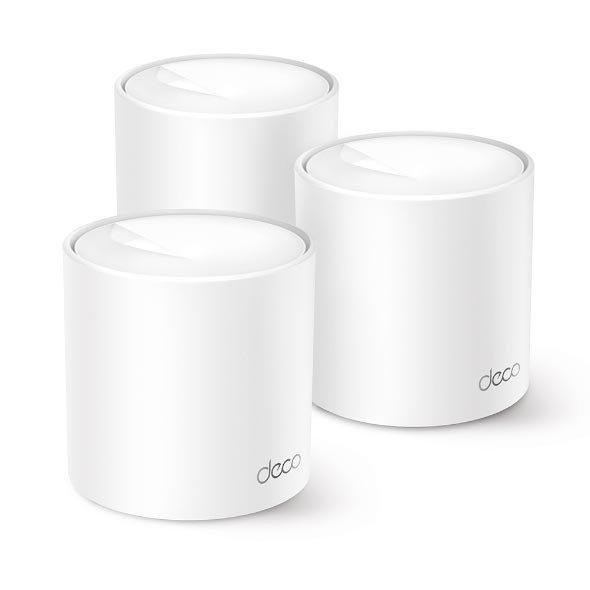
TP-Link Deco X20 AX1500 Whole Home Mesh WiFi 6 System (3 Pack) – TL-DECO X10-3

KSh28,000.00
- Faster Connections: Wi-Fi 6 speeds up to 1,500 Mbps—1,201 Mbps on 5 GHz and 300 Mbps on 2.4 GHz.
- Connect More Devices: OFDMA and MU-MIMO technology quadruple capacity to enable simultaneous transmission to more devices.
- Boosted Seamless Coverage: Achieve seamless whole home coverage with a clearer and stronger whole home Wi-Fi signal generated by Wi-Fi 6.
- Ultra-Low Latency: Greater reduction in latency enables more responsive gaming and video chatting.
- One Unified Network: Multiple units form a whole-home network that auto-selects the best connection as you move around your home.
- Robust Parental Controls – Limit online time and block inappropriate websites according to unique profiles you create for each family member.
- Setup Made Easier Than Ever: The Deco app walks you through setup step-by-step
TP-Link Deco X20 AX1500 Whole Home Mesh WiFi 6 System (3-Pack)
These days, everyone’s streaming vids, gaming online, video chatting and has a ton of smart gadgets. That old router just can’t handle it. Forget about dead zones and constant buffering if you get a mesh Wi-Fi setup. The TP-Link Deco X20 AX1500 Whole Home Mesh WiFi 6 System (3-Pack) or TL-DECO X20-3 – is still a really popular and budget-friendly way to get Wi-Fi in 2025. It blankets your place with Wi-Fi 6, covering up to 5,800 sq ft with speeds reaching 1.5 Gbps.
Why the TP-Link Deco X20 Still Sells
Even though there are newer Wi-Fi 6E and even Wi-Fi 7 systems out, the Deco X20 is still a top seller for these reasons:
- It’s a great deal
- It gives you solid Wi-Fi 6 (AX1500) with OFDMA and MU-MIMO Tech
- The 3-pack covers up to 5,800 square feet
- Handles 150+ gadgets hooked up at the same time
- Super simple to set up with the Deco app (less than 10 mins)
- Comes with TP-Link HomeShield security (free basic version, paid upgrade if you need it)
- Works with any internet company or modem
TP-Link Deco X20 (3-Pack) Main Features
1. New Wi-Fi 6 Tech
The Deco X20 is dual-band AX1500 which means:
- 1201 Mbps on the 5 GHz band
- 300 Mbps on the 2.4 GHz band
With OFDMA and MU-MIMO, it can handle a ton of devices – like smart TVs, laptops, phones, tablets, Ring doorbells, smart bulbs, and game consoles – all going at the same time without lagging.
2. Real Mesh – Say Goodbye to Dead Zones
Unlike those old range extenders that make extra networks and cut out sometimes, Deco X20s team up as one system:
– It seamlessly switches you from one to the other with just one Wi-Fi name (SSID)
– Your devices pick the spot with the best signal
– If one goes down, the others pick up the slack
3. Up to 5,800 Sq Ft Coverage
For example, in a typical 2-3 story house:
– Put one in the living room (hook it up to the modem)
– Drop another in the hall or kitchen
– The third one goes in the upstairs master bedroom, or other end of the house
Thick walls won’t be able to stop the Deco X20 because of the powerful antennas it has.
4. Run a Cable To It
It works wirelessly, but each Deco X20 has **2 Ethernet ports** in case you want to cable them together to make them run even better.
5. TP-Link HomeShield – Keeps Your Network Safe
Every Deco X20 has HomeShield Basic (always free):
- Guards your everyday gadgets
- Blocks bad sites
- Stops intruders
- Good parental controls (block bad stuff, set time limits)
You can pay extra for **HomeShield Pro** if you want better blocking and reports.
6. Simple Setup with The Deco App
Most folks are set up in less than 10 minutes:
1. Plug in the first one and connect to your modem
2. Get the TP-Link Deco app (works on iPhones and Androids)
3. Scan the code, follow the steps
4. Add the other two – the app tells you where to put them
The app also helps you:
- Put some gadgets first in line (good for gaming or 4K)
- Make guest networks
- Test your speed
- See what’s hooked up right now
Be the first to review “TP-Link Deco X20 AX1500 Whole Home Mesh WiFi 6 System (3 Pack) – TL-DECO X10-3”
Related products






Reviews
There are no reviews yet.