
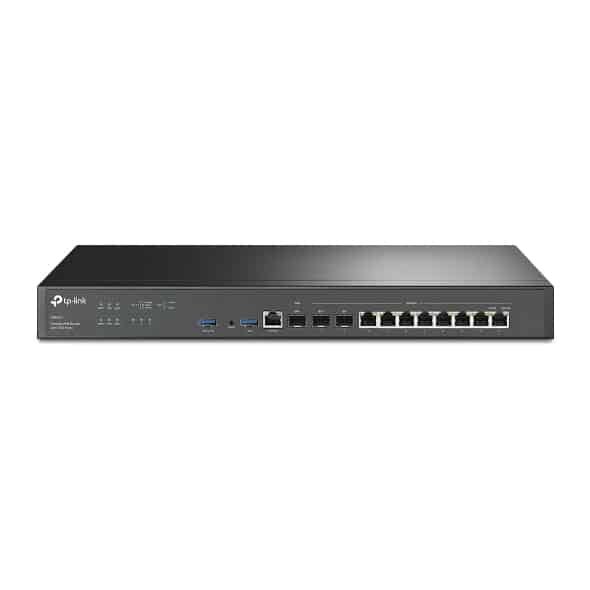
TP-Link Omada VPN Gateway with 10G Ports – TL-ER8411

KSh45,000.00
- Centralized Management: Cloud access and Omada app for ultra convenience and easy management.
- Two 10GE SFP+ Ports: 1× WAN and 1× WAN/LAN 10GE SFP+ ports provide high-bandwidth aggregation connectivity.
- Up to 10 WAN Ports: Fiber and RJ45 WAN ports with load balance raise the utilization rate of multi-line broadband
TP-Link Omada VPN Gateway with 10G Ports – TL-ER8411
These days, if you’re trying to run a business, fast networks, security, and easy management aren’t just extras—they’re a must. That’s where the TP-Link Omada TL-ER8411 comes in. It’s a VPN router that seriously kicks things up a notch. It’s got two crazy-fast 10Gbps SFP+ ports, a really strong processor, encryption built right into the hardware, and it plays nice with Omada SDN, all for a price that won’t make you faint.
This guide is long but it tells you everything about the TP-Link Omada TL-ER8411. We’ll look at what’s inside, how it works in the real world, how to set it up.
Why is the TL-ER8411 so Good?
A lot of business routers still have those old 1Gbps ports. The TL-ER8411 fixes that issue with:
- 1 × 10Gbps SFP+ WAN/LAN port
- 1 × 10Gbps SFP+ WAN port (just for WAN)
- 2 × 2.5Gbps RJ45 ports
- 8 × Gigabit RJ45 ports (1 WAN + 7 LAN you can set up)
- Up to 9.5 Gbps NAT speed (IMIX)
- Up to 3.8 Gbps IPSec VPN speed (AES-256)
- Handles 190,000 open things at once
- Works great with Omada SDN, whether it’s on the cloud or on your own computer
Basically, this router can handle a 10 Gbps internet at full speed while doing all the heavy lifting like encrypting stuff with IPSec, checking what’s inside each data packet, and making sure some apps get priority – things that used to cost a ton of money not too long ago.
TL-ER8411 – What’s Under the Hood
Feature | Specification
Model -TL-ER8411
CPU -Fast 4-core ARM processor
RAM / Storage -4 GB DDR4 / 128 MB NAND + 8 GB eMMC
10G Ports -2 × 10Gbps SFP+ (1 WAN/LAN, 1 WAN)
2.5G Ports -2 × 2.5GbE RJ45
Gigabit Ports -8 × 10/100/1000 Mbps (1 WAN + 7 LAN you can set up)
USB Port -1 × USB 3.0 (4G/5G modem or storage)
Max NAT Speed -9.5 Gbps
IPSec VPN Speed -3.8 Gbps (AES-256)
OpenVPN Speed -Around 1.1 Gbps
Concurrent Sessions -190,000
IPSec Tunnels – Up to 200
Omada SDN Works With It – Yes (Hardware, Software, or Cloud controller)
| Load Balancing & Failover – Up to 8 WAN ports (using VLAN or physical cables)
| Rack-mountable – Yes (Comes with the ears)
| Power Usage – Less than 25W
| Warranty (Phonex Tech Cambodia) – 3 Years on your property + Updates forever
Why Businesses Like the TL-ER8411
1. Ready for the future with 10G
With TrueMove, NTC Fiber, and Opennet offering fast internet plans out in Phnom Penh, Siem Reap, and Sihanoukville, businesses need routers that can keep up in the coming months. The two 10G SFP+ ports let you:
Have one 10G port for your main internet
Use the other 10G port for your internal network to a 10G switch (like the TP-Link SX3206HPP or JetStream TL-SX3206)
Combine multiple 2.5G/1G for servers or storage
2. Strong VPN for Remote Work
The TL-ER8411 works with all the main VPN types and speeds it up with hardware:
- IPSec (IKEv2 & IKEv1) – up to 200 connections, good for connecting offices
- OpenVPN – can be a client or server
- L2TP/IPSec & PPTP (still good for older devices)
- WireGuard (test version available through the Omada community)
3. Omada SDN – See Everything in One Place
The TL-ER8411 is part of the Omada Software Defined Networking system. That means:
- You can manage it from the cloud (free always)
- Easy setup for new locations
- It works well with Omada EAP wireless access points (EAP670, EAP780, etc.)
- It can steer devices to the right network, make sure everyone gets fair bandwidth, and balance the load on your network.
- Login pages & voucher system for hotels/cafést.
4. Good Security Without Paying Extra Every Year
Unlike some brands, TP-Link doesn’t make you pay yearly for security:
- It has a built-in SPI firewall
- Protection from attacks
- Filters IPs, MACs, and URLs
- Settings for one-click ALG
- Control access based on time, app, or website
- Free updates forever
Small Hotels & Resorts (20–150 rooms)
Gear: TL-ER8411 + 12× EAP670 + 2× TL-SG3428XMP
Result: Fast internet, handles 800+ Wi-Fi 6 users at the same time, login with vouchers, social login, set bandwidth limits for each room.
Regular Offices (50–200 people)
Gear: TL-ER8411 + TL-SX3206HPP 10G switch + EAP780 wall-plate APs
Result: Fast internet, connects to branch offices with IPSec, access control like Zero-Trust.
Schools & Universities
Gear: TL-ER8411 + 40× EAP655 + OC200 controller
Result: Filters content for 1500+ students, separate networks for different use , prioritizes bandwidth during exams.
Co-Working Spaces & Cafés
Gear: TL-ER8411 + 6× EAP773 + Cloud controller
Result: Login with Instagram/Facebook, limit speeds per user, automatic backups every day.
Setup
Even though it’s strong, the TL-ER8411 is easy to use:
1. Connect to any LAN port → 192.168.0.1
2. Put it into your Omada system (or create a free account)
3. Use the setup guide (5–7 minutes)
4. Turn on the 10G WAN port → connect your internet
Be the first to review “TP-Link Omada VPN Gateway with 10G Ports – TL-ER8411”
Related products





Reviews
There are no reviews yet.