
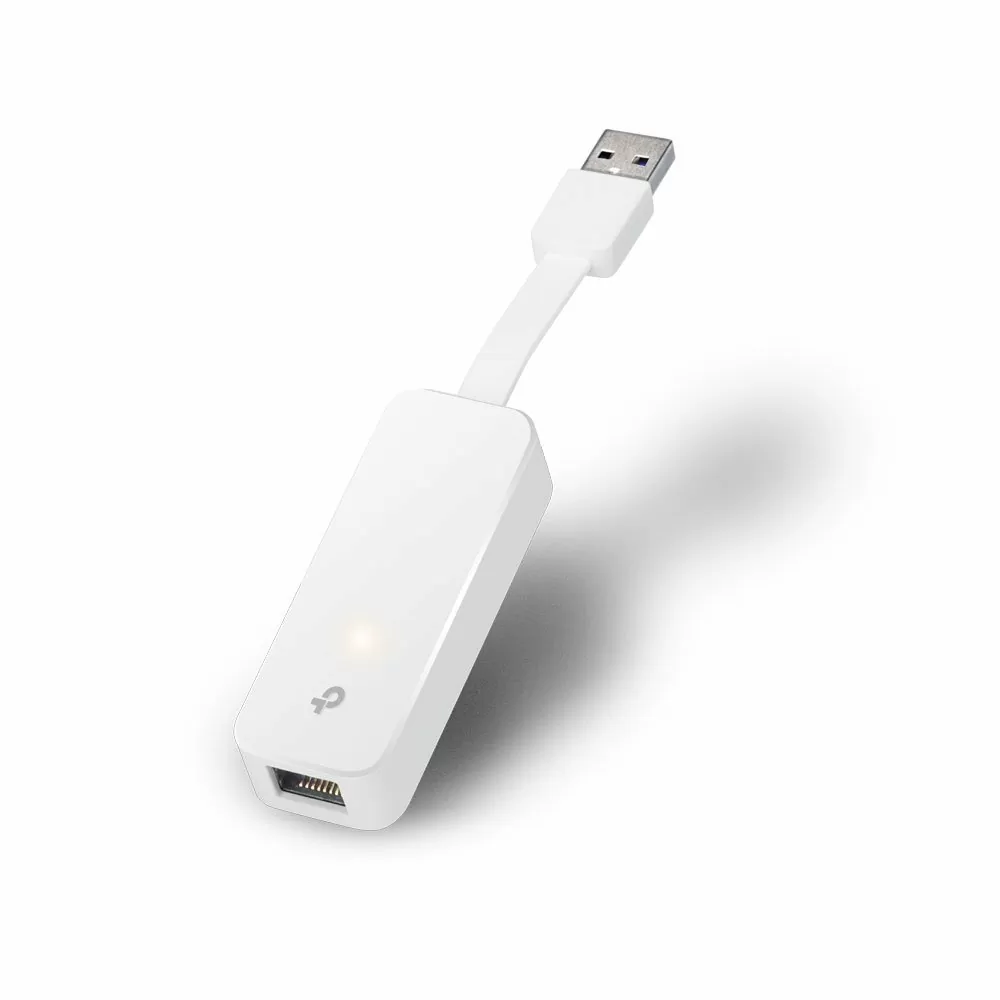
TP-Link USB 3.0 to Gigabit Ethernet Network Adapter Plug and Play – TL-UE300


KSh2,700.00
- Fastest USB 3.0 and Gigabit solution ensure high speed transfer rate
- Plug and Play in Windows (10/8.1/8), Mac OS X (10.9 & later versions), Chrome OS and Linux OS.
- Foldable and Portable design ideally suits your Ultrabook
TP-Link USB 3.0 to Gigabit Ethernet Network Adapter (TL-UE300) – Still a Great Way to Get Fast, Stable Internet
Yeah, Wi-Fi is everywhere now, but sometimes you just need a wired connection. If you’re a gamer who hates lag, someone who works from home and moves big files, a student watching lectures, or have a laptop that doesn’t have an Ethernet port, the TP-Link TL-UE300 USB 3.0 to Gigabit Ethernet Adapter is a good bet. It’s reliable, cheap, and super easy to use.
Why You Might Still Want a Wired Connection
Even though new Wi-Fi is out, Ethernet still has some good stuff:
- Gets you up to 1000 Mbps speed (Wi-Fi is usually around 300–600 Mbps)
- Almost no lag – important for gaming and video calls
- Won’t get messed with by microwaves
- No dropped connections when you’re downloading stuff
- Can upload and download at the same time
If your laptop doesn’t have an Ethernet port (like a MacBook Air, Surface Pro, or some others), the TL-UE300 gives you that solid wired performance back.
TP-Link TL-UE300 – What’s Cool About It
- USB 3.0 works with older USB 2.0, too)
- Gigabit Ethernet (adjusts to whatever speed you need)
- Realtek RTL8153 – known to be stable
- Folds up small (about 3 inches long)
- Doesn’t need drivers on most computers Works with Windows, macOS, Linux, ChromeOS, and Nintendo Switch
- Saves energy (IEEE 802.3az)
- Has lights to show power and activity
- Comes with a 3-year TP-Link warranty
Easy to Use (No CD Needed)
The best part about the TL-UE300 is that you just plug it in and it works.
- Windows 11 & 10: no drivers needed
- macOS: works without extra software
- ChromeOS & Linux: ready to go
- Nintendo Switch: works when docked
You only need a driver for really old computers.
Real Performance That You Can Feel
People say the TL-UE300 gets you 900+ Mbps when used with USB 3.0 and a good Ethernet cable. That’s basically Gigabit speed.
It’s way faster than USB 2.0 adapters, which only get around 280 Mbps.
Good for Lots of Things
1. Gamers
No more lag in games. The TL-UE300 can lower your ping.
2. Remote Workers
Video calls will be smoother. Wired is more reliable.
3. Streaming and NAS Users
Watch stuff without buffering.
4. MacBook Owners
MacBooks don’t have Ethernet ports anymore. This is a good fix.
5. Nintendo Switch
Stable online play.
6. Travel
Hotel Wi-Fi can be bad. Plug into the Ethernet port and get better speeds.
7. Mini PCs
Some mini PCs don’t have Ethernet. This fixes that.
Well-Made and Durable
The TL-UE300 has a foldable plug to keep the USB connector safe. It’s white, so it doesn’t show fingerprints. It’s also light so you won’t notice it in your bag.
How to Set Up.
1. Take it out of the box.
2. Fold out the USB part.
3. Plug it into your computer (use the blue USB port for best speed).
4. Plug in the Ethernet cable.
5. Wait a few seconds.
6. You’re online!
Be the first to review “TP-Link USB 3.0 to Gigabit Ethernet Network Adapter Plug and Play – TL-UE300”
Related products




Reviews
There are no reviews yet.