
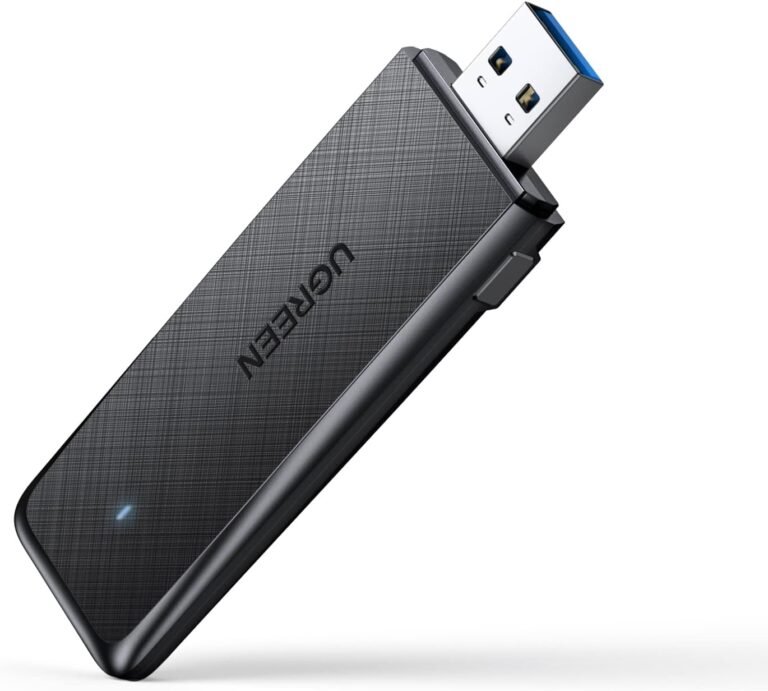
UGREEN AC1300 Dual-Band Wireless USB Adapter – CM492


KSh3,000.00
Key Features:
- Model: CM492 (also known as 50340)
- Interface: USB 3.0 (backward compatible with USB 2.0)
- Dimensions: 85 x 25 x 8 mm (compact and portable)
- Weight: Approximately 50g
- Chipset: Realtek RTL8812BU
- Antennas: Integrated internal antennas
- Security: WPA/WPA2, WEP, WPS support
UGREEN AC1300 Dual-Band Wireless USB Adapter – CM492
Here’s what you need to know about this adapter, why it’s worth buying, how well it works, and why Phonex Tech is a good place to buy it from.
What’s the UGREEN AC1300 CM492?
Why Choose Dual-Band Technology? Understanding 2.4GHz vs 5GHz
One of the standout features of the UGREEN AC1300 CM492 is its dual-band capability. But what does that mean, and why does it matter?
- 2.4GHz Band (up to 400Mbps): Excellent for range and penetrating walls. Ideal for everyday tasks like web browsing, email, and social media. However, it’s more prone to interference from microwaves, Bluetooth devices, and neighboring networks.
- 5GHz Band (up to 867Mbps): Faster speeds with less interference, perfect for HD/4K streaming, online gaming, video calls, and large file downloads. The trade-off is slightly shorter range.
With the UGREEN CM492, you can automatically or manually switch between bands for optimal performance. This makes it far superior to single-band adapters, reducing lag and buffering in crowded network environments.
In real-world tests, users report seamless 4K Netflix streaming on 5GHz and stable connections even in apartments with multiple WiFi networks.
Blazing-Fast Speeds: Up to 1300Mbps with USB 3.0
The “AC1300” rating isn’t just marketing – this adapter lives up to its promise. Thanks to USB 3.0 (10x faster than USB 2.0), data transfer is lightning-quick.
- On 5GHz: Achieve close to 867Mbps in ideal conditions – enough for lag-free gaming and ultra-HD streaming.
- On 2.4GHz: 400Mbps handles multiple devices without slowdowns.
Compared to older 802.11n adapters (max 300Mbps), the UGREEN AC1300 is 3-4x faster. It’s also MU-MIMO ready in compatible routers, allowing multiple devices to connect simultaneously without speed drops.
Whether you’re downloading large files or uploading content, this adapter performs like a wired Ethernet connection.
Easy Installation and Compatibility
One of the best things about the UGREEN CM492 is how user-friendly it is.
Step-by-Step Setup:
- Plug the adapter into a USB port.
- For Windows 11/10: Plug-and-play – no driver needed!
- For older Windows (8.1/8/7) or macOS 10.11+: Download drivers from UGREEN’s site or use the included CD.
- Use the built-in UGREEN Wi-Fi software or your OS’s network manager to connect.
The WPS button is a game-changer: Press it on the adapter and your router for instant, password-free connection.
Compatibility:
- Windows: 11/10/8.1/8/7 (full support)
- macOS: 10.11 and above (note: not compatible with M1/M2/M3 MacBooks due to chipset)
- No Linux support officially, though community drivers may work.
Unique Features That Set the UGREEN CM492 Apart
- Soft AP Mode: Turn your PC into a WiFi hotspot! Share your wired or mobile data connection with phones, tablets, or other devices.
- WPS One-Click Security: Quick, secure connections without typing passwords.
- Compact Design: Mini size fits in your pocket – great for travel.
- Stable Signal: Integrated antennas provide reliable coverage, even through walls.
Users love the Soft AP feature for creating temporary hotspots in hotels or offices.
Who Should Buy the UGREEN AC1300 CM492?
This adapter is ideal for:
- Gamers needing low latency
- Streamers watching 4K/8K content
- Remote workers on video calls
- Anyone with a desktop without WiFi
- Budget-conscious users wanting WiFi 5 performance (still excellent in 2025, even with WiFi 6 emerging)
Be the first to review “UGREEN AC1300 Dual-Band Wireless USB Adapter – CM492”
Related products


General


General


Reviews
There are no reviews yet.