
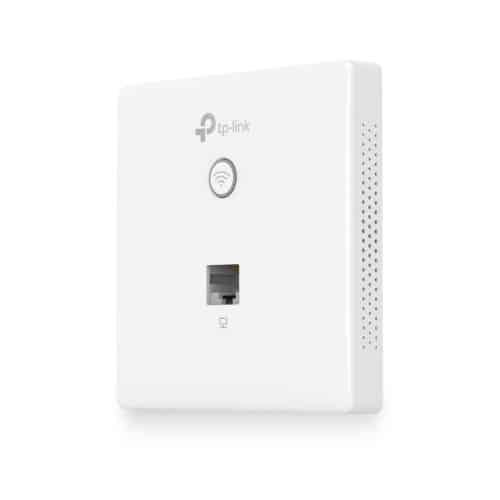
TP-Link Omada AC1200 Wireless MU-MIMO Gigabit Wall-Plate Access Point – TL-EAP230-WALL


KSh6,500.00
- Fast Dual-Band Wi-Fi: Simultaneous 300 Mbps on 2.4 GHz and 867 Mbps on 5 GHz totals 1,167 Mbps Wi-Fi speeds with MU-MIMO.
- Gigabit Ports: 2 Gigabit Ethernet ports (1× uplink + 1× downlink).
- Centralized Management: Cloud access and Omada app for ultra convenience and easy management.
- Private Connection for Every Room: Designed to meet every network need in environments with numerous separated rooms, like hotels, offices, and dormitories.
TP-Link Omada AC1200 Wireless MU-MIMO Gigabit Wall-Plate Access Point
Fast, reliable Wi-Fi isn’t just a nice thing to have these days—it’s a must. If you’re running a hotel, apartments, dorm, hospital, office, or even a small café, your guests and users expect great Wi-Fi the second they walk in. The TP-Link Omada AC1200 Wireless MU-MIMO Gigabit Wall-Plate Access Point (EAP230-Wall) is built to give them just that, without the messy look of regular access points.
Why a Wall-Plate Access Point?
Normal access points usually hang on ceilings or sit on shelves. This means cables all over the place, which isn’t pretty, especially in hotel rooms or fancy offices. The EAP230-Wall fixes this:
- It swaps out your old Ethernet jack for a clean, new plate.
- No more messy cables or bulky stuff in the room.
- The signal is stronger where people actually are (like by beds, desks, or chairs).
- It blends right in with the room.
- It has extra Gigabit Ethernet ports for things that need cables (TVs, phones, computers).
TP-Link EAP230-Wall Specs
Feature Specification
Model – EAP230-Wall
Wi-Fi Standard – 802.11ac Wave 2 (Wi-Fi 5)
Speed – AC1200 (300 Mbps @ 2.4 GHz + 867 Mbps @ 5 GHz)
MU-MIMO – Yes (2×2:2)
Antennas – 2 internal omnidirectional antennas
Ethernet Ports – 2 × Gigabit Ethernet (1× Uplink PoE In, 1× Downlink)
PoE Support – 802.3af/at
Max Power Consumption – 7 W
Mounting – EU / US standard wall junction box
Omada SDN Integration – 100% cloud or hardware controller managed
Guest Network & VLAN Support – Yes
Band Steering & Airtime Fairness – Yes
| Seamless Roaming – 802.11k/v/r (with Omada controller)
| Dimensions – 143 × 86 × 20 mm (fits perfectly in-wall)
Fast AC1200 Wi-Fi with MU-MIMO
The EAP230-Wall can hit 300 Mbps on the 2.4 GHz band and 867 Mbps on 5 GHz, adding up to AC1200 speeds. With 2×2 MU-MIMO, it can talk to multiple devices at once, instead of one at a time. This makes things faster and smoother when many people are using the Wi-Fi.
What this means for you:
- Lots of people streaming on Netflix in a hotel room won’t slow each other down.
- People in the office can have video calls, browse, and move files without any lag.
- TVs, tablets, phones, and computers all stay connected without a hitch.
Great for Hotels and Apartments
Hotel owners and property managers will love the EAP230-Wall because:
1. Nothing to see – Guests just see a cool wall plate, like a regular Ethernet port.
2. Gigabit port – The TV gets full wired speed.
3. Limit bandwidth – It’s easy to stop one guest from using up all the internet.
4. Custom Wi-Fi options – Create free or paid Wi-Fi, with your own branding.
5. No dropped connections – Guests can walk around and stay connected, especially with EAP225/EAP245 ceiling units.
Centralized Management with Omada SDN
The EAP230-Wall uses TP-Link’s Omada Software Defined Networking, which lets you manage things in a few ways:
- Free Cloud Management – Manage your access points from anywhere using an app or browser.
- OC200 / OC300 Hardware Controller – This gives you more advanced control.
- Omada Software Controller – Install this on your own server for total control.
With Omada, you get:
- Site maps and heatmaps of coverage
- Automatic channel and power stuff
- Group updates
- Reboot schedules
- Info on who’s using the Wi-Fi (plus the option to block them)
- Login using SMS, Facebook, or vouchers
Power over Ethernet (PoE) – Easy Install
The EAP230-Wall uses 802.3af/at PoE, so you only need one Ethernet cable from your PoE switch to the room. No power adapter needed, and no need to pay an electrician—saving you money.
Fits Standard Wall Boxes
The EAP230-Wall is small (143 × 86 × 20 mm) and fits right into standard wall boxes. It takes just a few minutes to install:
1. Take off the old plate.
2. Plug in the Ethernet cable.
3. Screw in the EAP230-Wall.
4. Add it to your Omada network.
.
Important Security Features
- WPA3-Enterprise & Personal
- Detects rogue APs
- Maps SSIDs to VLANs
- Isolates guest networks
- Filters MAC addresses and isolates clients
- Secure access (HTTPS & SSH)
Be the first to review “TP-Link Omada AC1200 Wireless MU-MIMO Gigabit Wall-Plate Access Point – TL-EAP230-WALL”
Related products






Reviews
There are no reviews yet.