


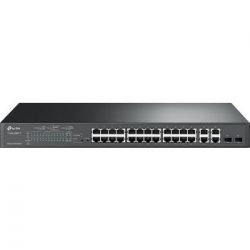
TP-Link TL-SG1024D 24-Port Gigabit Switch
Dependable network is super important for businesses, home offices, and pretty much anyone who’s growing. Whether you’re sending big files, watching 4K videos, got tons of users, or just want to expand your network, the TP-Link TL-SG1024D 24-Port Gigabit Switch is a solid, budget-friendly pick. It’s a fanless switch that doesn’t use much power and gives you fast Gigabit speeds without needing to mess with settings.
Why Get a 24-Port Gigabit Switch Like the TP-Link TL-SG1024D?
Gigabit Ethernet (1000Mbps) isn’t a luxury anymore—it’s something you really need. Older 10/100Mbps switches slow things down, especially with modern stuff like network drives, 4K security cameras, gaming PCs, and cloud backups. Getting a 24-port Gigabit switch like the TL-SG1024D can speed up your network by up to 10x and still work with your older devices.
The TL-SG1024D is unmanaged, so you literally just plug it in and you’re done—no software, IP addresses, or logins needed. Just hook up your router, computers, printers, etc., and you’re all set. It’s great for:
- Small and medium-sized businesses
- Schools and offices in Kenya
- Home labs and gaming
- Security camera systems
- Making your current network bigger without any downtime
It can handle 48Gbps and move 35.7 million packets per second, so all 24 ports can run at full speed at the same time—no slowdowns, even when things get busy.
TP-Link TL-SG1024D key Features
1. 24 Gigabit Ports That Adjust Automatically
All 24 ports support 10/100/1000Mbps speeds and Auto MDI/MDIX, so you don’t need special cables. Just use regular Cat5e or Cat6 cables, and the switch figures it out.
2. Saves on Power
TP-Link’s tech saves up to 20% on electricity (some tests show even more):
– Turns off power to ports that aren’t being used
– Changes the amount of power based on how long the cable is (shorter cables use less power)
– Made with recyclable stuff
Since electricity can be expensive in Kenya, this can save you money each year.
3. No Fan, No Noise
The strong steel case and fanless setup mean the TL-SG1024D is totally silent—great for offices, classrooms, or your quiet home. It stays cool even when it’s used for a long time.
4. Put It Anywhere
It’s only 11.6 × 7.1 × 1.7 inches, so it fits on a desk or in a server rack (the rack mounts are included). That’s why it’s called a **Desktop/Rackmount Switch.
5. Good Networking Features (But Easy to Use)
- IEEE 802.3x flow control (full-duplex) and backpressure (half-duplex)
- 8K MAC address table with auto-learning and auto-aging
- Store-and-forward switching for no errors when sending data
- Supports jumbo frames up to 10KB for sending big files faster
6. Meets Standards and is Reliable
- Follows IEEE 802.3, 802.3u, 802.3ab, and 802.3x standards
- MTBF (Mean Time Between Failures) over 100,000 hours
- TP-Link gives it a limited lifetime warranty (certain conditions apply)
Specifications
What It Is What It Does
Ports – 24 × 10/100/1000Mbps RJ-45
How Fast It Switches – 48 Gbps
|How Fast It Sends Data – 35.7 Mpps
MAC Address Table – 8K
Jumbo Frame – 10KB
Power Use – Max 13.1W (less when saving energy)
Size – 294 × 180 × 44 mm
Case – Steel, no fan
How to Mount It – Desk or 19 rack
Operating Temperature – 0–40°C
Even with newer, faster switches coming out, the TL-SG1024D is still great because:
- Most devices (laptops, printers, phones) still only use 1Gbps
- It’s cheap—way cheaper than switches with PoE or fancy settings
- It’s known to be reliable—lots of good reviews on Amazon, Newegg, and from Kenyan sellers
- It doesn’t have features you don’t need, which keeps the cost down (like PoE if you don’t need it)
What Can You Use the TL-SG1024D For?
1.Small Offices in Nairobi
Hook up 20+ computers, printers, phones, and a network drive. The Gigabit speeds stop lag when sharing files and backing up to the cloud.
2. Schools
Connect computer labs, offices, and Wi-Fi points. Silent operation means it won’t bother anyone in the classroom.
3. Security Camera Systems
Use it with NVRs and 1Gbps security cameras. It has enough ports for big surveillance setups without slowing down.
4. Home Networks and Gaming
Connect your smart home devices, gaming PCs, and streaming boxes for smooth performance.
5. Hotels and Restaurants
Make your guest Wi-Fi better by connecting multiple Wi-Fi points through a single, reliable switch.
Setup:
1. Open the box and get out the switch and power adapter.
2. Put it on a desk or in a rack.
3. Connect the cable from your router to any port on the switch.
4. Plug your devices into the other ports.
5. Turn it on—the lights will come on, and you’re connected!
No software, no setup, no need to call an IT person.
How It Saves Energy
Regular switches waste power on ports that aren’t being used and long cables. The TL-SG1024D knows:
– If a port is being used (turns off power to ports not in use)
– How long the cable is (uses less power for shorter cables)
Tests show it saves 15-25% compared to older switches, making it a good choice for the environment.
Be the first to review “TP-Link 24-Port 10/100/1000Mbps Gigabit Desktop Rackmount Switch – TL-SG1024D”
Related products




Reviews
There are no reviews yet.