
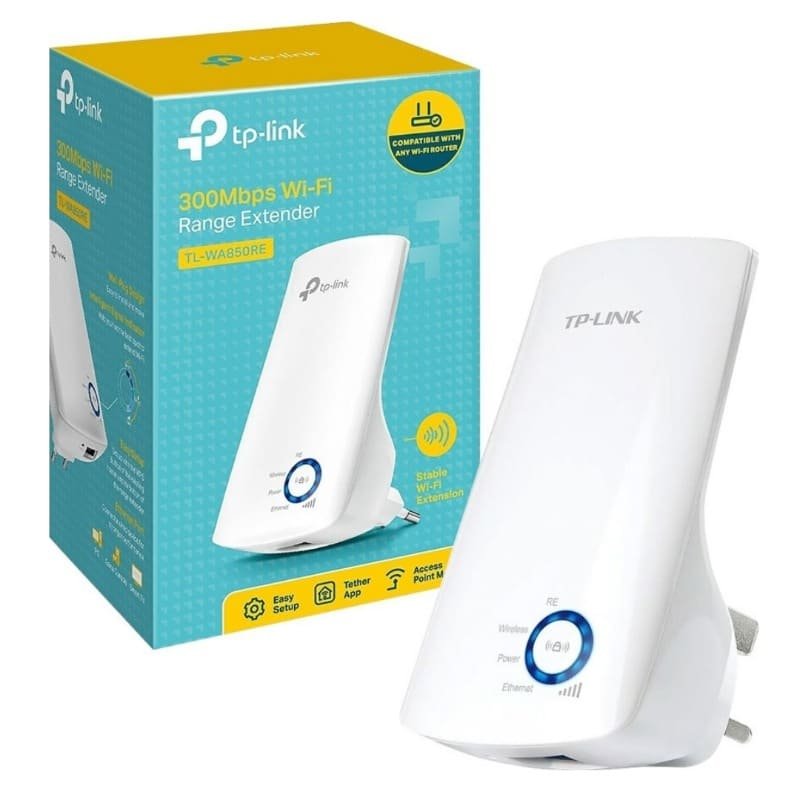
TP-Link 300Mbps Wi-Fi Range Extender – TL-WA850RE


KSh3,000.00
Key features for TP-Link N300 Wi-Fi Range Extender (TL-WA850RE)
- 10/100M Ethernet Port (RJ-45) Interface
- 2.4 to 2.4835 GHz Frequency
- Flexible Deployment
- 2 x Internal Antennas
- Ethernet Bridge
- 5 x Signal Indicator Lights
- Plug & Play
- 802.11 b/g/n Wireless Devices Compatible
Get Better Wi-Fi: A Look at the TP-Link TL-WA850RE
Let’s face it, weak Wi-Fi stinks. If you’re trying to watch videos, doing video calls, or just scrolling through your phone and the signal keeps dropping, you’re not alone. The TP-Link TL-WA850RE is a small, cheap thing that’s meant to fix this. It stops those dead spots and gives you better Wi-Fi all over your place. If you’re tired of waiting for stuff to load, this thing might be just what you need. TP-Link is a trusted company, so that’s a plus.
we sell the TL-WA850RE for a great price because everyone should have good Wi-Fi. We’re going to check out why this extender is cool, how it works, and why it’s good for your home. It doesn’t matter if you know a lot about tech or not, this will help you see how the TL-WA850RE can make your internet better. We’ll talk about setting it up, how well it works, and why you should buy it from Phonex Tech.
Why Use a Wi-Fi Extender?
Before we talk about the TP-Link thing, let’s talk about why you might even need one. Even the best Wi-Fi routers have limits. Walls and other stuff in your house can mess with the signal. This makes dead zones where your devices can’t connect. This happens a lot in big houses or apartments with thick walls.
A Wi-Fi extender, like this TP-Link one, grabs your Wi-Fi signal, makes it stronger, and sends it out farther. So, you get Wi-Fi everywhere without having to rewire your house or buy a new router. Studies say that most homes have Wi-Fi dead zones, which makes people annoyed and less productive.
The TP-Link TL-WA850RE isn’t just a basic extender. It works with almost any router. It can get speeds up to 300Mbps which is good for browsing the web, watching videos, and playing games. Plus, it plugs right into the wall, so it doesn’t take up space. If you’re looking for a good, cheap Wi-Fi extender, this one is usually at the top of the list because it’s easy to use and it works well.
When you get the TP-Link extender from our shop, is simple. Here’s what’s inside:
- The TL-WA850RE: It’s a small, white thing that plugs into the wall.
- Ethernet Cable: A short cable for setting it up or using a wired connection.
- Setup Stuff: A CD with software and a user guide.
- Quick Guide: A simple paper that shows you how to set it up fast.
.
The TL-WA850RE is cheap. It also doesn’t use much power. It’s a popular choice for people who want a cheap Wi-Fi booster.
what the TP-Link TL-WA850RE can do:
- Works with: Almost any router.
- Speed: Up to 300Mbps.
- Good for: Watching videos and playing games.
- Antennas: It has two antennas inside to send the Wi-Fi signal.
- Port: It has a port where you can plug in a device with a cable, like a TV.
- Easy Setup: It has a button for easy setup.
- Safe: It keeps your Wi-Fi safe with security stuff.
It’s easy to use, and the app is good.
Features
Signal Lights
The lights on the front show you how strong the signal is. This makes it easy to find the best spot for it. People say that these lights help them get much better Wi-Fi.
Easy Setup
You just press a button on your router and then a button on the extender. That’s it!
Ethernet Port
You can plug devices into it with a cable.
Night Mode
You can turn off the lights on the extender at night.
Other Stuff
These features make the TL-WA850RE a good choice.
Set It Up
Setting up the TP-Link thing is easy. Here’s how:
Plug It In
Plug it into the wall between your router and the dead zone.
WPS Method
- Press the WPS button on your router.
- Press the RE button on the extender.
- Wait for the Wi-Fi light to turn on.
- Check the signal lights and move it closer if needed.
Manual Setup
Connect your computer to the extender with a cable or Wi-Fi.
Go to tplinkextender.net in your browser.
Follow the steps to find your Wi-Fi and enter the password.
Save and restart.
Use the App
the Tether app, turn on Night Mode, and update the software.
If you have trouble, make sure DHCP is on in your router. It’s pretty easy to set up.
Be the first to review “TP-Link 300Mbps Wi-Fi Range Extender – TL-WA850RE”
Related products





Reviews
There are no reviews yet.