
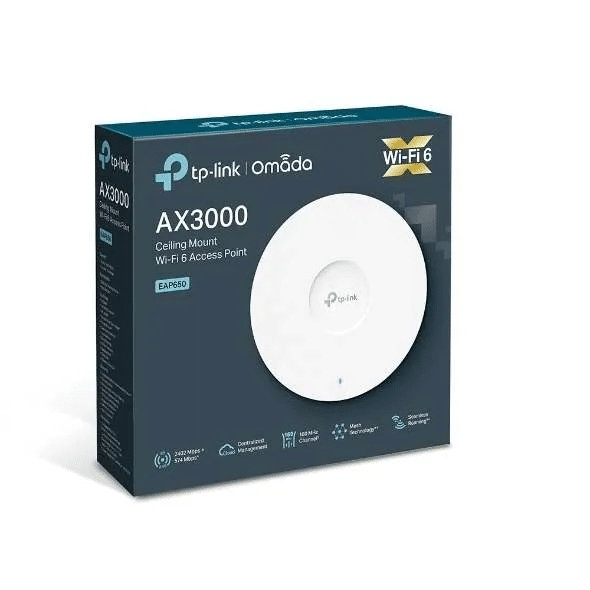
TP-Link AX 3000 Ceiling Mount WiFi 6 Access Point – TL-EAP650
KSh14,000.00
- WiFi 6 ceiling mount access point with AX3000 speeds
- 2.5 Gigabit Ethernet port with PoE+ support
- Dual-band operation with 574 Mbps + 2,402 Mbps
- Supports 500+ concurrent clients in high-density environments
- Professional ceiling/wall mount design
- Omada SDN integration for centralized management
- Advanced WiFi 6 features including OFDMA and MU-MIMO
- Enterprise security with WPA3 and captive portal
- Comprehensive coverage up to 2,000 square feet
- Ideal for business, education, and hospitality deployments
TP-Link BE3600 Ceiling Mount Tri-Band Wi-Fi 7 Access Point (TL-EAP723)
Now businesses, schools, hotels, hospitals, big homes, and warehouses count on it for really fast speeds, stability, and handling tons of devices at once. The TP-Link BE3600 Tri-Band Wi-Fi 7 Ceiling Mount Access Point TL-EAP723 gives you a lot of performance for the money.
This guide tells you everything about the TL-EAP723. Learn about how it performs, what it does, how to set it up, manage it, how it stacks up against Wi-Fi 6/6E, and why Phonex Tech is the place to buy with the best price, warranty, and support.
What’s So Great About the TP-Link TL-EAP723?
The TL-EAP723, part of TP-Link’s new Omada Pro series, gives you BE3600 performance:
– 688 Mbps on 2.4 GHz
– 866 Mbps on 5 GHz
– 2402 Mbps on 6 GHz (160 MHz channels)
– About 3.6 Gbps total
Here are the real Wi-Fi 7 features that make this access point ready for the future:
1. Super-Wide 320 MHz Channels (6 GHz band)
Wi-Fi 7 doubles the channel width from 160 MHz (Wi-Fi 6E) to 320 MHz. The TL-EAP723 works with 320 MHz channels on the 6 GHz band, almost doubling the speed of even the best Wi-Fi 6E access points.
2. Using Multiple Bands at Once (MLO)
Wi-Fi 7 devices (like the latest iPhones 16 series, Galaxy S24/S25, and Intel BE200/BE202 cards) can use the 2.4, 5, and 6 GHz bands all at the same time. This means:
- Up to 40–60% lower lag
- More reliable since it can switch bands
- Faster switching among bands
3. More Data Per Signal (4K-QAM)
Puts 25% more data in each signal than Wi-Fi 6, getting you way better efficiency.
4. Avoiding Interference (Puncturing) + Better MU-MIMO/OFDMA
Even when there’s interference on the 2.4/5 GHz bands, the EAP723 finds the clearest paths, keeping speeds high even when Wi-Fi 6 would slow down.
Tech Specs
Feature Specification
Wi-Fi -Wi-Fi 7 (802.11be) Tri-Band
Speed -BE3600 (688 + 866 + 2402 Mbps)
6 GHz -up to 2402 Mbps (320 MHz channels)
Antennas -4× internal omnidirectional (good for all bands)
Connections – 2×2:2 MU-MIMO on all bands
Ethernet Port -1× 2.5 Gbps PoE+ (802.3at)
Power Usage – Max 16.9 W
Mount It -Ceiling / Wall (kit included)
Admin – Omada SDN Controller, Cloud, App, Standalone
Roaming – 802.11k/v/r, Fast BSS Transition
Guest Network – Yes + Facebook / Voucher / SMS support
Mesh – Yes (with other Omada EAPs)
Warranty – 5 Years (if you buy from authorized sellers)
The 2.5 Gbps PoE+ port is key. Older Wi-Fi 6 APs often have 1 Gbps ports, which slow down Wi-Fi 7. The TL-EAP723 lets you get faster wireless speeds without needing to replace your entire network switch (as long as the connection from the AP to the switch is 2.5G or faster).
Easy Setup with Omada SDN
TP-Link’s Omada platform is one of the best. Other systems charge monthly for cloud management, but Omada Cloud is free.
Options:
- Free Omada Software Controller (Windows/Linux)
- OC200 / OC300 Hardware Controller
- Free Omada Cloud portal (control everything from one place)
- Omada App (iOS/Android) for changes on the go
During testing, setting up a new EAP723 took less than 90 seconds.
Be the first to review “TP-Link AX 3000 Ceiling Mount WiFi 6 Access Point – TL-EAP650”
Related products


Reviews
There are no reviews yet.