
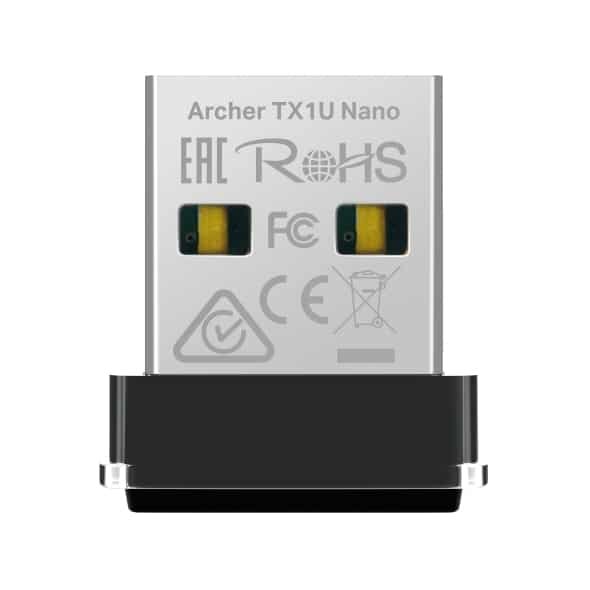
TP-Link AX300 Nano Wi-Fi 6 Wireless USB Adapter – TL-ARCHER TX1U NANO


KSh2,000.00
Key Features
- Wi-Fi 6 (802.11ax) – Latest standard for faster, more efficient wireless performance.
- Speed: Up to 287 Mbps on 2.4 GHz (real-world 200–250 Mbps).
- Single 2.4 GHz Band – Excellent range and wall penetration, ideal for larger homes or areas with obstacles.
- Ultra-Compact Size – Tiny nano design (17.5 × 15.8 × 7.1 mm) — smaller than a USB stick, perfect for travel and laptops.
- True Plug-and-Play – Built-in driver auto-installs on Windows 11/10 (no download/CD needed).
- OFDMA & 2×2 MU-MIMO – Lower latency and better performance in busy networks.
- Beamforming – Stronger, more focused signal to your device.
- Security – Supports WPA3 + backward compatible with WPA2/WPA.
- OS Support – Windows 11/10/7 + excellent Linux compatibility (native on modern kernels).
- Soft AP Mode – Turn your PC into a Wi-Fi hotspot.
- USB 2.0 Interface – Works on any USB port (2.0/3.0/3.1), low power use.
- Internal Antenna + LED – Discreet, no external parts, subtle activity light.
- Fully Backward Compatible – Works with older Wi-Fi 5/4 routers too
TP-Link Archer TX1U Nano AX300 Wi-Fi 6 Wireless USB Adapter
Whether you are working, streaming, or gaming, bad Wi-Fi can be a pain. If your computer is old or just doesn’t have good wireless, the TP-Link Archer TX1U Nano AX300 Wi-Fi 6 Wireless USB Adapter (TL-Archer TX1U Nano) could be what you need. It’s small but brings Wi-Fi 6 to your computer, giving you speeds up to 287 Mbps on the 2.4 GHz band.
You can find the Archer TX1U Nano from our stores. It’s a cheap way to improve your internet without getting a whole new computer. We will see why this Wi-Fi 6 USB adapter is great, what it can do, how well it works, and how to set it up. If you want the top Wi-Fi 6 USB adapter for your computer or a small wireless USB adapter for your laptop, this might be it.
What’s Wi-Fi 6? Why Should You Upgrade Now?
Wi-Fi 6 (802.11ax) is the newest kind of wireless. It’s better than Wi-Fi 5 (802.11ac) and is now common in new routers and devices.
Here’s why it’s better:
- Faster: It goes up to 287 Mbps on the 2.4 GHz band.
- Handles Crowds Better: It lets many devices connect at once without slowing down.
- Quicker Response: Good for gaming and video calls.
- Better Range: Gets a stronger signal.
- More Secure: Uses WPA3 to keep you safe from hackers.
A lot of people have smart devices and frequently use the internet. If you’re still using Wi-Fi 5, you’re missing out. The TP-Link Archer TX1U Nano makes it easy to upgrade. You don’t need to open your computer or do anything complicated.
This adapter uses the 2.4 GHz band, which is reliable and can go through walls better than the 5 GHz band. This makes it good for homes or offices where the 5 GHz signal isn’t strong everywhere.
TP-Link Archer TX1U Nano AX300 Wi-Fi 6 USB Adapter: What can do
The Archer TX1U Nano has a lot of tech in a small package.
Here’s what makes it special:
Tiny Size
At just 0.69 × 0.62 × 0.28 inches (17.5 × 15.8 × 7.1 mm), it’s one of the smallest Wi-Fi 6 USB adapters you can find. It’s smaller than a USB drive, so it’s good for travel or computers with few USB ports. You can plug it in and forget about it.
Fast Performance
Up to 287 Mbps on 2.4 GHz.
OFDMA reduces lag when lots of people are using the network.
MU-MIMO makes things smoother when you use it with a Wi-Fi 6 router.
Easy to Install
You don’t need a CD or to download anything for most people. It has a driver inside that automatically installs on Windows 11/10. Just plug it in, and you’re good to go.
Works with Everything
Operating Systems: Windows 11/10/7, Linux (Kernel 3.10 and later).
Works with older Wi-Fi 5/4 routers.
AP Mode: Turns your computer into a Wi-Fi hotspot.
Good Connectivity
An internal antenna for good performance.
Beamforming for a stronger signal.
Uses the latest security, like WPA3.
Setting Up the Archer TX1U Nano
The TP-Link Archer TX1U Nano is easy to set up. Here’s how:
1. Take it Out of the Box: You get the adapter and a quick guide.
2. Plug It In: Put it into a USB port on your computer.
3. Windows: The driver installs automatically.
4. Connect to Wi-Fi: Open your network settings, choose your Wi-Fi, and enter the password.
5. Linux: It usually works right away, but you can download a driver from TP-Link if needed.
For AP Mode:
Get the TP-Link software from their website.
Turn on Soft AP mode to make a hotspot.
The Archer TX1U Nano is good for everyday things:
- Browsing and Streaming: Plays 4K videos without problems.
- Gaming: Lower ping times are great for games on 2.4 GHz.
- File Transfers: Downloads faster than with Wi-Fi 5.
- Range: Works well through walls.
If you need the 5 GHz band for faster speeds, think about getting something like the TP-Link Archer TX20U Nano. But for most people, the TX1U Nano is a good mix of size, price, and performance.
The TP-Link Archer TX1U Nano AX300 Wi-Fi 6 Wireless USB Adapter is great for anyone who wants fast Wi-Fi without the extra bulk. It’s small, sets up easily, and works well. It’s one of the **top Wi-Fi 6 USB adapters**. It’s a good choice for work, fun, or just everyday use.
Be the first to review “TP-Link AX300 Nano Wi-Fi 6 Wireless USB Adapter – TL-ARCHER TX1U NANO”
Related products


Out of stock




-17%


Out of stock
General
Original price was: KSh24,500.00.KSh20,400.00Current price is: KSh20,400.00.
This product has multiple variants. The options may be chosen on the product page


Out of stock


Reviews
There are no reviews yet.