
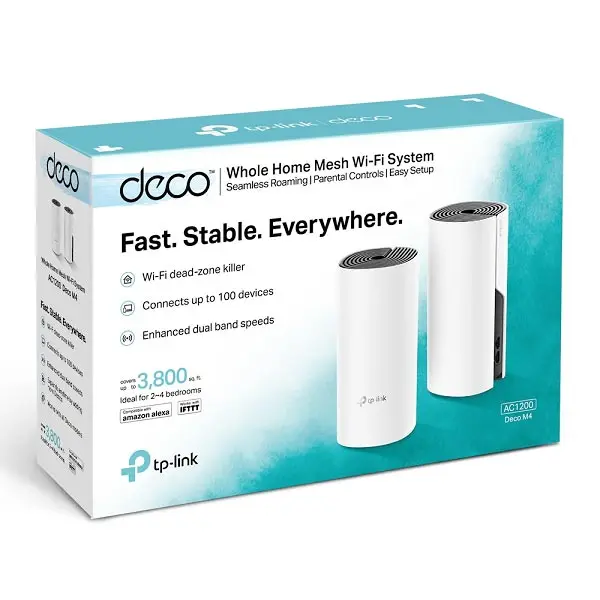
TP-Link Deco M4 AC1200 Whole Home Mesh Wi-Fi System (2 Pack) – TL-DECO M4 (2-PACK)

KSh12,500.00
- Whole Home Coverage: Deco M4 (2-pack) uses a system of units to achieve seamless whole-home WiFi coverage up to 260 square metres — eliminate weak signal areas once and for all!*
- TP-Link Mesh Technology: With advanced Deco Mesh Technology, units work together to form a unified network with a single network name. Devices automatically switch between Decos as you move through your home for the fastest possible speeds
- Fast Dual-Band WiFi: Deco M4 provides fast and stable connections with speeds of up to 1167 Mbps and works with major internet service provider (ISP) and modem.*
- Connect More Devices: Deco can handle traffic from even the busiest of networks, providing lag-free connections for up to 100 devices.*
- Parental Controls: Limit online time and block inappropriate websites according to unique profiles created for each family member.
- Easy Setup: Setup is easier than ever with the Deco app there to walk you through every step
TP-Link Deco M4 AC1200 Whole Home Mesh Wi-Fi (2-Pack)
It’s super annoying when you can’t get a good signal. If you’re tired of searching around your house for a Wi-Fi signal, the TP-Link Deco M4 AC1200 Whole Home Mesh Wi-Fi System (2-Pack) might be just what you need.
Let’s see why the Deco M4 (2-Pack) is still a popular and well-liked mesh Wi-Fi option right now.
What’s a Mesh Wi-Fi System? Why get it?
Old routers send Wi-Fi from one spot. The further you are from it, the weaker the signal. Thick walls and other networks nearby mess things up even more.
A mesh Wi-Fi system like the TP-Link Deco M4 swaps out your old router for multiple units (called nodes) that work together as one big network. Here’s what you get:
- One Wi-Fi name for the whole house
- No dropped calls as you walk around
- The strongest signal finds your devices automatically
- Want more coverage? Just add more Deco units
The Deco M4 (2-Pack) is great if your Wi-Fi is spotty in your 2–4 bedroom house, apartment, or little office.
TP-Link Deco M4 (2-Pack) Specs
Feature Specification
Model – TL-Deco M4 (2-Pack)
Wi-Fi Standard – Wi-Fi 5 (802.11ac), works with older stuff
Speed – AC1200 (300 Mbps on 2.4 GHz + 867 Mbps on 5 GHz)
Coverage – Up to 2,800 sq. ft. (260 m²) with 2 units
How many devices at once – 100+ devices
Ethernet Ports per Unit – 2 × Gigabit Ethernet ports (WAN/LAN auto-sensing)
Processor – Qualcomm quad-core CPU
Antennas – 2 inside antennas per unit
Parental Controls – TP-Link HomeCare™ (Trend Micro inside)
Antivirus & QoS – Free for life
Guest Network & Alexa Support – Yes
Setup – Deco app (iOS & Android) – takes less than 5 min
How Fast Is It Really?
Even with newer Wi-Fi 6 and Wi-Fi 6E systems out, the Deco M4 is still fast enough for most people.
- Stream 4K on several devices at the same time – no problem
- Play games online with no lag (Valorant, Call of Duty, Fortnite)
- Crystal-clear video calls on Zoom, Teams, or Google Meet
- Smart home gadgets (cameras, lights, plugs, doorbells) stay online
In tests this year, the Deco M4 got 350–450 Mbps near a node and 150–250 Mbps in other rooms on the 5 GHz band. That’s plenty for most home internet plans under 500 Mbps.
Why the TP-Link Deco M4 (2-Pack) Is Still a Good Budget Option
1. Best Bang for Your Buck
The Deco M4 (2-Pack) is cheap at Phonex Tech. It’s often cheaper than Amazon, Flipkart, and local stores. You get good coverage without paying a ton for Wi-Fi 6E systems that you probably don’t even need.
2. Super Stable
TP-Link’s mesh tech is good, and it switches between nodes super fast (802.11k/v/r support). You won’t even notice it happening.
3. Free Security for Life with TP-Link HomeCare™
Other companies charge monthly for antivirus and blocking bad websites. Deco M4 gives you HomeCare protection with Trend Micro for life – no extra charge.
4. Good Parental Controls
Make profiles for each person in the family, block stuff, pause the internet on specific devices or profiles, and set bedtimes. All in an easy app.
5. Can Use Wired Connection
Each Deco unit has two Ethernet ports. You can wire them together for the best performance. This is great for houses with multiple floors where the wireless signal might weaken.
6. Works with Any Internet Provider and Modem
Whether you have Airtel, Jio, or a local cable company, just plug the main Deco into your modem and you’re set.
Easy Setup
Forget confusing router settings. The Deco app walks you through it:
1. Get the TP-Link Deco app
2. Plug the first Deco into your modem
3. Scan the code on the bottom of the unit
4. Put the other unit somewhere else in the house
5. That’s it – your new Wi-Fi is up and running in under 5 minutes
The app also shows you a map of your coverage so you know where to put the units.
Be the first to review “TP-Link Deco M4 AC1200 Whole Home Mesh Wi-Fi System (2 Pack) – TL-DECO M4 (2-PACK)”
Related products



Reviews
There are no reviews yet.