
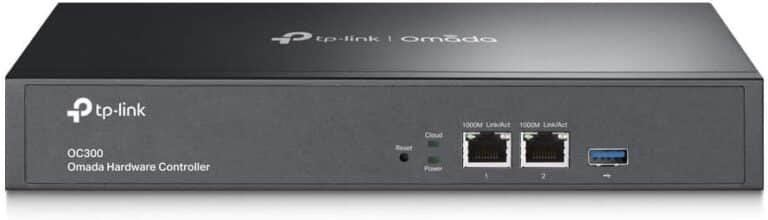

TP-Link Omada Hardware Controller TL-OC300
Whether you run a small office, a multi-floor hotel, a school campus, or a chain of retail stores, managing dozens (or hundreds) of access points, switches, and gateways individually is a nightmare. That’s exactly where the TP-Link Omada Hardware Controller OC300 (TL-OC300) shines as one of the most cost-effective, powerful, and reliable centralized network management devices on the market.
In this comprehensive 2000-word guide, we’ll cover everything you need to know: features, real-world benefits, technical specifications, comparison with cloud and software controllers, installation tips, and why buying from Phonex Tech gives you the best value in 2025.
What is the TP-Link Omada TL-OC300 Hardware Controller?
The TL-OC300 is the latest physical (on-premises) hardware controller in TP-Link’s Omada Software Defined Networking (SDN) platform. It is designed to centrally manage up to 500 Omada access points, JetStream switches, and SafeStream gateways from a single intuitive interface — without monthly cloud subscription fees.
Unlike the older OC200, the OC300 comes with a more powerful CPU, double the RAM, increased storage, and supports the newest Omada SDN features (v5.x firmware) out of the box. It is the direct successor that future-proofs your investment for the next 5–7 years.
Key Specifications at a Glance
Feature TL-OC300 Specification
Max Managed Devices –500 (APs + Switches + Gateways)
Max Concurrent Clients – Up to 20,000
CPU -Powerful 4-core processor
RAM -4 GB DDR4
Storage -32 GB eMMC + 2× USB 3.0 for external backup
Ethernet Ports -2× Gigabit Ethernet (1 PoE+ 802.3at IN port)
Power Supply – 802.3at PoE+ or 12V DC adapter (both included)
Dimensions – 180 × 120 × 35 mm
Management Methods – Standalone / Omada App / Omada Software Controller
Zero-Touch Provisioning (ZTP) – Supported
Warranty -5-Year Limited Warranty (when bought from authorized resellers like Phonex Tech)
Why Choose a Hardware Controller Over Cloud or Software Controller ?
1. 100% Local Control & Privacy
No internet dependency. Perfect for banks, hospitals, government offices, and schools that cannot send network data to the cloud.
2. Zero Recurring Fees
TP-Link Omada Cloud Essential is now pushing paid plans for >100 devices. The OC300 has no subscription — ever.
3. Lightning-Fast Response
Local processing means instant map loading, client lists, and configuration changes — even with 400+ devices.
4. High Reliability
Runs 24/7 without relying on your desktop/laptop being powered on (unlike the software controller).
5. Advanced Features Unlocked
Features like 802.1X portal authentication with external RADIUS, detailed traffic analytics, and seamless failover require a hardware or cloud controller.
6. Future-Proof for Wi-Fi 6E & Wi-Fi 7
The extra horsepower handles the massive client counts and bandwidth demands of the newest EAP670, EAP690E HD, and upcoming Wi-Fi 7 access points.
How Many Devices Can the OC300 Actually Handle?
TP-Link officially rates the OC300 at 500 managed devices, from deployers in Kenya and globally show:
- Up to 450 Omada APs + 50 switches comfortably
- Over 15,000 concurrent clients in high-density environments (universities, stadiums, conference centers)
- Zero lag when using Omada app or web UI even during peak hours
Features That Make the TL-OC300 Stand Out
1. Omada SDN Platform v5+ Ready
Full support for mesh, seamless roaming, band steering, airtime fairness, and OFDMA scheduling.
2. Dual Power Options (PoE+ & DC)
Power it directly from a PoE switch (e.g., TL-SG3428XMP) — no extra power cables.
3. USB Backup & Restore
Plug in a USB drive and export full configuration or firmware in seconds.
4. Multi-Site & Multi-Administrator Management
Create different admin accounts with custom privileges — perfect for MSPs and large IT teams.
5. Intelligent Network Monitoring & Alerts
Real-time traffic graphs, rogue AP detection, email/SMS alerts (via Omada app).
6. Voucher & SMS Portal Authentication
Ideal for hotels, cafes, and guest Wi-Fi networks.
7. Seamless Firmware Upgrades
Upgrade hundreds of APs/switches with one click — no downtime.
8. Load Balancing & Bandwidth Control
Prevent any single user from hogging the entire connection.
9. Built-in Site Survey Tool
Use the controller itself (no laptop needed) to check signal strength during installation.
Easy Installation & Setup (Step-by-Step)
1. Connect the OC300 to your network (via PoE switch or DC adapter).
2. Access http://omada.tplinkcloud.com or directly via its IP (default 192.168.0.100).
3. Adopt your existing Omada APs and switches (they auto-discover).
4. Import floor plans and place devices on the map.
5. Create SSIDs, set bandwidth limits, enable guest portal — done!
Who Should Buy the TL-OC300 ?
- Hotels & hospitality (50–300 rooms)
- Schools & universities (multiple blocks)
- Large offices & co-working spaces
- Hospitals & clinics with strict data privacy rules
- Retail chains & supermarkets
- Event venues & conference centers
- Any business tired of paying monthly cloud fees
Be the first to review “TP-Link Omada Hardware Controller – TL-OC300”
Related products



Reviews
There are no reviews yet.