
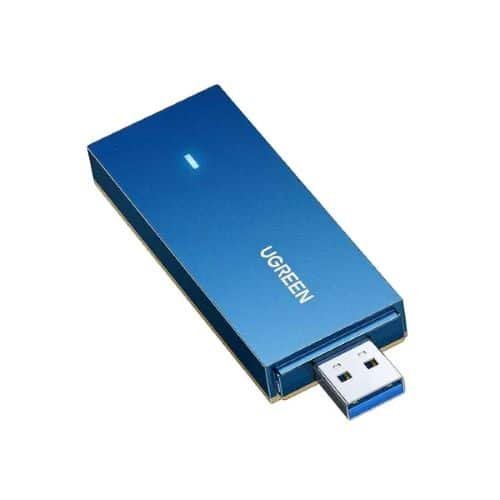
UGREEN AX1800 Dual-Band Wireless USB Adapter (Wi-Fi 6) – CM499


KSh5,500.00
Key Features
- Wi-Fi 6 USB adapter with speeds up to 1.8 Gbps
- Dual-band connectivity on 2.4GHz and 5GHz frequencies
- OFDMA and MU-MIMO technology for multiple devices
- Plug-and-play setup for easy installation
- Compact design that doesn’t block adjacent ports
- WPA3 security encryption support
- Backward compatible with previous Wi-Fi standards
- Compatible with Windows, macOS, and Linux
- Ideal for gaming, streaming, and video calls
- Affordable Wi-Fi 6 upgrade for existing computer
UGREEN AX1800 Dual-Band Wireless USB Adapter (Wi-Fi 6) – CM499
If your computer doesn’t have good wireless, the UGREEN AX1800 Dual-Band Wireless USB Adapter (Wi-Fi 6) – CM499 is a simple fix. You can get it now from our shop. This small WiFi 6 USB adapter gives you quick speeds, better stability, and tech that will last.
The CM499 is priced well and comes from UGREEN, a brand known for good stuff. It turns any computer with a USB port into a WiFi 6 beast. We’ll check out what it does, how to set it up, how well it works, and why it’s a top WiFi 6 USB adapter you can buy from us now.
What’s the UGREEN AX1800 WiFi 6 USB Adapter CM499?
The UGREEN AX1800 (CM499, or 90340) is a USB WiFi adapter that uses the newest Wi-Fi 6 (802.11ax) tech. Just plug it into a USB 3.0 port on your computer, and your wireless is upgraded without messing with the inside of your PC.
Here are the main things it offers:
- Speed: Up to 1800Mbps (AX1800)
- 5GHz: Up to 1201Mbps – Great for gaming, watching videos, and big downloads
- 2.4GHz: Up to 574-576Mbps – Good for long range and everyday stuff like browsing
- Port: USB 3.0 (works with USB 2.0, but slower)
- Security: WPA3, WPA2, WPA, WEP
- Works with: Windows 11/10 (easy setup), macOS, Linux (might need drivers)
Why Get WiFi 6 ?
WiFi 6 is a big step up from WiFi 5 (802.11ac). Here’s why the UGREEN CM499’s WiFi 6 is worth it:
1. Quicker Speeds: WiFi 6 uses tech to split channels into smaller ones, so many devices can talk at once. It also crams more data into each send, making it faster than WiFi 5.
2. Less Lag: Target Wake Time (TWT) saves power and lowers lag, so gaming feels like you’re wired in.
3. Handles Crowds Better: If you’re in a busy place or have lots of devices at home, WiFi 6 deals with it better by reducing interference.
4. Better Power Use: TWT means less power is used, which can make laptops last longer.
5. Good for the Future: WiFi 6 is a good choice for most people, as it’s cheap, supported, and gives fast speeds when used with a WiFi 6 router.
UGREEN AX1800 CM499 WiFi 6 USB Adapter Features
1. Super-Fast
-5GHz for Quickness: 1201Mbps – Grab a 10GB file fast or watch lots of videos without problems.
-2.4GHz for Distance: 576Mbps that goes through walls better—good for longer distances.
2. Stable
-MU-MIMO and Beamforming: Multi-User MIMO lets many devices get data at the same time. Beamforming points the signal right at your PC for stronger connections.
-Wider Reach: Antennas make the range longer than WiFi 5 adapters.
3. Safe with WPA3
WPA3 protects against attacks and keeps your data safe. Great for banking or working from home.
4. Simple Setup
-Drivers for Windows 11/10: Just plug it in, and Windows takes care of it.
– For macOS/Linux: Get drivers from Realtek (RTL8852AU).
5. Small
Easy to carry around.
6. Soft AP Mode
Turn your PC into a WiFi hotspot.
How to Set Up the UGREEN AX1800 CM499
Setting up the UGREEN WiFi 6 adapter is easy:
1.Plug It In: Put the adapter into a USB 3.0 port.
2.Windows 11/10: Drivers will set up on their own. Wait a bit for the UGREEN WiFi to show up.
3.Join WiFi: Pick your WiFi, type in the password.
4.Good to Have:
– Update Windows.
– Keep your PC away from things that could cause issues.
– Use a WiFi 6 router for fastest speeds.
For macOS or Linux:
– The chipset is Realtek RTL8852AU. Look for RTL8852AU driver [your OS].
Tip: If no WiFi shows up, try plugging it in again or restarting.
The UGREEN CM499 is best for most because it’s easy to set up and works well.
Who Should Buy It?
– People with computers that don’t have WiFi or are stuck on WiFi 5.
– Gamers who need less lag.
– People who work from home.
– People who download big files.
– People who want to upgrade an old laptop for a bit.
If you have a fancy router and want the 6GHz band, look at other models. But for most people, the CM499 is great.
Be the first to review “UGREEN AX1800 Dual-Band Wireless USB Adapter (Wi-Fi 6) – CM499”
Related products




Reviews
There are no reviews yet.