
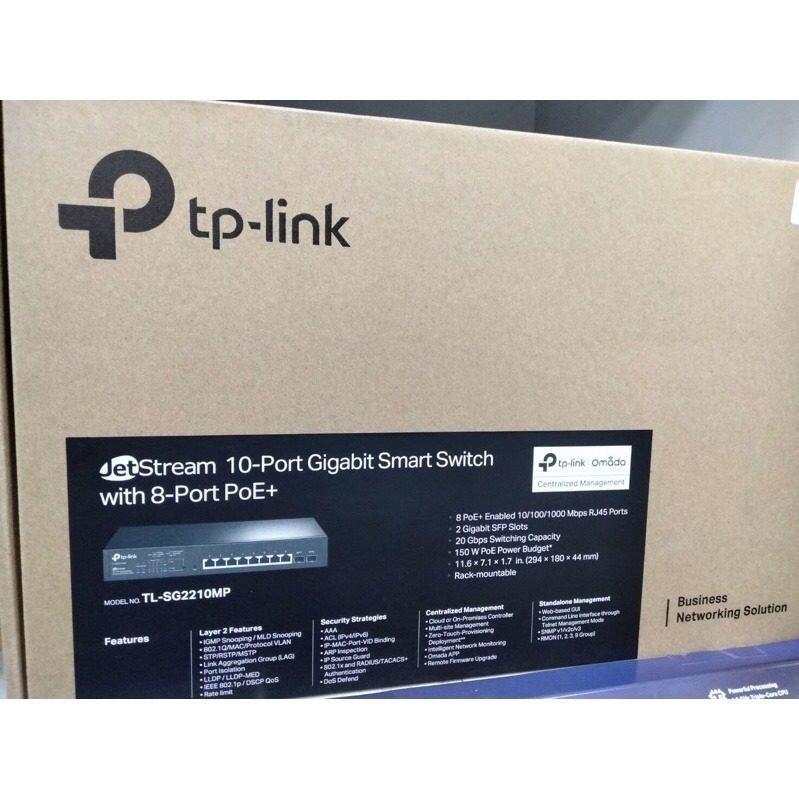
TP-Link JetStream 10-Port Gigabit Smart Switch with 8 PoE+ Ports & 2 Gigabit SFP Slots TL-SG2210MP

KSh19,000.00
Features
- JetStream 10-Port Gigabit Smart Switch with 8-Port PoE+.
- Provides high-speed Gigabit Ethernet connectivity.
- Features 8 PoE+ ports for powering compatible devices.
- Smart switch functionality for advanced network management.
- Ideal for small to medium-sized businesses and surveillance systems.
TP-Link JetStream TL-SG2210MP: A Solid 10-Port Gigabit Smart Switch with PoE+
If you’re using IP cameras, Wi-Fi, or VoIP phones, you need a good PoE switch. Check out the TP-Link JetStream 10-Port Gigabit Smart Switch (TL-SG2210MP) – it’s a workhorse for small and medium networks.
This switch has fast Gigabit speeds, PoE+, and cool settings in a small size that fits in a rack. Looking for a good PoE switch for a small business or a TP-Link TL-SG2210MP review?
Why This TP-Link Switch?
The TL-SG2210MP is a great option. It has 8 PoE+ ports (30W each, 150W total) and 2 SFP slots for fiber. It moves data fast (20 Gbps switching capacity and 14.9 Mpps forwarding rate), so things stay smooth even when you’re doing a lot.
It works with TP-Link’s Omada SDN, so you can control it from the cloud, great for IT folks with many sites. Switching from an old switch or making a network? The TL-SG2210MP has business-level stuff at a price that’s not bad – get it from Phonex Tech.
Specifications
What It Is How It Is
Ports in Total – 10 (8 x Gigabit RJ45 PoE+, 2 x Gigabit SFP)
PoE Type – IEEE 802.3af/at (PoE+)
PoE Power -150W total (up to 30W per port)
Switching Speed – 20 Gbps
Data Moving Speed – 14.9 Mpps
How to Control It – Omada SDN, Web GUI, CLI, SNMP
Extra Features – L2+ with static routing
Security Stuff – ACL, 802.1X, Port Security, DoS Defend
Goodies – L2/L3/L4 prioritization
Where to Put It – Rack (1U) or desktop
How Long It Lasts – Limited Lifetime
PoE+ – Why Is It Useful?
PoE lets devices get both data and power through one cable. The TL-SG2210MP uses PoE+ (802.3at), with up to 30W per port – twice the old PoE (802.3af) 15.4W limit.
Useful for:
- IP cameras (especially PTZ ones)
- New Wi-Fi
- VoIP phones
- IoT stuff
With 150W total, power many devices without extra power cords. Less mess, cheaper installs, and easy placement in tricky spots.
The TL-SG2210MP saves money on wiring. With more smart offices and cameras this year, PoE+ switches are super handy.
Key Things About This Switch
1. Fast Gigabit with SFP
All ports are Gigabit (10/100/1000 Mbps). SFP slots use fiber for far-off connections (10km+), great for connecting buildings fast.
2. Omada SDN – Easy Management
It works with TP-Link’s Omada SDN platform. Control the switch with:
- Omada Cloud Controller (free!)
- Hardware Controller (OC200/OC300)
- Omada App (iOS/Android)
It has easy setup, settings for groups, and live monitoring. Manage everything from anywhere for multiple sites – no VPN needed.
3. Extra Features
- VLAN: Separate networks with up to 4K VLANs
- QoS: Make voice/video smooth
- IGMP Snooping: Good for video
- Static Routing: Connect different VLANs
- Link Aggregation: Faster speeds by combining ports
4. Lots of Security
- Keep safe with:
- IP-MAC-Port Binding
- Access Control Lists (ACL)
- DHCP Snooping
- 802.1X Authentication
- Storm Control and DoS Defense
Good for sensitive places like offices.
5. Auto Fix & Long Distance
The switch can restart stuck PoE devices and send PoE up to 250m (slower speed) – great for warehouses.
Setup
To get started:
1. Plug in stuff.
2. Go to the web (192.168.0.1).
3. Use Omada Controller for features.
Be the first to review “TP-Link JetStream 10-Port Gigabit Smart Switch with 8 PoE+ Ports & 2 Gigabit SFP Slots TL-SG2210MP”
Related products



-7%
Business Solutions
Original price was: KSh14,000.00.KSh12,999.00Current price is: KSh12,999.00.


Reviews
There are no reviews yet.