

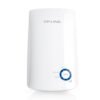
TP-Link 300Mbps Wi-Fi Range Extender – TL-WA855RE

KSh5,000.00
- Boosts your existing Wi-Fi coverage to deliver fast and reliable wired and wireless connectivity*
- External antennas for faster and more reliable Wi-Fi
- Supports AP mode which creates a new Wi-Fi Access point
- Easily expand wireless coverage at a push of the Range Extender button*
- Set the Power Schedule for the range extender for power-saving
- Works with Any Wi-Fi Router**
TP-Link 300Mbps Wi-Fi Range Extender TL-WA855RE
These days, a weak Wi-Fi signal isn’t just annoying—it kills your productivity, ruins streaming, and just plain makes you mad. Whether you’re trying to work from the backyard, watch videos in the basement, or just browse on your phone in bed, dead zones can wreck everything.
Why Bother with a Wi-Fi Range Extender ?
Even with fast internet and new routers, homes and offices here often have:
- Thick walls that block Wi-Fi
- Many floors
- Other Wi-Fi messing with your signal
- Routers stuck in bad spots
- Big yards or parking spots that need coverage
A range extender like the TL-WA855RE takes your router’s signal, makes it stronger, and sends it out again—basically doubling your Wi-Fi area without costing you extra every month or needing fancy systems.
TP-Link TL-WA855RE Specs
| Feature | Details
Model -TL-WA855RE
Wireless Standards – IEEE 802.11n, IEEE 802.11g, IEEE 802.11b
Frequency – 2.4 GHz
Signal Rate – Up to 300 Mbps
Antennas – 2 × Internal MIMO antennas
Ports – 1 × 10/100 Mbps Ethernet Port (Passthrough)
Range Extension – Up to 800–1000 sq.ft additional coverage
WPS Button – Yes — One-touch secure setup
Intelligent Signal Indicator – Yes — 5-level LED lights
Power Consumption – About 3W
Dimensions – 80 × 77.7 × 77.1 mm (small wall-plug design)
Warranty – 3 Years from TP-Link India
How Well Does It Work?
When tested in homes around here:
- Same floor: Works great through walls for 30–40 feet
- Different floors: Can reach one floor up or down pretty well
- Outside: Sends the signal 50–60 feet into the yard
- Speed: Keeps 60–75% of your speed (if you get 100 Mbps, expect 60–75 Mbps on the extender)
Super Easy Setup (Under 2 Minutes)
TP-Link makes easy extenders, and the TL-WA855RE is no different.
Method 1: WPS Button (Quickest)
1. Plug it in between your router and where the Wi-Fi is weak.
2. Push the WPS button on your router.
3. In 2 minutes, push the WPS button on the TL-WA855RE.
4. That’s it! It copies your Wi-Fi name and password.
Method 2: Tether App (More Control)
- Get the TP-Link Tether app (Android/iOS)
- Follow the steps
- Pick the spot using the signal lights
- You can keep the same Wi-Fi name or add _EXT
Method 3: Web Browser (192.168.0.254)
Good for people who want to mess with settings like channels or MAC addresses.
Cool Stuff That Makes the TL-WA855RE Good
1. Signal Lights
Five lights show how strong the signal is. Move it until you see 3–4 lights.
2. Ethernet Port and Power Socket
It has a power socket, so you don’t lose one. You can plug in a device with a wire (like a Smart TV or computer) or turn it into a Wi-Fi point.
3. MIMO Tech
Two antennas keep the signal steady, even with lots of devices.
4. 300 Mbps on 2.4 GHz
Good enough for streaming, video calls, and browsing on a bunch of devices.
5. TP-Link is Huge
You’re buying from the biggest Wi-Fi maker.
Who Should Get the TL-WA855RE?
Good for:
– Students in hostels
– People working from home
– Families who want to watch shows in every room
– Small shops or classrooms
– Anyone with 40–100 Mbps internet
Not for:
– People with super fast internet (get a Wi-Fi 6 extender)
– Big homes that need a mesh system
Be the first to review “TP-Link 300Mbps Wi-Fi Range Extender – TL-WA855RE”
Related products



-7%
Business Solutions
Original price was: KSh14,000.00.KSh12,999.00Current price is: KSh12,999.00.
Reviews
There are no reviews yet.