
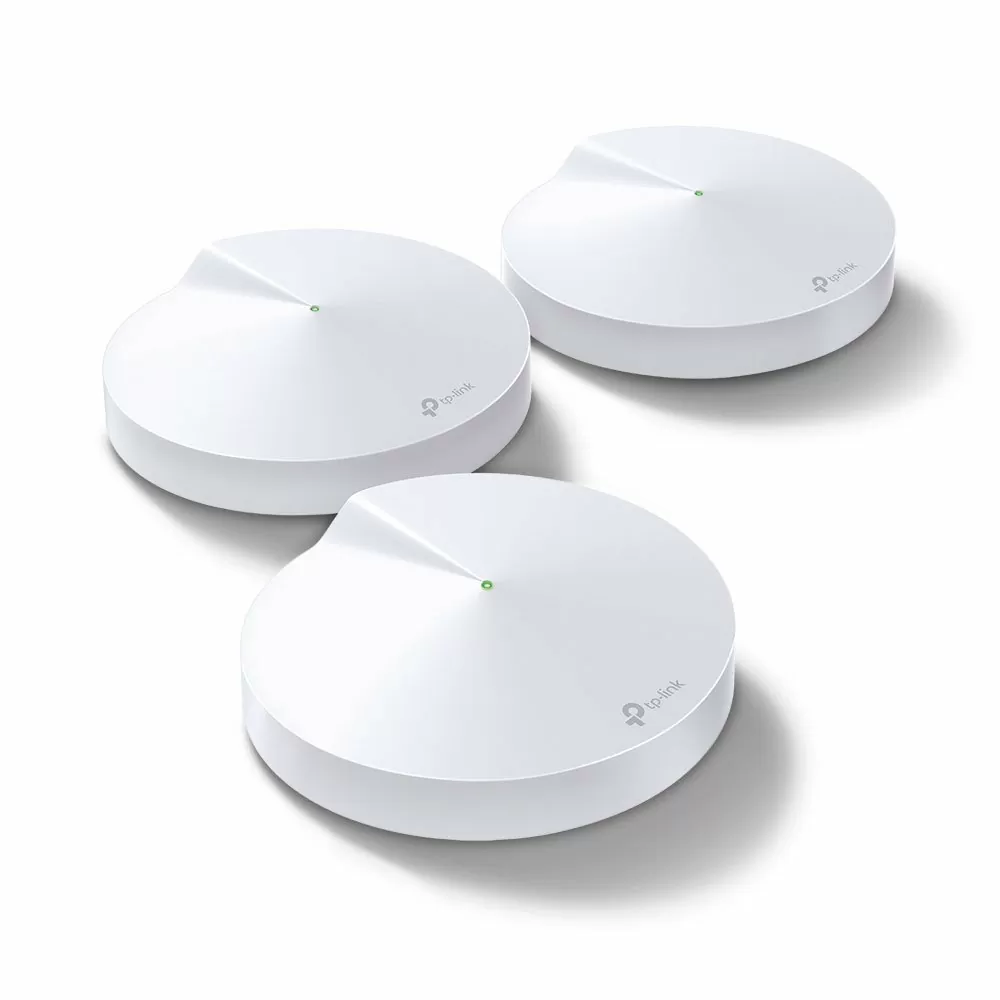
TP-Link Deco M5 AC1300 Whole Home Mesh Wi-Fi System (3 Pack) – TL-DECO M5-3


KSh29,000.00
- Deco uses a system of units to achieve seamless whole-home Wi-Fi coverage — eliminate weak signal areas once and for all!
- With advanced Deco Mesh Technology, units work together to form one unified whole-home network with the same network name. Devices automatically switch between Decos as you move through your home for the fastest possible speeds.
- A Deco M5 three-pack delivers Wi-Fi to an area of up to 5500 square feet, while a Deco M5 two-pack delivers up to 3800 square feet. And if that’s not enough, simply add more Decos to the network anytime to increase coverage.
- Deco M5 provides fast and stable connections with speeds of up to 1267Mbps and works with any internet service provider (ISP) and modem.
- Deco can handle traffic from even the busiest of networks, providing lag-free connections for over 100 devices.
- TP-Link HomeCareTM provides a suite of personalized and secure features, including Parental Controls, built-in Antivirus and Quality of Service (QoS).
- Setup is easier than ever with the Deco app there to walk you through every step.
TP-Link Deco M5 AC1300 Whole Home Mesh Wi-Fi System (3-Pack) – TL-DECO M5(3)
These days, everyone’s got smart homes, streams 4K, games online, and works remotely. That means you need solid Wi-Fi that covers your whole place. But lots of homes still have dead spots, laggy videos, and dropped calls cause old routers can’t keep up.
That’s where the TP-Link Deco M5 AC1300 Whole Home Mesh Wi-Fi System (3-Pack) – TL-DECO M5(3) comes in. It’s still super popular, even in 2025.
What’s the TP-Link Deco M5 (3-Pack) All About?
The Deco M5 is a mesh Wi-Fi system that replaces your old router with three Deco boxes that team up.
Each box gives you:
- Speeds up to 1,300 Mbps total (400 Mbps on 2.4 GHz + 867 Mbps on 5 GHz)
- Coverage for up to 5,500 square feet (about 510 m²) with all three boxes
- Room for 100+ gadgets online at once
- Built-in antivirus and parental controls (HomeCare) from Trend Micro
Why the Deco M5 Is Still the best
Newer mesh systems from Google, Amazon Eero, Netgear Orbi, and even TP-Link’s own Deco X series have Wi-Fi 6 and beyond. So why are people still talking about the Deco M5?
1. The price is great for what you get.
You can grab the 3-pack for way less than Wi-Fi 6 systems, and it’s almost as good for most homes.
2. It just works.
TP-Link’s Adaptive Routing Technology (ART) picks the best path between the boxes, and people say it never goes down.
3. The free security stuff lasts forever.
Other brands charge you every year for antivirus and parental controls. The Deco M5 gives it to you free, always.
4. Setting it up is a piece of cake.
The Deco app is known for being easy to use, even if you’re not a tech expert.
5. It works with everything.
It’ll play nice with your internet provider, modem, Alexa, and IFTTT.
Cool Things It Still Does Great
1. TP-Link HomeCare (From Trend Micro)
- Blocks viruses on your network
- Stops bad websites
- Prevents hacking
- Good parental controls (set age limits, block websites, limit screen time)
- Free, unlike other brands
2. Adaptive Routing Technology (ART)
Automatically picks the fastest way for your data to go, even if one box goes down.
3. MU-MIMO + Beamforming
Lets lots of devices talk to the router at the same time, which is important if you have tons of smart devices.
4. It Switches Smoothly (802.11k/v/r)
Your phone or laptop will jump between Deco boxes without dropping your Zoom call or music.
5. Guest Network and Prioritizing
Create a separate Wi-Fi for guests and make sure your games and streams get priority.
6. Wired Connections
If you can, plug the Deco boxes together with Ethernet cables for the best performance.
Setting It Up
1. Download the TP-Link Deco app (iOS/Android)
2. Plug the first Deco into your modem
3. Follow the instructions. It’ll figure out your internet settings.
4. Put the other two boxes where you want them and add them in the app with a QR code
The app also lets you:
– See who’s online
– Turn off the internet for certain people (dinner time!)
– Test your internet speed
– Get security reports every month
Be the first to review “TP-Link Deco M5 AC1300 Whole Home Mesh Wi-Fi System (3 Pack) – TL-DECO M5-3”
Related products


-7%
Business Solutions
Original price was: KSh14,000.00.KSh12,999.00Current price is: KSh12,999.00.
Reviews
There are no reviews yet.